Annual Meeting Production Checklist: 15 Things Corporate Communications Teams Forget

Chief Executive Officer
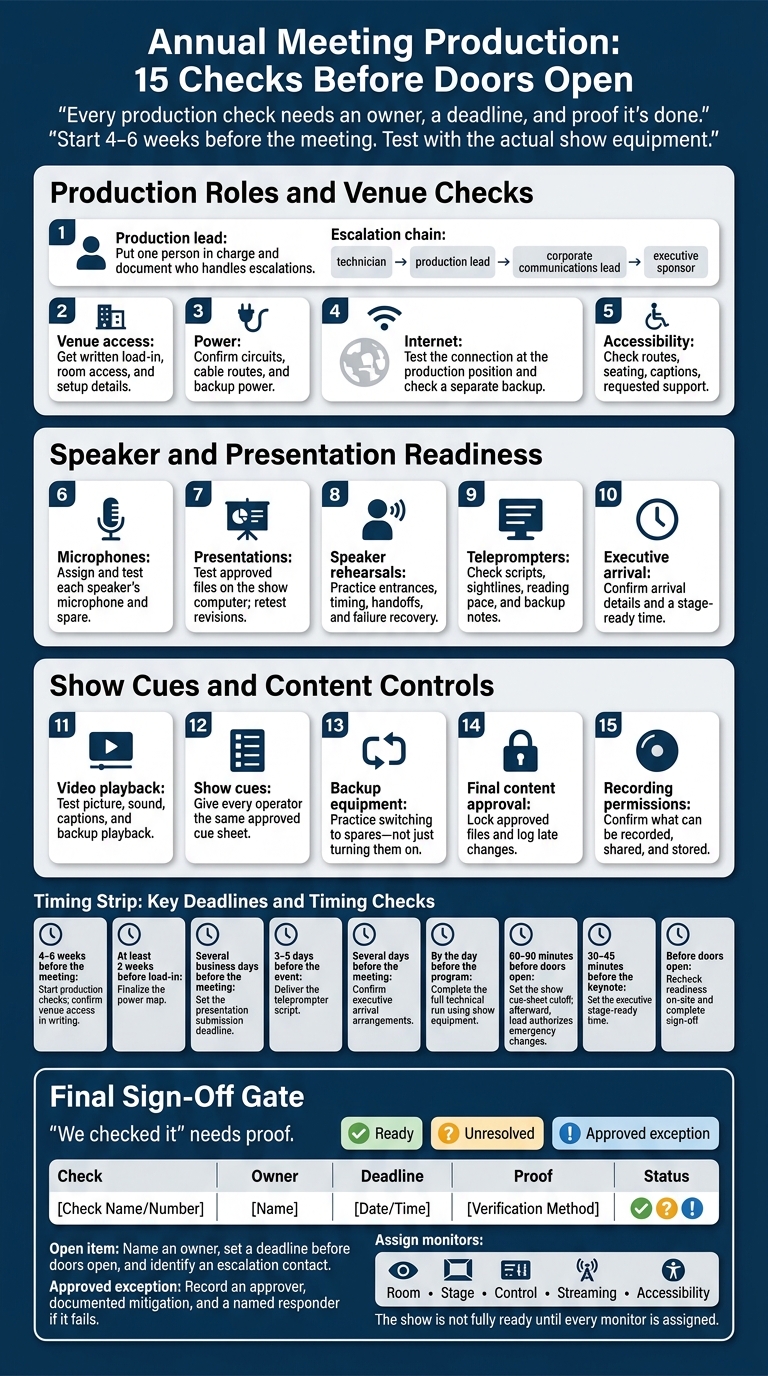
I don’t mark an annual meeting ready until every production check has an owner, a deadline, and proof it’s done. Start 4–6 weeks before the meeting, test with the actual show equipment, and close open issues before doors open.
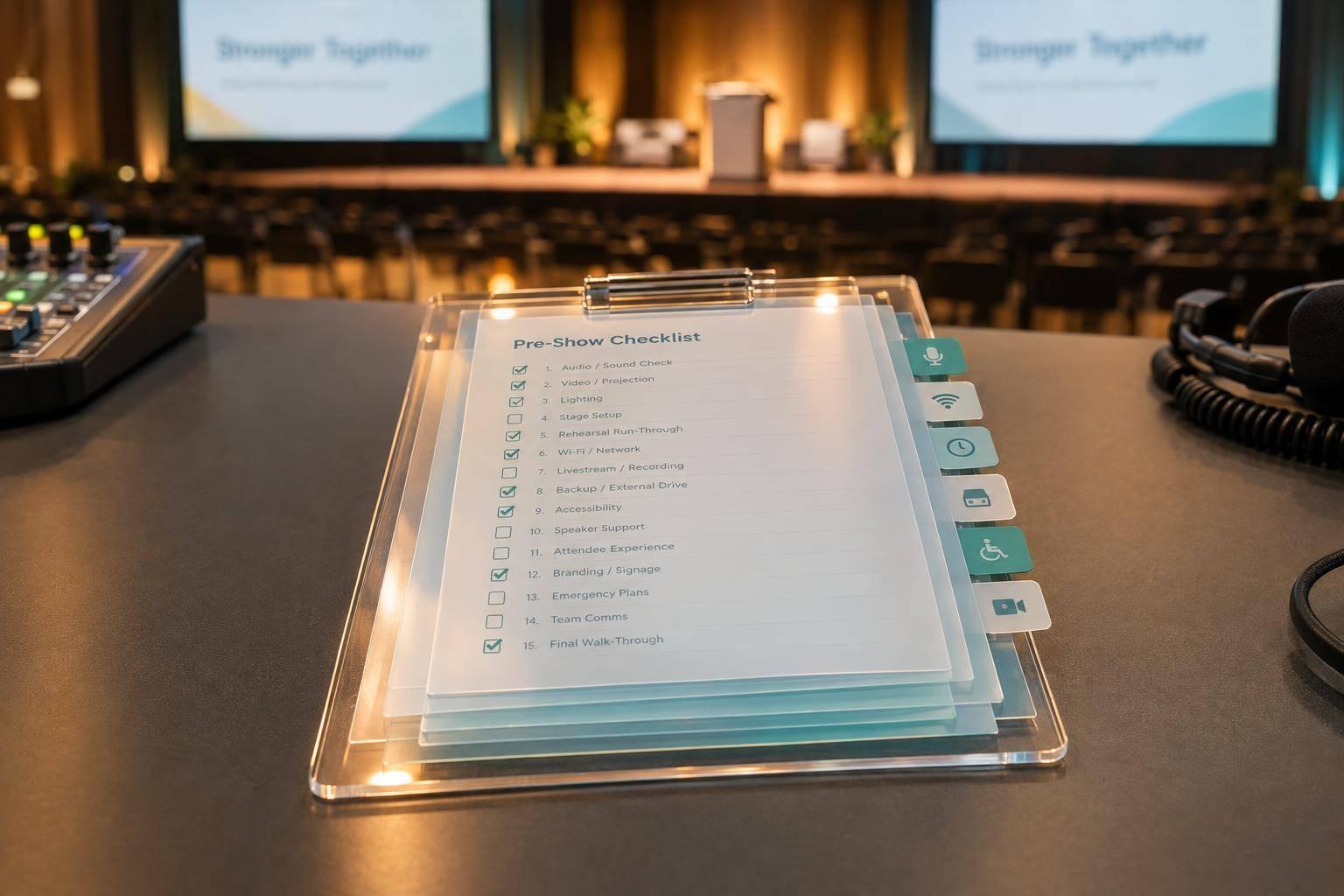
I use these 15 checks to keep the team focused:
- Production lead: Put one person in charge and document who handles escalations.
- Venue access: Get written load-in, room access, and setup details.
- Power: Confirm circuits, cable routes, and backup power.
- Internet: Test the connection at the production position and check a separate backup.
- Accessibility: Check routes, seating, captions, and requested support.
- Microphones: Assign and test each speaker’s microphone and spare.
- Presentations: Test approved files on the show computer; retest revisions.
- Speaker rehearsals: Practice entrances, timing, handoffs, and failure recovery.
- Teleprompters: Check scripts, sightlines, reading pace, and backup notes.
- Executive arrival: Confirm arrival details and a stage-ready time.
- Video playback: Test picture, sound, captions, and backup playback.
- Show cues: Give every operator the same approved cue sheet.
- Backup equipment: Practice switching to spares - not just turning them on.
- Final content approval: Lock approved files and log late changes.
- Recording permissions: Confirm what can be recorded, shared, and stored.
My final rule: <u>“We checked it” needs proof.</u> Before doors open, I mark each item Ready, Unresolved, or Approved exception - and confirm who is monitoring the room, stage, control, streaming, and accessibility.
Annual Meeting Production: 15 Checks Before Doors Open
Checklist Items 1–5: Production Roles and Venue Checks
1. Name the Production Lead
Appoint one production lead who has authority over AV, staging, speaker support, streaming, recording, and show-day changes. At kickoff, the final production meeting, and the pre-show briefing, review the responsibility matrix, cell numbers, backup contact, and show caller.
Corporate communications owns business decisions and executive escalation. Document the escalation path: technician → production lead → corporate communications lead → executive sponsor.
2–3. Confirm Venue Access and Power
2. Venue access: The production manager is responsible for getting written confirmation from the venue manager during contracting, 4–6 weeks before the meeting, and at the final walkthrough.
Document load-in/load-out windows, room and dock access, security check-in, freight elevator size, parking, storage, labor rules, and setup/strike windows. Specify who to call if the dock or room is unavailable. Attach the access schedule and loading map to the shared sign-off sheet.
3. Power: The AV lead owns the power plan, with electrical service verified by the venue electrician. During the site survey, confirm circuit ratings, shared loads, breaker locations, distribution gear, cable routes, and backup power.
Finalize the power map at least 2 weeks before load-in, then test it at peak demand during setup. Protect cable crossings and identify who can access the electrical room on show day.
4–5. Check Internet and Accessibility
4. Internet: The technical director coordinates with venue IT and corporate IT during the site survey, setup, and pre-show checks. Verify wired connectivity, upload speed, stability, firewall rules, required ports, and remote speaker access.
Run a remote call, a stream test, and a backup-connection test that uses a different network path. Save the measured results, minimum show requirements, and venue IT support contact.
5. Accessibility: The event lead owns accessibility, with support from the venue accessibility contact and production manager. Collect accommodation requests during registration. At the site survey, inspect accessible routes, seating, restrooms, backstage, and stage access.
During rehearsal, test captions for remarks and videos, assistive-listening devices, requested interpretation, and remote caption access. Recheck routes and sightlines before doors open. Record any exception in the shared sign-off sheet, including the workaround, approver, and deadline.
sbb-itb-ae35a94
Checklist Items 6–10: Speaker and Presentation Readiness
6–7. Assign Microphones and Test Presentations
Once venue access, power, internet, and accessibility are confirmed, finalize speaker inputs and playback files.
6. Microphones: The audio engineer handles channels, frequencies, gain, routing, and recording feeds. The stage manager handles presenter handoffs and microphone changes. The production or presentation manager maintains the master assignment sheet.
Before the technical advance, create a presenter-by-presenter matrix that lists microphone type, label, channel, frequency, handoff point, battery status, and spare. Match each speaker’s role to a lavalier, handheld, headset, or podium microphone.
Test every microphone during setup and rehearsal. Have speakers stand in their stage positions, move, and speak at normal volume. Check signal, gain, feedback risk, mute status, range, battery level, and channel routing. Use new or fully charged batteries. Keep tested, labeled spares within reach, and assign one person to handle swaps.
7. Presentations: The presentation manager and communications content lead should set a submission deadline several business days before the meeting. Require the final file and one named backup.
Test approved files on the playback computer and through every playback endpoint: switcher, screens, audio system, clicker, and confidence monitors. Check aspect ratio, resolution, fonts, animations, transitions, hyperlinks, embedded audio and video, notes, and presenter view. Retest every revised file, and keep the live file separate from the rollback file.
Once files are approved, move straight into the full technical rehearsal.
8–9. Rehearse Speakers and Test Teleprompters
8. Speaker rehearsals: The speaker lead schedules rehearsals with support from the stage manager, executive communications team, and technical operators. Book early, and complete the full technical run by the day before the program.
Use show equipment to practice entrances, stage marks, microphone fitting, clicker use, confidence monitors, slide changes, video transitions, timing, handoffs, and exits. Run the highest-risk segments without stopping. Practice recovery steps for a microphone swap, frozen slides, and missing video so speakers know what to do while operators respond.
9. Teleprompters: During script development, confirm whether each speaker needs a teleprompter, confidence monitor, printed notes, or a combination. Once the script is locked, match teleprompter support to the speaker’s delivery style. The executive communications lead owns this readiness check.
Deliver the script 3–5 days before the event. At rehearsal, check text size, reading speed, sightlines, operator position, screen height, stage distance, and camera relationship from the speaker’s position. Start with 8–10 words per line, then adjust for the speaker.
Set clear rules for who approves revisions and how the operator receives them. Keep printed notes and the previous approved script available.
10. Confirm Executive Arrival Plans
10. Executive arrival: Several days before the meeting, the executive assistant, executive communications lead, security team, and stage manager should confirm the arrival window, credentials, drop-off point, access route, escort, green-room location, briefing time, microphone fitting, and departure plan.
Add primary and backup phone numbers to the production schedule. Include the venue’s local time zone in every schedule and message. Set a stage-ready time 30–45 minutes before the keynote, then reconfirm on show day.
If arrival slips, use a preapproved holding segment. Keep the microphone, teleprompter or notes, confidence monitor, clicker, and opening cue ready.
Checklist Items 11–15: Show Cues and Content Controls
With speakers and arrival timing set, lock down playback, show cues, backups, and permissions.
11–12. Test Video Playback and Finalize Show Cues
11. Video playback: Once speakers are set, lock the playback chain. Test every approved video on the show system when it arrives, during rehearsal, and before doors open. The playback operator owns the final system test; the content owner confirms the approved file.
Check file format, resolution, aspect ratio, frame rate, duration, and transitions. Trace the signal through screens, confidence monitors, and output feeds. Verify audio, captions, and sync for the audience, livestream, and recording outputs. Define what happens when each video ends and what to do if playback fails. Keep the approved file on the primary playback computer, with a tested backup on a separate device.
12. Show cues: Next, lock the cue sheet. The show caller owns the master version; the technical director and department leads check it after rehearsal. Assign every entrance, video, lighting change, camera shot, and transition a cue ID, trigger, operator, and fallback. Use clear standby and execute calls.
Set a cutoff 60–90 minutes before doors open, and give all operators the same version. After that cutoff, only the production lead should authorize emergency changes.
13–14. Test Backup Equipment and Approve Final Content
13. Backup equipment: During system design, the technical director assigns a tested spare or fallback to each critical failure point. At load-in and pre-show, test backup microphones, batteries, computers, playback devices, cables, adapters, connectivity, recording and streaming equipment, power supplies, and controls.
Document each spare’s location, owner, connection steps, and changeover time. Rehearse the switch - not just power-on - while the show caller runs the holding action.
14. Final content approval: At the final content gate, before show files are locked, the communications lead names the required approvers, freezes files after final review, and logs every late change. Never overwrite the approved version.
15. Confirm Recording and Distribution Permissions
15. Recording permissions: The communications lead owns the final rights gate. Before rehearsal, review permissions for recording, livestreaming, photos, attendees, and speakers, along with third-party content rights.
Document what can be recorded, where it can be used, how long it can be kept, and who can access it. Label each segment room-only, internal, livestream, external, photo-only, or no-recording.
Conclusion: Sign Off Before Doors Open
After the last rehearsal, run a final on-site review to close the loop. The production lead should recheck readiness before doors open. Verify each item on-site, then mark it Ready, Unresolved, or Approved exception.
For anything still open, name an owner, set a deadline before doors open, and identify an escalation contact. Each approved exception needs an approver, documented mitigation, and a named responder if it fails.
Assign room, stage, control, streaming, and accessibility monitors before doors open. This is especially critical when live streaming shareholder meetings where compliance and engagement are paramount. The show is not fully ready until every monitor is assigned.
FAQs
Which unresolved issues should delay doors opening?
Keep doors closed until every check below is confirmed:
- Venue and connections: Power is available, the room is ready, and both primary and backup internet connections are reliable.
- AV and playback: AV checks and end-to-end technical rehearsals are complete using the exact files and equipment. Presentations and videos are compatible with the setup, and playback has been tested.
- Microphones and spares: Microphone assignments are set. Backup microphones, batteries, and cables are working.
- Show control: Show cues and the run of show are under control, with clear ownership of timing and authority to approve last-minute changes.
- Recording and webcast: Permissions are confirmed, backup procedures are in place, test recordings are clear enough to understand, and response paths are set for contingencies.
What counts as proof that a production check is complete?
Proof means documented confirmation that every critical system has been tested end-to-end on the actual show setup. Each item must have an owner and an approved backup path, and contingency switchovers must also be tested.
The run-of-show/master documents must include current approvals and versioned files, with final rehearsals completed 24–48 hours before the show. Any changes must go through the documented approval/review process and appear in the master documents before showtime.
How can we prioritize rehearsals when executives have limited time?
Run a technical rehearsal that matches the event in two stages. First, test audio, video, and compatibility 48–72 hours before the event. Use the same room setup and show system so you can fix microphone, playback, and file issues ahead of time.
Then, 30–60 minutes before doors open, rehearse the high-risk executive moments: speaker handoffs, transitions, and Q&A or voting points.
Assign one show caller and one approval owner for timing changes. This keeps decisions from conflicting when executive time is limited.
Related Blog Posts



Streamline your workflow, achieve more

Lorem ipsum dolor sit amet, consectetur adipiscing elit. Maecenas ac velit pellentesque, feugiat justo sed, aliquet felis.



Lorem ipsum dolor sit amet, consectetur adipiscing elit. Maecenas ac velit pellentesque, feugiat justo sed, aliquet felis.