Leading Local Event Production For In-Person Small Town Hall + Teams Broadcast In Michigan

Chief Executive Officer

Hybrid events combine in-person and virtual participation, making them a popular choice for town halls. This guide focuses on creating successful hybrid events using Microsoft Teams, with a specific focus on Michigan venues. Key takeaways include:
- Microsoft Teams Town Halls: Supports up to 10,000 participants (100,000 with Teams Premium) and offers features like live captions, Q&A, and presenter modes.
- Technical Requirements: Stable internet (2-3 Mbps per viewer), eCDNs for large audiences, and Teams-certified AV equipment are essential.
- Venue Selection: Choose spaces with good acoustics, lighting, and technical infrastructure. Examples in Michigan include The Madison in Detroit and the Vistatech Center in Livonia.
- Event Preparation: Conduct rehearsals, test networks, and assign roles (organizer, producer, moderator) to ensure smooth execution.
- Engagement Tools: Use live Q&A, interactive polls, and live reactions to involve remote and in-person attendees.
- Post-Event Analysis: Collect feedback and analyze attendance data to improve future events.
Hybrid events require careful planning, from AV setups to Teams configurations, to deliver a seamless experience for all attendees.
Choosing the Right Venue for Small In-Person Town Halls
Venue Size and Layout Requirements
The size of your venue directly impacts the technical setup you'll need. For instance, if presenters are more than 30 feet away from the camera, you'll need PTZ cameras or a multi-camera arrangement to capture everything clearly. Events hosting over 50 in-person attendees will require custom production, including external PA systems and dedicated technical staff to manage the setup.
It's not just about space; clear sightlines are equally important. Ensure the venue allows for multiple camera angles - wide shots for context and tight shots for presenters. Confidence monitors (50–60 inches) should be placed near the stage, enabling speakers to view their slides and the remote feed. Physical risers are also necessary to ensure everyone in the room has a clear view of the presentation.
Lastly, confirm that the venue's technical capabilities can support live broadcasting.
Required Venue Features for Live Broadcasts
A strong internet connection is non-negotiable. Make sure the venue's network meets Microsoft 365 standards. For example, Huntington Place in Detroit offers two independent ISP providers with 10 Gbps trunks for full redundancy. Similarly, the Henry Center for Executive Development in East Lansing provides a 10 Gbps fiber network along with integrated AV/IT lecterns.
Good acoustics are another must-have. Julian Simpson, Market Development Manager at Shure, emphasizes:
"If there is no synergy with your audio solution, then your meeting or video conference will be adversely impacted. Poor speech intelligibility can lead to missed details... which can have a negative impact on your business' bottom line".
Look for venues with sound-dampening features like carpeting or panels to reduce echoes. Modern spaces with hard surfaces - such as glass or exposed brick - can create "dead spots" that harm audio quality for virtual attendees. Additionally, the venue should support PA systems equipped for "mix-minus" setups to avoid audio feedback during hybrid interactions.
Lighting is equally crucial. A three-point lighting setup (key, fill, and back lights) ensures presenters stand out and don't blend into the background. Venues should offer adjustable LED panels or spotlights and avoid placing speakers in front of bright windows. As for power infrastructure, the venue should provide access to extension cords, power strips, and dedicated circuits. This is especially critical for high-power devices like laser projectors (15,000+ lumens) and broadcast encoders.
Once you've addressed these technical essentials, it's time to explore Michigan venues that fit the bill.
Michigan Venue Options for Small Town Halls
If you're looking for venues in Michigan, several options cater to small town halls while meeting these technical requirements:
- The Griswold Auditorium in Allegan offers 3,616 square feet of space with seating for up to 600 attendees.
- Studio Neue in Plymouth is ideal for smaller gatherings, providing 1,000 square feet of flexible space for up to 50 people. This "blank canvas" layout is perfect for setting up camera angles and AV stations.
- The Vistatech Center at Schoolcraft College in Livonia is built for professional meetings, accommodating up to 600 attendees.
- Oakland University's Oakland Center in Rochester is a versatile option for campus and community town halls.
- The Madison in Detroit features a modern 130-seat auditorium, specifically designed for presentations.
To ensure everything runs smoothly, conduct a network stress test replicating your expected audience size to identify any potential issues. Finally, schedule an onsite technical rehearsal 24 hours before the event to address any last-minute concerns.
Configuring Microsoft Teams for Hybrid Events
Technical Setup for Teams Broadcasting
Before your town hall begins, make sure the organizer has a Microsoft 365 Enterprise (E1, E3, E5) or Education (A3, A5) license - this is a must for hosting town halls. Check that the venue's network aligns with Microsoft 365's streaming requirements. For larger audiences, you might want to use an Enterprise Content Delivery Network (eCDN) to avoid bandwidth issues.
To ensure professional-quality audio and video, connect your setup using Teams-certified devices or HDMI-to-USB capture boxes. Pair XLR microphones and professional cameras with an audio interface for balanced sound. If you're planning a high-end production, use RTMP-In to stream from external encoders like OBS Studio or Wirecast. Configure the video codec to H.264 High Profile, set the resolution to 720p at 30 fps, and use a 2-second keyframe interval.
Assign specific roles - organizers, co-organizers, and presenters - and always have at least one team member stationed outside the main venue for redundancy.
Teams Settings for Audience Engagement
Once your hardware is ready, fine-tune Teams settings to boost engagement for remote participants. Enable moderated Q&A to manage attendee questions and activate live reactions, which supports up to 20,000 participants with Teams Premium.
Use the "Manage What Attendees See" feature to spotlight up to seven presenters at once, helping remote viewers stay focused on key speakers. For a more inclusive experience, turn on live translated captions, which can support up to six languages - or up to 10 with Teams Premium.
The green room feature is a lifesaver, offering presenters and organizers a private space to test their audio and video setups before going live. This reduces the risk of technical hiccups during the broadcast. Additionally, set up a separate event chat for your production team to coordinate in real-time without interrupting the audience.
Testing and Troubleshooting Teams Integration
Join the session 30 minutes early and start broadcasting 10 minutes before the event with a "starting soon" slide. Run multiple full rehearsals and perform silent network tests to catch any potential performance issues, especially if you're using an eCDN.
Assign a team member to join as an attendee to monitor the stream for delays, audio sync problems, or visual glitches. Test in-room audio to ensure local amplification doesn’t create feedback or noise for online viewers.
Instead of sharing a direct calendar link, use a custom join link so you can quickly redirect attendees to a backup event if something goes wrong. During the live broadcast, rely on real-time telemetry and the Call Quality Dashboard (CQD) to monitor and optimize audio, video, and network performance.
How to Set Up Hybrid Meeting for Events: Equipment, Tips, Best Practices
Corporate Optics Audiovisual Production Services
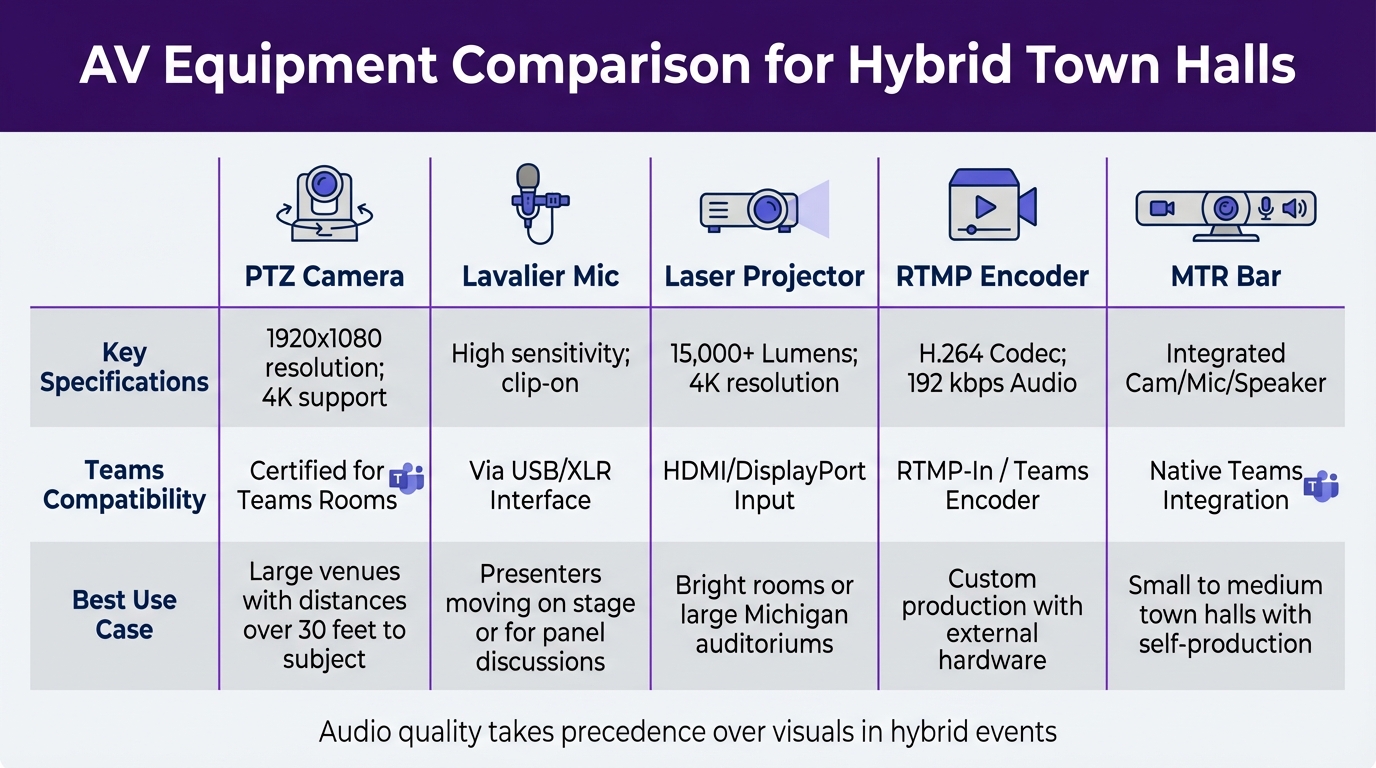
AV Equipment Comparison for Hybrid Town Halls with Microsoft Teams
AV Tools and Equipment Comparison
Corporate Optics provides top-tier AV equipment tailored for hybrid town halls, considering factors like venue size, presenter mobility, and production demands.
| AV Tool | Key Specifications | Teams Compatibility | Best Use Case |
|---|---|---|---|
| PTZ Camera | 1920x1080 resolution; 4K support | Certified for Teams Rooms | Large venues with distances over 30 feet to subject |
| Lavalier Mic | High sensitivity; clip-on | Via USB/XLR Interface | Presenters moving on stage or for panel discussions |
| Laser Projector | 15,000+ Lumens; 4K resolution | HDMI/DisplayPort Input | Bright rooms or large Michigan auditoriums |
| RTMP Encoder | H.264 Codec; 192 kbps Audio | RTMP-In / Teams Encoder | Custom production with external hardware |
| MTR Bar | Integrated Cam/Mic/Speaker | Native Teams Integration | Small to medium town halls with self-production |
For setups requiring extended coverage - such as distances over 30 feet or audiences exceeding 50 - Corporate Optics provides custom production solutions with specialized optics and dedicated technical teams. When it comes to hybrid events, audio quality takes precedence over visuals; while minor video imperfections may go unnoticed, poor sound significantly impacts the audience's experience.
By offering these equipment options, Corporate Optics ensures seamless AV solutions tailored to Michigan venues and their unique demands.
Custom AV Solutions for Michigan Venues
Michigan venues come with their own set of challenges, including union labor regulations, power requirements, and internet connectivity. Corporate Optics expertly navigates these hurdles, managing everything from union labor coordination to power distribution and internet setup, particularly in Detroit venues like the Cobo Center.
To streamline event planning, Corporate Optics provides custom 3D renderings that illustrate how AV equipment will fit into your specific venue layout. For large auditoriums, laser projectors with 15,000+ lumens and QLED screens are used to combat high ambient light levels. To ensure smooth multi-location streaming, Corporate Optics employs eCDNs, which prevent bandwidth bottlenecks during live broadcasts.
These tailored solutions are fully integrated with Teams broadcasting, creating a seamless hybrid event experience.
Coordinating On-Site AV with Teams Broadcasting
Corporate Optics combines on-site AV setups with Teams broadcasting by using advanced technologies like NDI and RTMP. Through Network Device Interface (NDI), the team extracts isolated video feeds and mixed audio directly from Teams meetings, enabling professional-grade production using external software like OBS Studio or vMix. The final high-quality production is then ingested back into Teams Town Halls via Real-Time Messaging Protocol (RTMP) for a polished broadcast.
"Microsoft town hall events will now support 1080p full HD video for the live event stream, up from a former 720p limit." - Guy Campos
For more complex venues, Corporate Optics uses SDI connections with equipment like Blackmagic Decklink or AJA T-Tap Pro to extract clean video streams for traditional production workflows. Audio feedback is managed through "mix-minus" setups, ensuring remote participants don’t experience disruptive echoes. Additionally, Microsoft’s ultra-low-latency streaming reduces delays to under five seconds, allowing real-time interaction between on-site and remote attendees.
These efforts ensure a smooth and professional broadcast, delivering a high-quality hybrid event experience every time.
sbb-itb-ae35a94
Engaging On-Site and Remote Audiences
Pulling off a hybrid event that resonates with both in-person and remote attendees hinges on combining interactive tools with thoughtful visual design. The goal? To create a seamless experience that feels inclusive for everyone.
Creating Interactive Experiences for Hybrid Events
Bridging the gap between physical and virtual spaces starts with the right tools. Platforms like Slido make it easy for attendees to participate by letting them ask questions and vote directly from their phones. No need for shared microphones or cumbersome setups - just scan a QR code on-site to join the action without downloading an app.
"Thanks to Slido, we can provide better learning by moving away from the speaker-led education to creating an environment where dialogue can happen." – Milda Salciute, Knowledge & Events Senior Executive, IMEX Group
For those using Microsoft Teams, presenter modes like Standout or Side-by-side can elevate the virtual experience by overlaying presenters on the content. Want to spark engagement? Seed questions in the chat ahead of time and allow pauses to manage delays in audio transmission or unmuting.
Interactive tools are only part of the equation, though. Capturing attention also depends on creating visually captivating environments.
Using AV and Lighting Design to Maintain Attention
Visuals play a crucial role in keeping audiences hooked. A simple three-point lighting setup - key, fill, and back lights - ensures presenters are well-lit and easy to see. Just avoid placing lights directly behind them, as this can cast distracting shadows over their faces.
For dynamic visuals, use multiple cameras. A solo presenter benefits from two cameras, while panel discussions often need three to five for better coverage. And for a more immersive experience, project remote participants onto large screens so they appear life-sized, making them more noticeable to the in-person audience.
Post-Event Analytics and Feedback Collection
Gathering feedback right after the event is key to understanding what worked and what didn’t. Tools like Microsoft Teams provide detailed reports, including join/leave times, average attendance duration, and Q&A transcripts. Segment this data by attendee type and session to pinpoint the most effective formats.
"Capture event feedback from attendees, presenters and organizing team directly after your event. Be open to suggestions and insights for what can improve." – Microsoft Adoption
Boost survey response rates by sending follow-ups promptly, ideally within 72 hours. Share the feedback with speakers to help them refine their approach. On the technical side, monitor performance using the Call Quality Dashboard (CQD) to assess network stability. Finally, document lessons learned in an internal technical playbook to make future events even smoother.
Team Coordination and Contingency Planning
Hybrid town halls require well-coordinated teams and solid backup plans. Managing both an in-person audience and a Microsoft Teams broadcast calls for clearly defined roles and strategies to handle unexpected challenges.
Building Your Event Team
To keep things running smoothly, assign specific responsibilities to your team members. Here's how roles typically break down:
- The Organizer sets up the event, handles scheduling, and manages permissions.
- The Producer takes charge of the technical broadcast, including starting and stopping the stream, queuing content, and managing back-channel communications.
- Presenters focus on delivering the content.
- Moderators facilitate interaction by overseeing Q&A sessions and chat discussions.
- An IT Administrator monitors network performance and resolves technical issues as they arise.
"A Moderator is an extra set of eyes, ears, and hands managing the virtual logistics and audience, so the Presenter can focus on content." – Microsoft Virtual Event Playbook
For larger-scale events, you might also want a Technical Lead to handle live troubleshooting. And for added security, have at least one team member join from a different location. This ensures someone can maintain control if the primary venue experiences an internet outage.
Once roles are assigned, the next priority is preparing for potential technical issues.
Creating a Contingency Plan
Technical glitches are inevitable, especially in venues with unreliable internet. To minimize disruptions, keep backup copies of all presentation materials on a separate device. Use a redirection URL for attendee invitations, allowing you to update the meeting link without needing to resend invites.
Have your team join the event 30 minutes early for last-minute checks. Start the broadcast 10 minutes ahead of schedule with a "starting soon" slide to confirm the stream is stable.
These steps pave the way for a smoother event, but some organizations, like Corporate Optics, go even further with their contingency measures.
Corporate Optics' Approach to Crisis Management
As mentioned earlier, thorough rehearsals and network tests are non-negotiable. Corporate Optics takes this a step further by embedding redundancy into every hybrid event. Their teams use private back-channel communication systems - completely separate from what attendees see - so producers, moderators, and on-site staff can coordinate behind the scenes without impacting the audience experience.
They also implement a tiered support system to address issues efficiently. This ranges from self-service FAQs (Tier 0) to direct escalation to platform support teams (Tier 3). Additional measures include network stress tests before the event and real-time telemetry monitoring during the broadcast. These proactive efforts ensure potential problems are caught early, keeping both in-person and virtual audiences engaged from start to finish.
Case Study: Michigan Hybrid Town Hall Success
Event Goals and Challenges
This event aimed to achieve audience parity, ensuring both in-person and remote attendees had an equally engaging experience. However, the production team faced some tough challenges. A manufacturing client in Metro Detroit needed to broadcast their quarterly leadership town hall to 8,500 employees - 400 attending in person, with the rest tuning in via Microsoft Teams.
The venue itself presented obstacles: high ceilings and open spaces made audio clarity a challenge, which could have disrupted remote Q&A participation. On top of that, the network infrastructure hadn’t been tested for the demands of streaming 1080p video to thousands of viewers. With approximately 3 Mbps required per person, the risk of network strain was significant.
Solutions Provided by Corporate Optics
Corporate Optics tackled these challenges head-on, starting with a comprehensive network performance test. Based on the results, they implemented an Enterprise Content Delivery Network (eCDN). This solution ensured efficient video distribution across the local network without overloading the system.
To address the audio issues, lapel microphones were provided for presenters, while wireless roaming microphones captured audience questions on-site. This setup ensured that remote viewers could clearly hear every interaction, even in the challenging industrial environment. Additionally, Microsoft Teams Rooms (MTR) in presenter mode was integrated into the setup, effectively transforming the shop floor into a production studio. Using the "Manage What Attendees See" feature, the production team controlled which of the seven presenter feeds appeared on screen for remote viewers.
A full dry run was scheduled 24 hours before the event to test all transitions, audio levels, and presenter links. To further safeguard the broadcast, 4G/5G backups were established, along with a private back-channel for real-time communication among the team.
These carefully planned measures ensured the event ran smoothly from start to finish.
Results and Lessons Learned
The town hall streamed seamlessly to all 8,500 employees, with no interruptions. Post-event analytics revealed that remote attendees stayed engaged throughout the 90-minute broadcast, and their Q&A participation matched that of the in-person audience. The client confirmed that the eCDN effectively prevented network strain, and the roaming microphones were essential for creating a unified experience for both in-person and remote participants.
"The day was executed without a hitch thanks to your calm expertise. We appreciate all of the prep work and coaching that created a flawless experience for both our speakers and attendees." – Jane E.M. Soura, Alerus
The biggest takeaway? Proactive planning beats reactive troubleshooting every time. The dry run and silent test caught potential issues before they could disrupt the live event. These steps have now become a standard requirement for future hybrid events in Michigan.
Conclusion
Key Points to Remember
Pulling off a successful hybrid town hall in Michigan requires thoughtful planning and attention to detail. Start by choosing the right Microsoft Teams format. For larger events, Teams Town Hall is a solid choice, accommodating up to 10,000 attendees while offering producer-level controls for seamless management. Make sure your network is up to the task - an eCDN can help prevent bandwidth issues when streaming in 1080p, which typically uses about 3 Mbps per viewer.
Don’t underestimate the importance of sound quality. Audiences are far more forgiving of lower video resolution than poor audio. Equip presenters with lavalier microphones and have wireless roaming mics ready for audience questions. To look polished on camera, use a three-point lighting setup with key, fill, and back lights.
Clearly define roles early on. Assign an Organizer to handle event setup, Co-organizers to oversee Q&A, Presenters to deliver the content, and Moderators to engage with the audience. Schedule rehearsals and finalize all technical preparations at least 3–4 weeks before the event.
These steps lay the groundwork for a smooth and professional hybrid event, a standard that Corporate Optics consistently delivers.
How Corporate Optics Can Help
Corporate Optics simplifies every aspect of hybrid event planning, offering comprehensive solutions tailored to Michigan venues. Their services include network performance testing, eCDN setup, and custom AV programming for systems like Crestron or Q-SYS. With their technical know-how and on-site coordination, they ensure your event runs without a hitch. Whether you're addressing 400 employees or 8,500 attendees, Corporate Optics guarantees a seamless experience for both in-person and remote audiences, eliminating the technical challenges that often accompany hybrid events.
FAQs
What key technical setup is needed to host a successful hybrid town hall with Microsoft Teams?
To host a smooth and engaging hybrid town hall using Microsoft Teams, you'll need to focus on a few key technical components. Start by ensuring a reliable high-speed internet connection to maintain uninterrupted streaming and deliver clear audio and video for both in-person and online participants.
Equip your venue with high-definition cameras, microphones, and speakers to capture and broadcast the event effectively. This setup ensures that every voice is heard and every detail is seen, no matter where attendees are located.
For seamless interaction, consider using Microsoft Teams Rooms-compatible hardware or similar conferencing systems. These tools help bridge communication between on-site attendees and remote participants, making the experience more cohesive. Additionally, configure Teams to handle critical event elements, such as scheduling, managing attendee access, and sharing content.
To elevate the event further, incorporate pre-recorded segments, multiple presenters, or advanced production tools. These additions can keep the audience engaged and add a professional touch to your town hall. Following these steps will help you deliver a well-executed and inclusive hybrid event.
How can I provide clear audio and video for both on-site and remote participants during a hybrid town hall event?
To ensure clear audio and video for both in-person and remote attendees, start with top-notch audiovisual equipment. Invest in professional-grade microphones, cameras, and audio mixers. These tools deliver sharp visuals and crisp sound for your on-site audience while seamlessly connecting to your streaming setup for remote participants.
Before the event, test all your equipment to avoid last-minute glitches. Pay attention to lighting, fine-tune audio levels to minimize echo, and set up cameras at angles that keep visuals engaging. For remote attendees, a stable internet connection is key, along with a dependable platform like Microsoft Teams. Platforms like this offer features such as breakout rooms and view-only settings, which can make the virtual experience more interactive and tailored.
By combining careful preparation, quality equipment, and thoughtful execution, you can create an engaging hybrid event that works for everyone.
How can I choose the best venue in Michigan for a hybrid town hall event?
To find the best venue in Michigan for a hybrid town hall, start by focusing on its technology setup. You'll need high-speed internet, professional-grade audiovisual (AV) equipment, and reliable live streaming capabilities. These are crucial for ensuring a seamless experience for both in-person and virtual attendees.
Next, consider the venue's capacity and layout. It should comfortably fit your audience while offering spaces designed for hybrid features like broadcasting or interactive elements such as Q&A sessions. Make sure the venue also provides technical support with staff experienced in managing live streaming and AV setups.
Lastly, take the time to read reviews or look into past hybrid events hosted at the venue. This can give you insight into how well it handles events like yours. Choosing a venue with the right tools and expertise will make your town hall engaging for everyone, whether they’re attending in person or online.
Related Blog Posts



Streamline your workflow, achieve more

Lorem ipsum dolor sit amet, consectetur adipiscing elit. Maecenas ac velit pellentesque, feugiat justo sed, aliquet felis.



Lorem ipsum dolor sit amet, consectetur adipiscing elit. Maecenas ac velit pellentesque, feugiat justo sed, aliquet felis.