Tips On How To Produce An Annual Shareholder Meeting: A Step-By-Step Production Timeline.

Chief Executive Officer

An annual shareholder meeting goes off track when legal deadlines, voting setup, and live production are planned on separate tracks. I’d treat it as one job with one timeline, one owner per task, and one final run of show.
Here’s the short version:
- Pick the format early: in-person, virtual, or hybrid using modern shareholder meeting engagement tools
- Lock the meeting date, agenda, proposals, and record dates
- Tie legal notice timing to registration, access, and voting steps
- Build one timeline from about 20 to 24 weeks out through post-meeting filings
- Rehearse the full meeting, not just slides or speaker remarks
- On meeting day, monitor quorum, webcast, audio, voting, and incident logs at the same time
- File voting results fast: for many U.S. public companies, Form 8-K Item 5.07 is due within 4 business days
- Keep a post-meeting record with vote reports, recordings, Q&A logs, captions, and issue notes
A few dates matter right away:
- Meeting notice under Delaware law is generally 10 to 60 days before the meeting
- Final rehearsal should be done 1 to 2 weeks before the event
- Venue and vendor work often starts 16 to 20 weeks ahead
- Debrief and closeout usually happen within 2 to 5 business days after adjournment
What’s the main takeaway? If you want the meeting to start on time, verify quorum, process every valid vote, handle shareholder questions, and close with clean records, you need one joined-up plan from day one.
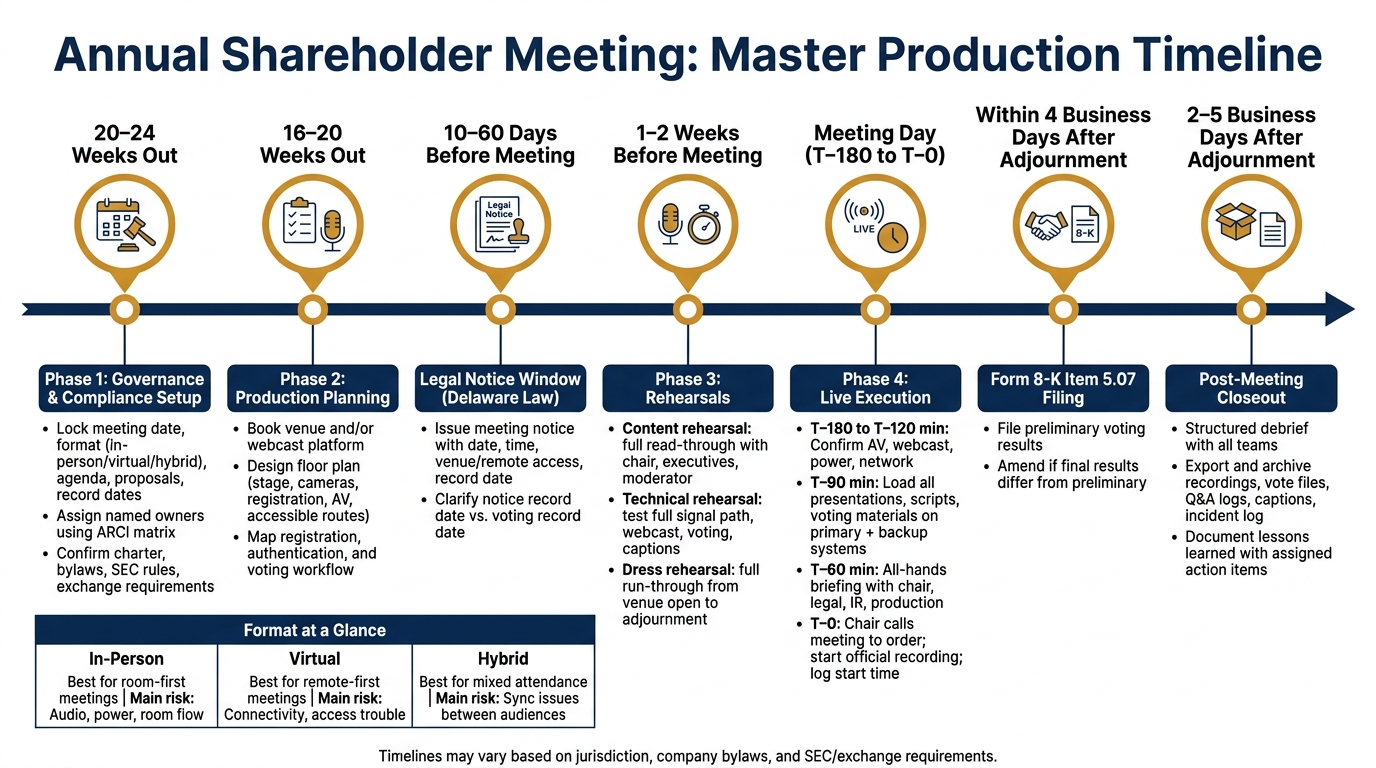
Annual Shareholder Meeting: Master Production Timeline (20–24 Weeks Out)
How To Prepare for a Shareholder Meeting?
sbb-itb-ae35a94
Quick comparison
| Format | Best fit | Main setup needs | Main risk |
|---|---|---|---|
| In-person | Room-first meetings | Venue, registration desk, stage, mics, seating, on-site voting support | Audio, power, room flow |
| Virtual | Remote-first meetings | Webcast platform, login support, remote voting, captioning | Connectivity, access trouble |
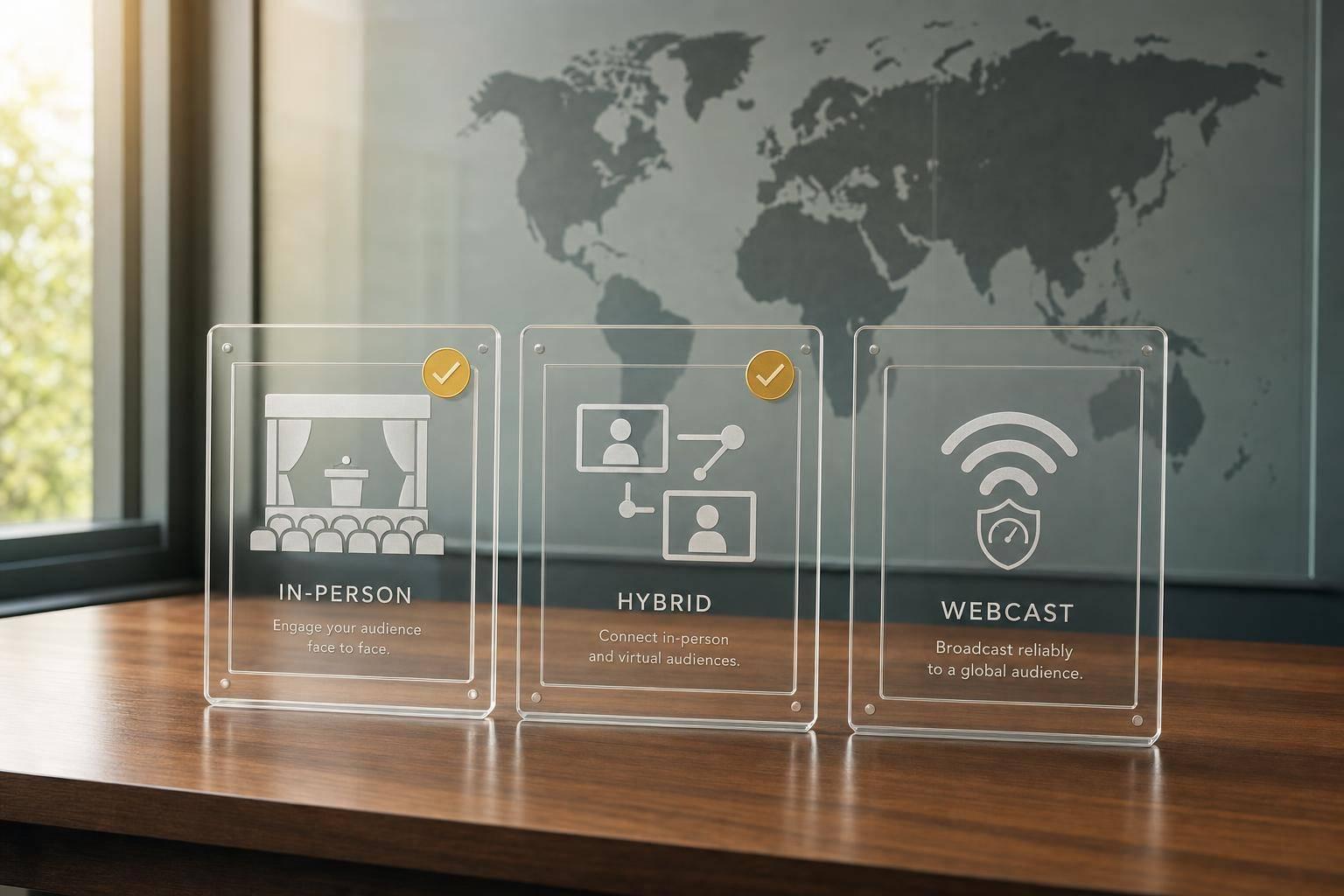
| Hybrid | Mixed in-room and remote attendance | Venue + platform + synced voting and Q&A | Sync issues between both audiences |
If I were planning this meeting, I’d start with format, governance rules, and the voting path first - then build the room, webcast, and rehearsal plan around those choices.
Phase 1: Set Governance, Compliance, and Ownership Early
Once the master timeline is set, lock down the legal inputs that shape every production call.
Confirm the Agenda, Proposals, Record Dates, and Required Filings
Start by checking the meeting date, format, chair, record dates, notice timing, agenda, proposals, quorum, vote thresholds, and inspector of elections against the company's charter, bylaws, state law, SEC rules, and exchange requirements.
Meeting notices need to include the date, time, venue when applicable, remote access method, and record date. Delaware law generally requires notice 10 to 60 days before the meeting.
The notice record date and voting record date may be different. Legal should spell out which date controls each purpose so registration and voting eligibility are set up the right way. That cuts down on confusion when the transfer agent, proxy solicitor, and voting provider line up participation data.
It also helps to build a proposal matrix for each ballot item. For every item, document:
- required vote
- eligible shares
- abstentions
- broker nonvotes
- withheld votes
- any separate class or series vote
Legal should approve the wording before the voting administrator loads anything into the system. From there, the matrix becomes the basis for voting-system setup and script checks during rehearsal.
Also confirm the post-meeting filing calendar now, not later. Form 8-K Item 5.07 is generally due within four business days after adjournment. Assign one owner before the meeting date is final.
Assign Owners Across Legal, Investor Relations, Communications, and Production
Give each deliverable to one named owner, not a group or department. A responsibility matrix works well here, using four labels: A (accountable), R (responsible), C (consulted), and I (informed).
Core roles usually include the board chair, corporate secretary, Legal and securities counsel, Investor Relations, transfer agent or proxy solicitor, inspector of elections, Communications, and the production lead. AV, webcast, registration, facilities, security, and IT leads should each own their own workstreams.
The main output in this phase is the master meeting brief. Think of it as the single source of truth for the event. It should include the meeting date and time zone, format, venue or platform, accessibility needs, record date, quorum and vote standards, agenda, proposals, chair and presenters, shareholder-question policy, registration and voting workflow, proxy-material status, filing deadlines, communications protocol, production contacts, escalation tree, rehearsal dates, security requirements, and post-meeting deliverables.
That brief should then be used as the handoff document for room setup, webcast configuration, registration, and show calling. Version control matters here. Everyone - internal teams and outside vendors - needs to know which revision is the one to follow.
If it helps, hold a formal governance-readiness meeting with the corporate secretary, Legal, Investor Relations, Communications, production lead, transfer agent or proxy solicitor, voting provider, and key executives. Phase 1 is done when every vote, approval, and deliverable has a named owner and approved assumptions.
With governance and ownership set, the next move is to shape the room, webcast, and voting flow around those rules.
Phase 2: Build the Production Plan for the Room, Broadcast, and Voting Workflow
Once governance is set and owners are clear, the job shifts from legal planning to technical execution. This is where the meeting either works smoothly or starts to wobble. The room, webcast, registration flow, and voting setup can't be planned in isolation. They need to function as one connected system.
Design the Venue or Hybrid Environment Around Access, Sightlines, and Control
Start with a scaled floor plan before you book or install any equipment. That plan should show the stage, lectern, board or executive seating, projection surfaces, confidence monitors, camera positions, lighting positions, audio-control area, registration desk, shareholder seating, accessible routes, and emergency exits.
This step matters more than it may seem. A room can look fine on paper and still fail in practice. Camera sightlines must stay clear of floral arrangements, lectern edges, and audience foot traffic. Confidence monitors need to sit where presenters can read them without turning away from shareholders or the main camera. AV, scenic and lighting production, venue logistics, speaker support, webcast execution, and on-site staffing should all be coordinated through this same floor-plan process so the full setup follows one workflow.
Set aside separate spaces for:
- registration
- voting administration
- technical control
- private speaker preparation
Before the design is final, ask for a venue walk-through, current floor plans, ceiling heights, power information, internet details, loading schedules, and an inventory of installed equipment. Also check rigging, fire-code, union, and venue restrictions before signing contracts. That small bit of homework can save a lot of pain later.
Every signal path and failure point should be documented across audio, video, lighting, power, and network. On the network side, one rule should be non-negotiable: do not use venue Wi-Fi as the primary webcast or voting connection. Use a wired primary internet connection with tested upload capacity, a secondary connection, and a written failover procedure.
Once the room setup is clear, the next layer is shareholder entry, verification, and voting.
Map the Webcast, Registration, and Shareholder Voting Process
Registration should run as a controlled sequence, not a loose collection of steps. The flow should cover proxy notice delivery, platform access, identity or control-number check, eligibility confirmation, entry to the meeting, voting access, and support escalation. Proxy materials should clearly explain how shareholders can attend remotely, take part, and vote.
It's also smart to separate the experience for each participant type. Registered shareholders, beneficial owners who hold shares through a broker or bank, and proxy holders do not move through the process in the same way. The system should validate control numbers or other approved credentials, stop duplicate voting where that applies, and route ownership or access disputes to a trained support desk. It should also log the time and status of authentication, voting eligibility, ballot submission, and technical interventions without exposing personal data that isn't needed.
Treat the ballot as a locked document with one change-control owner. That keeps confusion out of the process. Every team should work from the same approved proposal titles, order, choices, director names, and deadlines. Lock the approved ballot version before any system setup begins.
The run of show should state exactly:
- when polls open
- who announces the voting window
- how proxy votes reconcile with live votes
- when polls close
- who authorizes the final count
Before rehearsal, test the full chain from end to end: authentication, question submission, poll opening, vote casting, poll close, and result export.
Those workflow needs should shape the format choice. The best format is usually the one with the fewest access and control problems, not the one that looks nicest in a planning deck.
Compare In-Person, Virtual, and Hybrid Production Requirements
Use this comparison to match format to governance, access, and production capacity.
| Requirement | In-Person | Virtual | Hybrid |
|---|---|---|---|
| Venue dependencies | Full venue, seating, stage, registration, accessible routes, power, loading, and on-site security | Primarily platform, presenter locations, support operation, and controlled recording spaces | Physical venue plus platform, dedicated control room, remote-presenter support, and additional network capacity |
| Shareholder access | Physical check-in and identity or ownership verification; remote participation may be unavailable | Authentication, browser or telephone access, platform support, and remote participation instructions | Coordinated physical and remote admission with equivalent participation rules |
| Voting workflow | Ballots, electronic devices, paper backup, or administrator-managed voting; proxy reconciliation essential | Secure authenticated ballot, live voting window, platform support, and audit trail | One synchronized voting process that prevents conflicting physical and remote submissions |
| AV requirements | Room reinforcement, microphones, projection, lighting, cameras if recording, audience Q&A microphones | Presenter microphones and cameras, screen capture, encoder, captions, platform monitoring, and backup connectivity | All in-person requirements plus remote contribution, program switching, echo prevention, and additional monitoring |
| Staffing | Producer, stage manager, AV crew, registration team, voting administrator, ushers, and shareholder support | Producer, platform administrator, webcast operator, moderator, voting administrator, technical support, and remote speaker support | Combined teams with clear ownership for room, broadcast, platform, voting, and support operations |
| Primary technical risks | Room acoustics, blocked sightlines, power, equipment failure, and crowd movement | Connectivity, platform outage, browser compatibility, authentication, and remote speaker failure | Any failure in the room or platform can affect the other audience; synchronization and echo are major risks |
| Backup procedures | Spare microphones and presentations, paper or alternate voting method, backup power, and room announcements | Secondary platform or dial-in route, backup encoder and connection, prerecorded content, and support escalation | Independent fallback for each audience, documented pause messaging, alternate voting access, and coordinated incident logging |
Use the selected format to lock staffing, equipment, and rehearsal scope in Phase 3.
Phase 3: Rehearse the Program and Lock the Run of Show
Once the room setup, platform, and voting flow are in place, rehearsal shows whether they actually work together. At this stage, the production plan is set. Rehearsal is the last full check before the live meeting.
Finalize Scripts, Presentations, and Presenter Instructions
Build one controlled meeting content pack that includes the chair script, agenda, order of business, quorum language, proposal text, voting instructions, remarks, question process, closing language, slides, lower-thirds, holding slides, and webcast copy. Legal and the corporate secretary should verify quorum, vote thresholds, abstentions, and eligibility. Investor Relations should confirm proposal language. Communications should approve tone and graphics. Production should check that every asset can be displayed, captioned, and recorded. Proxy materials must describe the voting process and the required vote for each proposal correctly.
Give each presenter a one-page briefing. It should cover arrival or login time, speaking order, duration, approved wording, mic instructions, slide-control rules, and a backup login method.
Run Content, Technical, and Dress Rehearsals With Backups
Rehearsals should happen in three stages. Each one builds on the last.
The content rehearsal is a full read-through with the chair, corporate secretary, executives, moderator, and question manager in the room. Check that proposal names match the proxy materials, voting instructions use plain English, and the program fits the time available. Flag unclear wording, heavy legal jargon, and missing transitions. Time every segment and keep adjusting the run of show until there are usable buffers across the program.
The technical rehearsal checks the full signal path, not just single pieces of equipment. Test microphones, backup microphones, presentation playback, cameras, webcast encoding, remote presenter feeds, lower-thirds, captions, voting access, and communication between the stage and control room. For hybrid meetings, test both sides of the experience: the in-room audience path and the remote shareholder path, including authentication, question submission, and voting. Have all presenters log in 15 minutes early so connection problems can be fixed before the meeting starts.
After each system passes on its own, run the full meeting in sequence. The dress rehearsal should mirror the live meeting from venue opening through adjournment, using the actual presenters, approved scripts, final slides, and the complete voting workflow. Run it straight through. Stop only for safety, legal, or critical technical issues. Track actual segment lengths, rough handoffs, and any gap between the plan and what happens live. Accessibility is part of live production here, not a side task. Test real-time captions for latency and accuracy, check audio levels, and confirm that attendees can submit questions without depending on a single input method.
Keep an issue log with the category, severity, owner, fix, deadline, and retest status for each problem. Put first attention on anything that could block quorum confirmation, shareholder voting, webcast access, or clear audio. After each fix, retest the exact workflow under the same conditions where it failed. If a change affects shareholder-facing language or meeting procedure, the corporate secretary, legal representative, or show caller should approve it. A workaround is not the same as a fix.
Freeze the run of show after the final review by Legal, IR, Communications, and the corporate secretary, no later than the business day before the meeting. Use one version number and send one controlled copy to every role: show caller, stage manager, presenters, webcast operator, voting team, captioner, and executives. Remove old versions from shared folders. After lock, allow changes only if they are legally required, factually needed, or critical to keeping the meeting running. Log every late change, note who approved it, update the script, slides, graphics, captions, and cue sheets together, and run a focused retest before meeting day.
Phase 4: Execute Meeting Day and Close Out the Official Record
Follow a Meeting-Day Checklist From Venue Open to Adjournment
Once the run of show is locked, the job shifts from practice to live control.
Open the venue or production room at T−180 to T−120 minutes. At that point, confirm access, room setup, AV, webcast, power, and network. The technical director should check primary and backup power, internet connectivity, wired network access where available, bandwidth, firewall permissions, encoder settings, and communication lines between the stage, registration desk, legal team, investor relations, and control room.
By T−90 minutes, load and verify presentations, scripts, graphics, voting materials, Q&A procedures, and contingency files on the primary playback system, a tested backup system, and a locked offline backup. By T−60 minutes, run a short all-hands briefing for presenters, the chair, legal, IR, the inspector of elections, moderators, venue staff, and production leads. Go over speaking order, timing cues, microphone positions, voting windows, Q&A rules, and the exact signals that allow a pause or technical reset. At T−30 minutes, open registration or the virtual lobby and confirm that registration and attendance data are reaching the corporate secretary or inspector of elections for quorum determination.
After those checks clear, move from room setup to live monitoring.
When the chair calls the meeting to order, start the official audio and video recording at once and log the exact start time. At that same point, the chair or corporate secretary should confirm notice and quorum. Give one person clear ownership of each live function: audio, webcast, captions, questions, registration, voting, slides, and time. The stage manager should be the main link between the control room and presenters, while the chair handles procedural calls.
Document Incidents, Voting Results, and Required Post-Meeting Actions
Use a structured incident-response table during the live event:
| Incident | Immediate Action | Decision Owner | Backup Communication Method |
|---|---|---|---|
| Primary presentation computer fails | Switch to the tested backup computer; give the presenter the printed slide sequence | Technical director; chair informed | Stage manager via headset or hand signal |
| Microphone or room audio fails | Mute the failed channel; deploy a spare mic; pause the speaker if intelligibility is affected | Production lead and chair | Printed cue cards or hand signals |
| Webcast interruption | Confirm whether the issue is local or platform-wide; switch to the backup encoder; log the outage | Webcast director and production lead | Approved status message on the investor-relations webpage or shareholder support line |
| Vote platform or internet outage | Switch to the approved fallback process, keep an audit trail, and preserve quorum/voting status | Chair, legal counsel, and inspector of elections | Telephone support or designated shareholder-services contact |
| Incorrect slide or script appears | Remove the incorrect material immediately; display the approved version; notify legal and IR | Chair or legal counsel | Internal headset; corrected written notice if shareholders were affected |
After adjournment, keep the record open long enough to capture all final outputs. Confirm that the inspector of elections has closed voting and that the corporate secretary has received the preliminary vote report. Then export and verify recordings, vote files, attendance data, chat and Q&A logs, captions, the incident log, and the final run of show. Save at least two copies in approved storage locations, and limit access to sensitive shareholder information.
For U.S. public companies, Form 8-K Item 5.07 generally requires reporting preliminary voting results within four business days after the meeting ends when final results are not yet available. If the first filing contains preliminary results, an amended Form 8-K is required once final results are known. Prepare the Form 8-K filing calendar before meeting day so no one is scrambling afterward.
Within two to five business days, hold a structured debrief with production, legal, investor relations, the corporate secretary, the transfer agent, and the webcast team. Use the same categories as the master timeline - governance, venue, AV, webcast, voting, accessibility, vendors, and budget - and rank each issue by impact, legal risk, and recurrence. Then turn those findings into assigned actions with deadlines, such as adding a second wired internet path or requiring final slides 48 hours before rehearsal. Archive the approved run of show, contracts, technical diagrams, recordings, the incident log, and debrief decisions so the next team starts with a documented baseline. Reconcile vendor invoices against purchase orders and approved change orders before closing the project.
FAQs
Who should own the full meeting timeline?
A single, named owner should run the full meeting timeline. That cuts down on confusion and makes accountability clear.
For annual shareholder meetings, that usually means one production lead or partner overseeing staging, audiovisual, streaming, and voting. Every cue and every decision in the run-of-show should have one clear owner.
What should be tested before rehearsal day?
Before rehearsal day, test the site, equipment, and software under the same conditions you'll face during the event. That means checking the room acoustics, power, internet bandwidth, firewall or VPN limits, upload speeds, camera sightlines, and backup connections.
Then make sure all presentation files and media are loaded onto the playback computer. Lock version control so nobody shows up with the wrong deck. Remote participants should also test access ahead of time, including screen sharing, document access, and audio from different locations and devices.
How do you handle a voting or webcast outage?
Prioritize transparency and have a backup plan ready before anything goes wrong.
If there’s an outage, acknowledge it right away. Explain what’s happening, outline the steps being taken, and give shareholders clear directions on how they can join through other channels.
Keep a written fallback plan in place with pre-configured backup streaming and internet access. If the outage means the meeting no longer meets legal communication standards, be prepared to adjourn and reconvene at a later time. Your technical support team should carry out the backup plan and log all issues with exact timestamps.
Related Blog Posts



Streamline your workflow, achieve more

Lorem ipsum dolor sit amet, consectetur adipiscing elit. Maecenas ac velit pellentesque, feugiat justo sed, aliquet felis.



Lorem ipsum dolor sit amet, consectetur adipiscing elit. Maecenas ac velit pellentesque, feugiat justo sed, aliquet felis.