The Biggest Av Mistakes Made In Board Meetings (And How Professional Production Prevents Them).

Chief Executive Officer
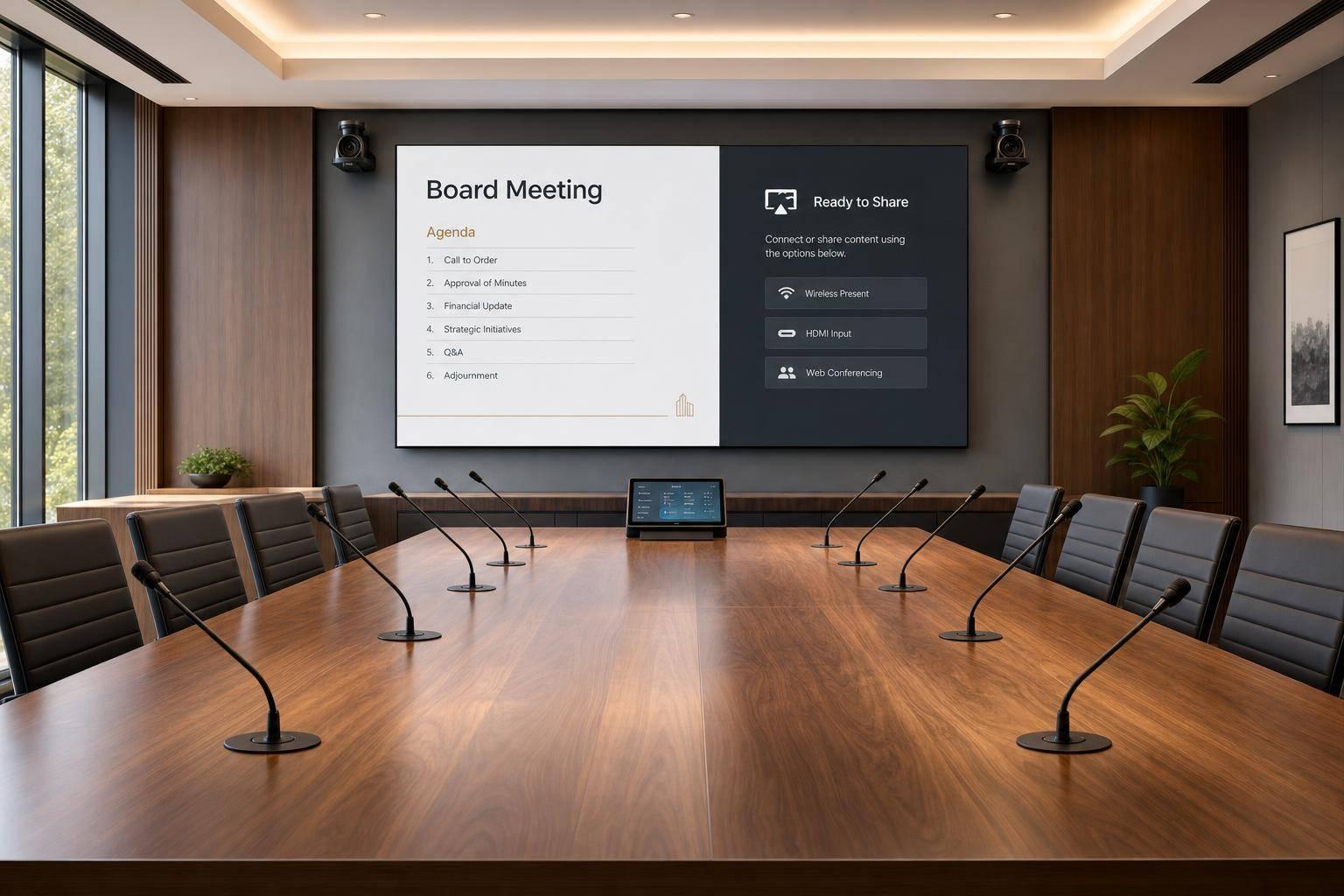
Board meetings lose time fast when audio, video, or screen sharing fails. One cited study found a single meeting disruption can cost a median of 12.2 minutes per person, and a 2026 survey said more than 7 in 10 IT leaders had dealt with meeting issues like audio failure or dropped connections.
If I had to sum up the article in plain English, it comes down to this:
- Bad audio means people miss comments, ask for repeats, and lose the thread
- Weak video setup makes remote directors miss faces, reactions, and who is speaking
- Poor content handling leads to delays, wrong inputs, and private files showing on screen
- No rehearsal turns small setup gaps into live meeting problems
- Professional production cuts those risks with seat-based audio planning, camera presets, operator-run content, remote-side testing, and backup plans
This is not just about making the room work. It is about making sure in-room and remote board members can take part on the same terms.
| Problem | What goes wrong | What stops it |
|---|---|---|
| Microphone gaps | Some directors cannot be heard | Audio planned by seat, room tuning, remote audio check |
| Weak camera and lighting | Remote attendees miss faces and reactions | Eye-level camera placement, presets, added lighting, second angle if needed |
| Screen-sharing mistakes | Delays, wrong content, private material shown | Operator-run playback, preloaded files, tested backup source |
| No full rehearsal | Issues show up live | Agenda-based run-through with all cues and fallback steps |
| No remote-point-of-view test | Room looks fine in person but not online | Off-site test using the same meeting platform and connection type |
The main point: if the meeting matters, the AV setup should be built around who needs to hear, see, speak, vote, and share, not just around whatever gear is already in the room.
Below, I break down the biggest boardroom AV mistakes and the production steps that stop them before the meeting starts.
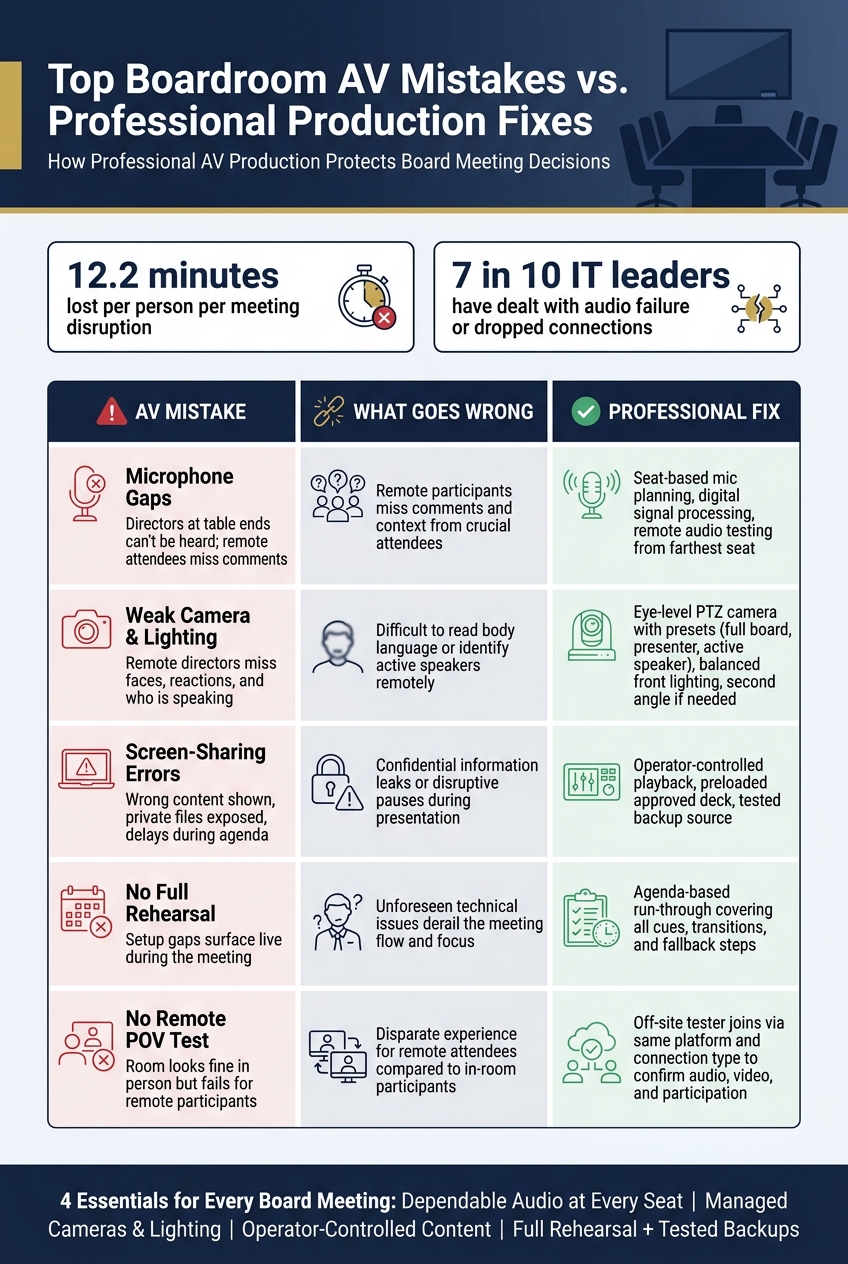
Top Boardroom AV Mistakes vs. Professional Production Fixes
Meeting Room AV Problems? Here's What AV Technicians Do
sbb-itb-ae35a94
The Most Common AV Mistakes in Board Meetings
Most boardroom AV problems don’t start with a dramatic breakdown. They start small, then snowball before anyone in the room spots what’s happening. And once that happens, equal participation slips, the pace slows, and decision-making gets harder than it should be.
The three trouble spots below cause the biggest issues.
Poor microphone coverage and unmanaged room audio
One of the most common mistakes is simple: putting one microphone in the middle of the table and assuming that’s enough. It isn’t.
People seated at the ends of the table are often too far from the mic’s pickup range. So when they speak, remote directors hear patchy, uneven, or missing audio. That leads to pauses, repeat questions, and a weaker back-and-forth. When sound breaks down, the board loses both time and clarity.
The room itself can make things worse. Hard floors, glass walls, and high ceilings bounce sound around the space. That creates echo and makes speech harder to understand, especially for remote participants listening through laptop speakers, earbuds, or headphones. Good room design covers every seat and reduces reverberation with acoustic treatment. Without that base layer, even good microphones can struggle.
Unreliable video conferencing, weak camera framing, and bad lighting
Video problems often come from choices that seem minor at first. A single fixed camera placed too high or too far off-center can leave out people sitting at the ends of the table. For remote directors, that means missing facial expressions, side glances, and other visual cues that help them track the conversation and push back when needed.
Lighting can make a bad video setup even worse. If there’s a window behind someone, the camera may turn them into a silhouette. If the room relies on overhead fluorescent lights, faces can end up buried in shadows. Either way, remote attendees don’t see people clearly - they see shapes.
Then there’s conference platform stability. Dropped connections, frozen video, and delayed audio can derail a meeting fast. This risk goes up when the platform account, user permissions, network path, and device settings haven’t been tested together using hybrid meeting planning best practices before the meeting starts.
Screen-sharing delays, content switching errors, and skipped rehearsal
Content issues have a way of showing up at the exact wrong moment. A presenter plugs in an untested laptop. An adapter is missing. The wrong desktop gets shared. Open files appear on-screen that no one meant to show. A last-minute deck update never made it onto the presentation system. Someone switches to the wrong input in the middle of the agenda.
None of these problems sound huge on their own. But in a board meeting, they chew up fixed agenda time and chip away at the room’s confidence. You can feel it happen: the meeting slows down, attention drifts, and trust in the process takes a hit.
The deeper issue is this: many teams treat setup like a simple power-on check instead of a full run-through. But a basic test doesn’t prove that screen sharing works, camera framing looks right, or video audio will play the way it should. If no one walks through the actual agenda ahead of time, those gaps stay hidden until the meeting is live. Professional production deals with those gaps before anyone joins the room.
How Professional Production Prevents Each Failure
Audio design built around every seat and every speaker
Professional audio starts with the seating map, not the microphone. Before anyone picks gear, the team maps coverage for every director, executive, presenter, and likely question spot.
Microsoft’s room-planning guidance says there should be at least one microphone within 7.5 feet (2.3 meters) of each participant, with overlapping coverage when more than one microphone is needed.
The right setup depends on the room. Some spaces work best with table microphones. Others need a ceiling array. That choice comes down to table shape, room construction, and what the room needs to look like on camera.
After placement, digital signal processing takes over. It handles acoustic echo cancellation, gain management, and even speech levels across the room. The goal is simple: every seat must be heard clearly so the board discussion doesn’t fall apart.
Then comes the part people skip too often: testing. Run a speech test from the farthest seats. At the same time, monitor the remote audio return on an actual remote device outside the room, so both sides of the call are checked in real conditions.
That coverage only works when the room is tested from the farthest seat and from the remote side.
Managed video, camera presets, and hybrid room layout
PTZ cameras with programmed presets solve the fixed-camera problem head-on. A well-set room includes presets for:
- the full board
- the presenter
- the active speaker
The main camera should sit below the display at seated eye level. That way, remote participants see the room more naturally, and remote directors can read facial expressions and follow the discussion without losing context.
If one camera can’t show both the full table and the presenter, the answer is simple: add a second angle.
Lighting matters too. Balanced front or side lighting helps avoid silhouettes and heavy facial shadows. Displays also need to be sized and placed so remote participants and shared content stay in view without making people turn away from the camera.
Once the room is visible, the next risk is whether content can switch cleanly without delay.
Operator-controlled content, rehearsal, and fallback plans
Use a managed room computer with the approved deck preloaded. Before the meeting begins, confirm fonts, media, aspect ratio, and a tested backup source.
An operator should handle inputs, slides, layouts, and transitions during the meeting. That keeps presenters focused on the discussion instead of fumbling with the system. It also lowers the chance of exposing sensitive board material by mistake, since screen sharing stays in the hands of one designated operator. That ties operator control straight to meeting credibility and confidentiality.
For board meetings, use operator-controlled playback through a managed wired input, with a tested backup source ready.
Technical design cuts risk. Rehearsal proves the setup works. These controls still need a full rehearsal before the board meets.
Even that setup fails without a rehearsal, which is the next layer of protection.
Pre-Meeting Checks That Protect Boardroom Credibility
Even a well-designed boardroom still needs pre-meeting validation. These checks help stop disruption when the board can least afford it.
Run a full technical rehearsal, not a basic equipment check
A simple power-on check won’t cut it. A real rehearsal should mirror the meeting from opening remarks to adjournment. That includes microphone coverage, camera presets, content switching, executive-session handoff, and voting.
AVIXA recommends full equipment run-throughs, software-compatibility checks, redundancy testing, and complete simulations with presenters and AV staff. In plain terms, the team should walk through the agenda in order: the chair opens, the operator switches to the opening camera, a presenter shares slides, a video plays with audio, the group moves into discussion, and the meeting enters executive session. The goal is to rehearse operator cues, not just confirm that devices turn on.
If remote attendees are joining, run the full rehearsal at least a week in advance. Then do a shorter final check on meeting day. Write down each agenda segment, speaker, content source, operator action, expected result, owner, and fallback. That record makes it much easier to spot weak points and fix them before directors enter the room.
Next, test the room the way a remote director will experience it.
Test the room from the remote participant's point of view
From inside the room, a lot can look fine when it isn’t. Remote directors often get a very different version of the meeting. Owl Labs reported that 72% of workers said technical issues delayed meetings or wasted time, while 70% reported difficulty seeing everyone's faces and 70% reported difficulty hearing everyone in meetings. That’s why someone should join from a separate remote location before the meeting starts, using the same platform and connection type that directors will use.
That tester should confirm a few basic things:
- Every speaker is intelligible, including people at the far end of the table, with no echo or delay
- Faces are visible, framing is correct, and shared content is readable without glare
- Participation works - raising a hand, asking a question, and casting a vote - so remote directors have actual access, not just a video feed
NOAA recommends asking remote participants to join 15–20 minutes before the scheduled start time to address any technology issues.
Use a failure-prevention matrix for high-stakes meetings
Every critical AV function needs three things: an owner, a test, and a fallback. The table below links common failures to the business problems they can cause, along with the controls that help stop them.
| AV Mistake | Boardroom Impact | Production Control | Pre-Meeting Test | Fallback Plan |
|---|---|---|---|---|
| Microphone doesn't cover a director | Comments missed or inaccurately recorded | Seat-based mic plan, gain control, operator monitoring | Test every seat; remote listener confirms clarity | Spare microphone or wired handheld |
| Echo or feedback enters the call | Discussion slows; credibility drops | Echo cancellation, mute discipline, separated audio paths | Run multiple open mics with a remote listener | Mute affected channels; switch to backup audio device |
| Poor camera framing | Remote directors can't identify speakers or read reactions | Camera presets and multi-camera switching | Test chair, presenter, wide-room, and discussion views | Fixed wide shot or backup camera |
| Backlighting or glare obscures faces | Nonverbal cues and documents are hard to follow | Front lighting, shade control, display-angle adjustments | Review the remote feed with actual slides displayed | Reposition participants, close shades, or switch camera angle |
| Screen sharing fails or shows wrong content | Presentations stall; confidential material may be exposed | Operator-controlled playback, locally stored files | Rehearse every deck, video, and handoff | Backup laptop or pre-distributed offline materials |
| Network or conferencing platform fails | Remote directors lose access to discussion or voting | Managed network, account checks, alternate connection | Run a stability test; confirm backup credentials | Backup network, dial-in audio, or alternate device |
| Recording or confidential-session controls fail | Record is incomplete or sensitive discussion is captured | Recording operator, visible status checks, session protocol | Start, pause, stop, and verify recording behavior | Stop recording manually; document the event; use approved backup notes |
| Unclear transition ownership | Delays undermine board confidence in the process | Cue sheet, assigned operator, agenda-based rehearsal | Run the complete meeting flow with participants | Chair moves to a simplified format while the operator restores service |
Before the meeting begins, assign clear roles. The meeting owner approves the agenda and risk priorities. The technical director controls the system. The platform operator handles cameras and content. The room host watches remote participants. Keep production control separate from meeting facilitation so a presenter or secretary isn’t stuck fixing problems in real time.
Once these checks are set, professional production can protect the meeting itself.
How Professional AV Production Protects Decisions and Meeting Trust
Once the room checks are done, production has one job: protect the meeting itself.
When AV runs the way it should, directors can stay on governance instead of getting dragged into tech issues. That’s the point of professional production. You get one operator, one workflow, and one backup plan. With a dedicated operator handling microphones, cameras, content switches, and remote access, the chair can keep attention on the agenda instead of playing IT support.
When AV isn’t managed well, it chips away at the meeting. Minutes disappear. Momentum stalls. And the chair gets pulled into fixing problems that should never have landed on their plate.
Board content also needs tight control. Use restricted sharing, meeting passwords or PINs, disabled chat or file sharing, and a pre-share check for open documents. Those steps help keep sensitive material contained. And when that process is handled well, directors spend less time second-guessing how the meeting is being run and more time making decisions.
That control tends to show up in three areas:
- Access: who can join, view, and interact
- Backup: what happens if audio, video, or sharing fails
- Operator ownership: who is actively running the meeting systems
In self-managed meetings, those tasks often fall to the chair. In a professionally produced meeting, each one sits with a dedicated operator, and the backup path gets tested before the meeting begins.
Key takeaways for executives and meeting planners
The takeaway for board planners is simple: every board session needs four things in place. You need dependable audio coverage at every seat, carefully managed cameras and lighting for hybrid participants, operator-controlled content sharing, and a full rehearsal with tested backup options for high-stakes agenda items.
It also helps to assign roles before the meeting starts. Set clear ownership for the chair, presenter, producer, and remote-participant liaison. That way, no single person is trying to govern the meeting and troubleshoot it at the same time.
For high-stakes board meetings, use room-specific AV design, live technical support, contingency planning, and post-meeting review.
FAQs
How many microphones does a boardroom really need?
It depends on the room size, layout, and how meetings usually run. There isn't one fixed number that works for every space.
Smaller boardrooms often do well with directional tabletop microphones. Bigger rooms may need beamforming ceiling-mounted arrays to cover more seats without dead spots.
The main goal is simple: everyone should be heard clearly without having to lean in or speak up.
It's also smart to keep spare wireless handheld or lavalier microphones on hand in case a main unit stops working.
What should be tested before a hybrid board meeting starts?
Test the full system with a technical rehearsal 24 to 48 hours before the event. Then run a 30-minute virtual green room check right before the meeting starts.
That second check matters more than people think. A setup that worked yesterday can still go sideways on meeting day because of a muted mic, a loose cable, a laptop output issue, or a network hiccup.
During these checks, confirm:
- microphones
- PTZ camera presets
- display sharpness
- the network and failover
- laptop handoffs
- video playback
- mix-minus audio
- backup gear is pre-configured and ready
It’s the kind of prep that saves you from last-minute scrambling when the room is live and everyone’s waiting.
When does a board meeting need a dedicated AV operator?
A board meeting needs a dedicated AV operator when it goes beyond the basics, especially for hybrid sessions, multi-location meetings, or high-stakes executive gatherings.
A good operator helps stop common problems before they derail the meeting: audio feedback, connection dropouts, and slide or screen-share issues. And if something does go wrong, they can fix it fast so directors can stay focused on the agenda.
Related Blog Posts



Streamline your workflow, achieve more

Lorem ipsum dolor sit amet, consectetur adipiscing elit. Maecenas ac velit pellentesque, feugiat justo sed, aliquet felis.



Lorem ipsum dolor sit amet, consectetur adipiscing elit. Maecenas ac velit pellentesque, feugiat justo sed, aliquet felis.