How Production Teams Support Executive Speakers At Press Conferences

Chief Executive Officer
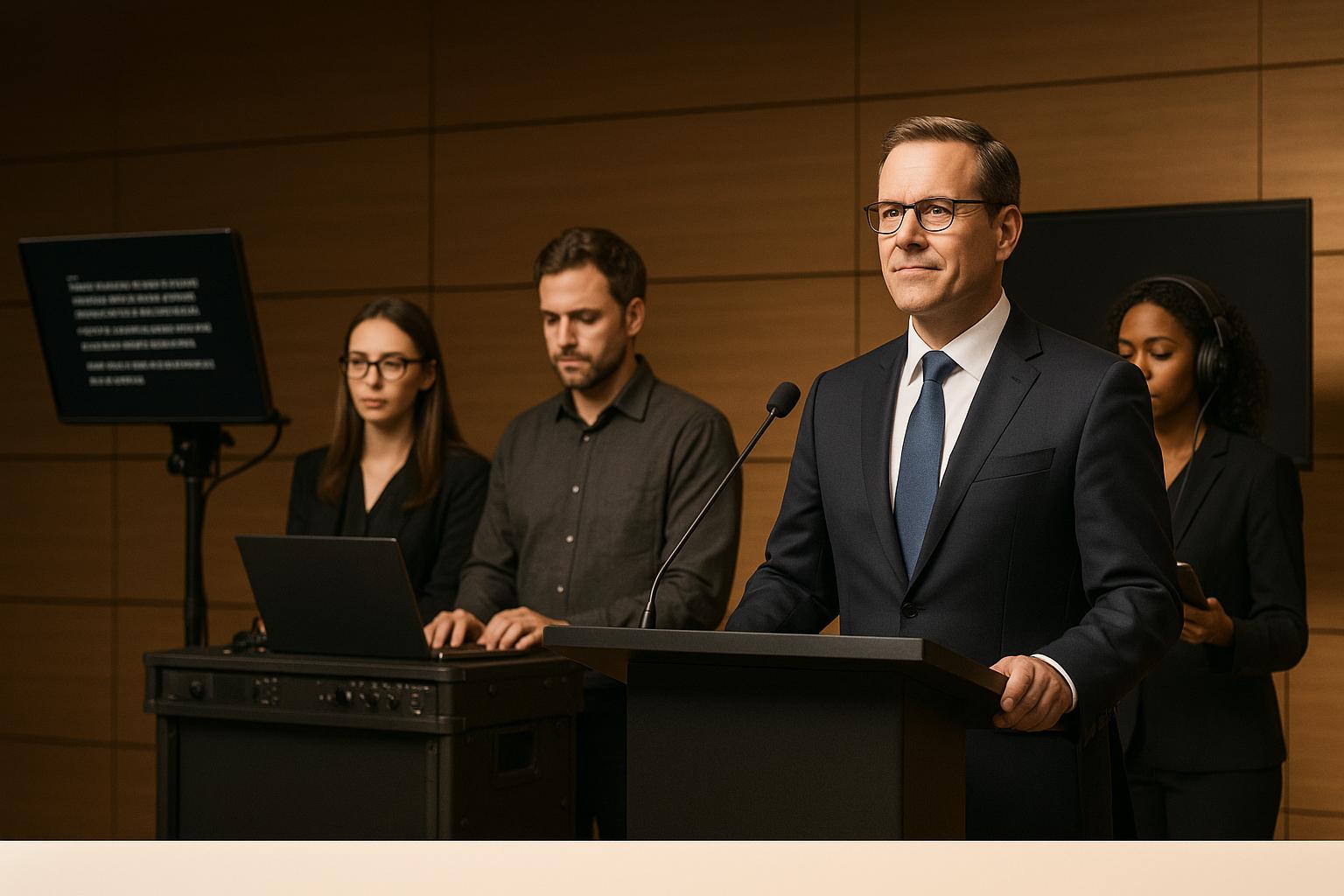
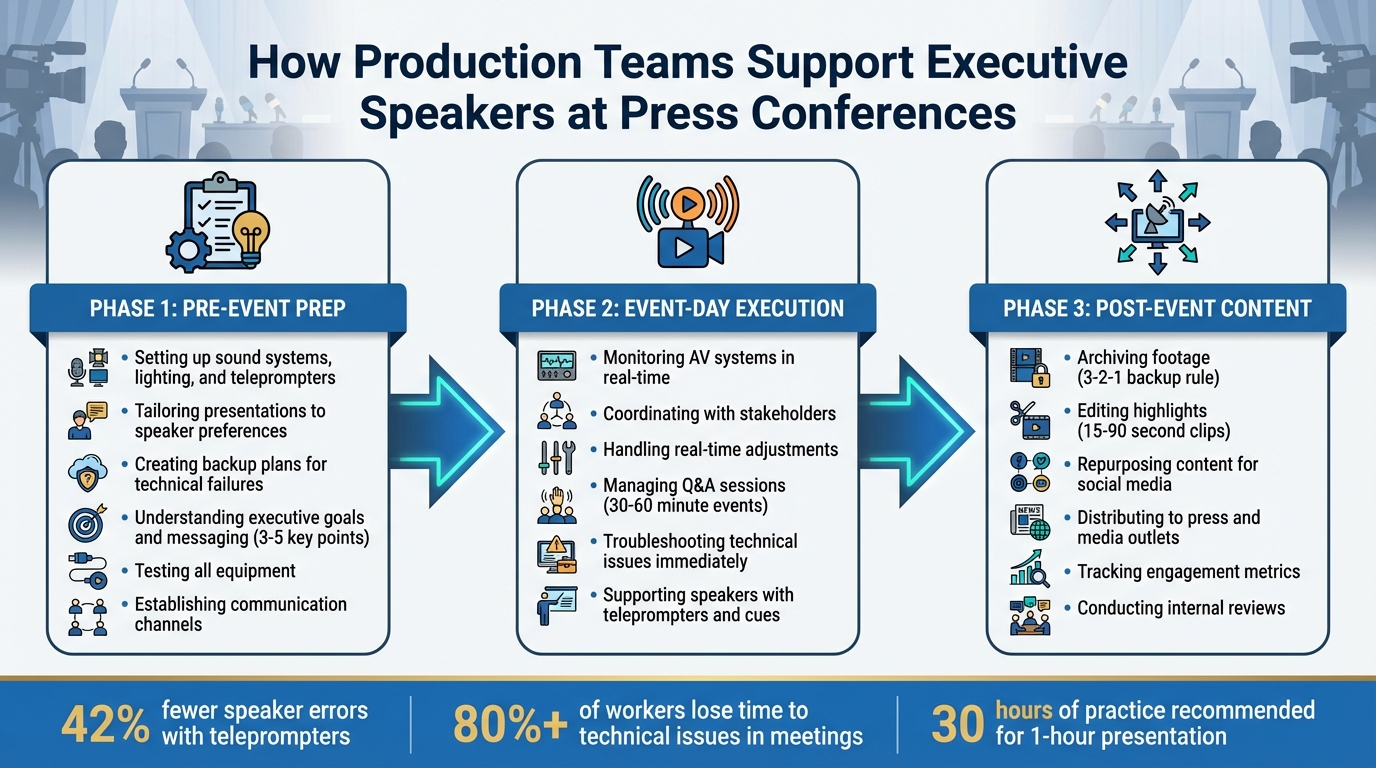
Production teams ensure press conferences run smoothly by managing every technical and logistical detail, so executives can focus on delivering their message. Their work spans three critical phases:
- Pre-Event Prep: Setting up sound systems, lighting, and teleprompters; tailoring presentations to speaker preferences; and creating backup plans for technical failures.
- Event-Day Execution: Monitoring AV systems, coordinating with stakeholders, and handling real-time adjustments to avoid disruptions.
- Post-Event Content: Archiving footage, editing highlights, and repurposing content for social media and press distribution.
This meticulous process minimizes errors, maintains focus on the speaker's message, and amplifies the event's impact across platforms.
Three Phases of Production Team Support for Executive Press Conferences
Event Production Tips for Non-Event People: Marketers, PR & Comms Teams - Logan Clements
Pre-Conference Planning and Speaker Preparation
Prepping for a conference starts weeks ahead, focusing on far more than just securing a venue. It’s about tailoring every technical and presentation detail to match the speaker's comfort level and anticipating potential hiccups. This groundwork ensures a smooth, confident delivery and sets the stage for everything that follows.
Understanding Executive Goals and Presentation Requirements
The first step? Pinpointing the purpose of the event. Whether it’s unveiling a product, addressing a crisis, or announcing a partnership, the event’s goals shape every decision, from tech setup to messaging. Teams work to distill the speaker’s message into 3–5 key points that will resonate with the media and audience alike.
Brad Phillips, President of Phillips Media Relations, highlights the importance of seamless teamwork among speakers:
Little is more awkward than watching co-presenters fumble while transitioning to one another. Good co-presenters are like teammates in a relay race; one hands the baton off to the other seamlessly.
To ensure this flow, each speaker is assigned a distinct message, creating a unified narrative. Early in the process, teams also assess speaker preferences - like whether they’re more comfortable with a teleprompter or note cards - and test all equipment, flagging anything that might need a backup. For televised events, they often use matte, branded backdrops to reduce glare and boost visual appeal.
Setting Up Communication Channels and Backup Plans
Clear communication is critical to avoiding chaos on event day. Production teams create direct lines of contact with executives, assistants, PR staff, and venue coordinators, so everyone knows who to reach out to for everything - from last-minute script tweaks to technical glitches. They also provide speakers with reference guides containing key data, so there’s no need to improvise under pressure.
Backup plans are non-negotiable. If a microphone cuts out or a projector malfunctions, the show must go on. Teams prepare redundant audio systems, spare laptops, and alternative internet connections to cover any technical failures. They also rehearse potential curveballs - like tough journalist questions - using a “devil’s advocate” approach to help speakers respond with confidence.
Audiovisual Setup and Configuration
When it comes to executing a successful conference, the audiovisual (AV) setup is where all the detailed pre-planning comes to life. AV quality can make or break the event - it’s the difference between a seamless experience and a distracting technical failure. Clear sound and sharp visuals are essential for keeping the audience engaged and ensuring that your executive’s message lands effectively. Every word needs to be heard, and every visual element should enhance the speaker’s authority, allowing them to present with confidence.
Selecting and Setting Up AV Equipment
The choice of equipment should align with the executive's presentation style. For example, wireless lapel microphones are ideal for speakers who move around, while separate microphones for Q&A sessions ensure smooth audience interaction. Conducting early sound checks is crucial for catching issues like unwanted buzzing or fluctuating audio levels. If the venue uses a house mixer, be prepared for potential limitations - bringing your own mixer can give you more control and flexibility during the event.
For visuals, opt for high-resolution cameras (Full HD or 4K) to deliver crisp images. Proper lighting is equally important - use soft LED lights with strategic backlighting to create a professional appearance. Presentation slides should be clean and visually appealing, avoiding cluttered designs, distracting fonts, or overly bright colors that could pull focus from the speaker. Pre-recorded video clips, such as testimonials or product demonstrations, can add variety and energy to the presentation. Keep these clips short - ideally one to three minutes - and ensure they are in HD or higher quality.
Once the primary equipment is in place, having reliable backup systems ensures the event runs smoothly, no matter what technical challenges arise.
Installing Backup Systems and Redundancy
Backup systems are your safety net. For audio, use dual-backup transmission, combining network and traditional cables. Equip key devices with redundant microphone inputs and automatic power switching to handle unexpected power failures. As Al Keltz, General Manager at Whirlwind, explains:
More elaborate units might have dual redundant mic inputs, a tone generator, signal meters, outputs that are selectable for mic or line and automatic power switching – that is, if AC fails, the unit will switch seamlessly to battery backup.
Internet reliability is another critical component. While Wi-Fi can be unpredictable, having a full Ethernet backup ensures uninterrupted connectivity. This is especially important considering that 80% of workers reported losing time in meetings due to technical issues in 2023. Additionally, backup power banks are essential for keeping lights and projectors operational during outages.
A well-stocked "black bag" containing adapters, cables, and other spare accessories can resolve last-minute connectivity problems. To avoid surprises, test all equipment the night before and have technical experts on-site to troubleshoot any issues in real time. These measures provide peace of mind, allowing the executive to focus on their presentation without worrying about technical hiccups.
Teleprompter and Speaker Support Tools
When the AV setup is ready, it's time to help executives deliver their message with confidence. Teleprompters are a key piece of speaker support, enabling presenters to maintain eye contact while staying on script. When properly configured, teleprompters not only reduce stress but also allow speakers to focus on their delivery instead of memorizing content. In fact, research reveals that executives using teleprompters during quarterly earnings calls were 42% less likely to misspeak or provide inaccurate information compared to those relying on memory or notes. Beyond teleprompters, production teams utilize tools like support guides, fact sheets, and real-time feedback systems to ensure speakers stay on message and respond effectively to audience reactions. These tools complement the AV setup and rehearsal strategies discussed earlier.
Setting Up Teleprompters for Speaker Comfort
To effectively use a teleprompter, customization is key. Production teams adjust font size, scrolling speed, and positioning to suit the speaker's preferences and the presentation environment. For camera-mounted teleprompters placed 5-8 feet away, fonts are typically set between 48-60 points and use clean sans-serif typefaces like Arial or Verdana. High contrast - white or yellow text on a black background - ensures maximum readability. The teleprompter should align with the speaker's eye level, ideally at an 8-10 foot distance, to avoid awkward head movements.
Proper script formatting is just as important. Scripts should feature short sentences, one idea per line, and ample white space between paragraphs to create natural pauses. This approach not only minimizes reading errors by up to 30% but also helps speakers retain up to 95% of their natural speaking rhythm. Dr. Lisa Chen, a cognitive psychologist who studies reading behaviors, highlights the importance of formatting:
The physical format of teleprompter text directly impacts cognitive processing speed. When text is properly formatted for teleprompter reading, speakers can maintain up to 95% of their natural speech patterns, compared to only 70% with poorly formatted text.
Rehearsals are essential for fine-tuning teleprompter use. During practice sessions, the operator matches the scrolling speed to the speaker's natural pace - usually 120-150 words per minute - and adjusts the script in real time if the speaker changes phrasing. The operator follows the speaker’s rhythm, keeping the active line slightly above the center of the glass. Backup plans include printed scripts with large text placed behind the lectern and a second device loaded with the script in a prompter app. These backups are tested during tech rehearsals to ensure a seamless transition if needed.
Delivering Real-Time Feedback and Support
Once the presentation begins, production teams provide subtle, real-time support to keep executives on track. Support guides or fact sheets with key data points are prepared in advance, helping speakers stay focused on core messages without improvising. Moderators can introduce speakers, manage Q&A sessions, and discreetly signal when it’s time to wrap up remarks if the speaker is running long.
The teleprompter operator plays a vital role in adapting to the speaker’s flow. If the executive goes off-script to address a question or audience reaction, the operator pauses scrolling until the speaker returns to a recognizable line. Scripts often include visual cues like [PAUSE], [HOLD FOR REACTION], or [APPLAUSE], giving operators clear moments to stop and allow for audience interaction. This flexibility lets speakers engage naturally while staying aligned with their prepared remarks.
Stage Design and Presentation Flow
The way a stage is set up plays a big role in how executives connect with their audience. A thoughtfully designed stage not only sets the mood but also projects professionalism and helps speakers feel confident, all while ensuring clear communication. Production teams carefully plan the stage design to align with the speaker's message and the event’s objectives, factoring in everything from the backdrop to how speakers move during different segments of the press conference.
Designing a Professional Stage Layout
The backdrop is the visual centerpiece of the stage. Step-and-repeat designs printed on matte, solid-color surfaces are ideal for branding, as they provide a clean, polished look without glare or wrinkles. Strategic lighting is key - it not only enhances the backdrop but also draws attention to the speaker. For multi-camera setups, camera risers should be positioned above the audience to ensure clear, unobstructed views.
Podium placement and stage furniture require precise planning. When multiple speakers are involved, seating should be labeled and arranged so that everyone faces the reporters. A clutter-free stage is essential - all power cables and technical equipment should be hidden to avoid distractions and allow speakers to move freely. If a stage riser is used, press risers should match its height and include safety features like railings, stairs, and secure bracing for stability.
Once the stage is ready, attention shifts to coordinating speaker movements and ensuring seamless transitions.
Planning Speaker Movements and Transitions
After the stage is set, well-orchestrated speaker movements are crucial for maintaining the event’s momentum. An experienced moderator is essential for managing introductions, timing, and transitions. Marina Roca from Watchity highlights the importance of this role:
Designate a moderator who can maintain control of time and guide transitions between segments of the event. The moderator should also help keep the focus on key messages if speakers veer off-topic.
Rehearsals are vital for fine-tuning timing and transitions. Press conferences typically run 30-60 minutes, with each speaker’s segment limited to 3-5 minutes. To keep the flow smooth, some speakers may introduce the next speaker. For Q&A sessions, the moderator is responsible for managing the order of questions, selecting which ones to address, and keeping within the time limits. Photo opportunities are reserved for the end of the event to avoid breaking the presentation’s rhythm - the emcee invites speakers back on stage once the presentations are over.
sbb-itb-ae35a94
Rehearsals: Building Confidence and Refining Performance
After setting up the technical framework and preparing speakers, rehearsals become the backbone of a successful presentation. They help fine-tune both the delivery and technical aspects, ensuring everything runs smoothly. Experts suggest dedicating around 30 hours of practice for a one-hour talk. Some speakers, like Issac Lidsky, have taken this advice to heart - he rehearsed his 11.5-minute TED Talk over 1,000 times, clocking in an impressive 191 hours of preparation.
Running Full Technical Rehearsals
Comprehensive technical rehearsals are essential. These sessions test every piece of equipment - microphones, cameras, lighting, and internet connections - and choreograph speaker movements to ensure seamless framing and transitions. This includes checking sound quality for all microphones and audio sources, coordinating lighting levels and cues with the tech team, and running through slides and videos to confirm they function flawlessly. Full script run-throughs align speaker delivery with audiovisual elements like slides, videos, and lighting changes.
"By conducting a thorough production rehearsal, the team can identify and address any potential issues before the live event, ultimately leading to a more polished and professional production."
– Crescat
Once the technical details are squared away, attention shifts to perfecting the speaker's performance.
Providing Feedback to Improve Speaker Delivery
Rehearsals are invaluable for refining a speaker's delivery. Feedback sessions help eliminate common pitfalls like filler words, nervous gestures, and fidgeting. These sessions are often recorded, allowing speakers to review their opening lines, vocal modulation, body language, and pacing. To add an extra layer of preparation, a team member can play "devil's advocate", asking challenging questions to help the speaker practice clear and concise responses.
Speakers are encouraged to rehearse out loud, focusing on key ideas rather than memorizing every word. This approach helps maintain a natural, conversational tone. Strong opening and closing statements are especially emphasized, as they play a pivotal role in capturing and holding the audience's attention. Presentation expert Nancy Duarte highlights the challenge of achieving a natural delivery:
"Going from sounding memorized and canned to sounding natural is a lot of work"
The feedback process is iterative, with speakers continuously refining their presentations based on insights from trusted peers or professional coaches.
Event-Day Execution and Real-Time Management
After weeks of rehearsals and careful planning, the day of the event is all about staying sharp and managing everything in real time. Production teams switch into action mode, monitoring every technical detail and working closely with various stakeholders to keep things on track. The ultimate goal? Make sure the executives deliver their message smoothly, without any technical glitches.
Monitoring and Adjusting AV Systems During the Event
On the big day, production teams depend on advanced AV monitoring systems to keep an eye (and ear) on everything. These systems continuously check audio and video feeds for things like quality, clarity, and sync issues. Video monitors display live feeds, high-quality audio monitors let technicians hear exactly what the audience hears, and multiview displays provide a bird’s-eye view of multiple streams on a single screen. This setup makes it easier to catch and fix problems right away.
Skilled technicians are ready to troubleshoot in real time and handle show cues. For instance:
- If a microphone cuts out, they can switch to backup handheld mics and adjust frequencies.
- Uneven audio coverage? They’ll tweak speaker placement and delays.
- Slide playback issues? These are avoided by using .mp4 files and mirrored playback machines.
All of this equipment, rigorously tested during rehearsals, becomes indispensable during the live event. Backup gear and pre-planned solutions are always on hand to address any hiccups immediately. For hybrid press conferences, where virtual components are involved, teams rely on hardwired internet connections with extra bandwidth and redundant streaming paths to avoid connectivity failures.
But technical monitoring is only one piece of the puzzle. The event’s success also hinges on seamless collaboration with stakeholders.
Coordinating with Event Stakeholders
Managing an event means more than just running the tech. Production teams work hand-in-hand with venue staff, marketing teams, PR agencies, and media representatives to ensure smooth execution. A dedicated team member typically oversees press check-ins, manages sign-ins, and handles kit distribution. Meanwhile, the moderator sets the tone by introducing key players and outlining the agenda.
Time management is crucial. The schedule is broken into clear sections - like introductions, the main presentation, guest participation, and Q&A - usually lasting 30–60 minutes. During Q&A sessions, team members help by passing microphones around, keeping track of who’s asked questions, and encouraging quieter attendees to participate. If time gets tight, the moderator signals when it’s time for the final round of questions.
When a crisis arises, coordination becomes even more critical. Jenny Wüstner, an expert in PR and thought leadership for Healthcare & Life Sciences at Merck, highlights the importance of teamwork and having extra hands on deck:
Team work makes the dream work! In a situation of a crisis you need to involve people from diverse backgrounds and increase the resources involved in handling the communication: Responding to inquiries, jumping on calls with journalists, commenting on social media and organizing press briefings. If you have no access to more resources internally, think about hiring an agency.
Clear roles and responsibilities are essential to avoid confusion. Each team member knows their specific tasks - whether it’s monitoring audio levels or handling media queries. Once the formal part of the event wraps up, production teams often arrange one-on-one interviews between speakers and reporters. These intimate discussions allow executives to share additional insights in a more relaxed setting, boosting media engagement. This level of coordination ensures the executives can focus entirely on delivering their message.
Post-Event Wrap-Up and Content Delivery
When the press conference wraps up, the real work of turning live moments into lasting resources begins. Production teams dive into organizing and editing the recorded material, transforming raw footage into polished assets that extend the event's influence far beyond the day itself.
Archiving and Editing Event Footage
To safeguard the content, teams adhere to the 3-2-1 backup rule: three copies of the files are stored across two types of media, with one copy kept off-site or in the cloud. Files are meticulously organized using a naming format like "YYYYMMDD_EventName_ContentType", paired with detailed metadata. This includes event details, speaker names, topics, dates, and keywords, making it easy to locate specific content later. To ensure longevity, footage is converted into open, non-proprietary formats that will remain accessible as technology evolves.
Once everything is sorted, the editing process begins. Teams sift through the footage to cut out irrelevant parts, fix any technical issues, and enhance the video, audio, and graphics quality. They craft concise highlight clips, typically 15 to 90 seconds long, that capture the most compelling announcements. These clips are enhanced with automatic subtitles and branded intros and outros, maintaining the professional quality established during the live event.
Collaborating on Content Repurposing
After editing, the focus shifts to repurposing the content for maximum reach. Production teams work closely with marketing and communications departments to adapt the material for various platforms. Full recordings and highlight reels are uploaded to platforms like YouTube, while shorter clips (15–60 seconds) are optimized for social media channels like Instagram, TikTok, and Twitter.
The distribution strategy is multi-faceted. Follow-up emails are sent to journalists and attendees, including links to recordings, press kits, and transcripts. Major media outlets receive press releases, audio feeds, and video clips for broader coverage. All materials are also made available on the company’s website, organized in chronological order with integrated search tools for easy navigation.
To gauge the content’s performance, teams track metrics like reach and engagement across all platforms. Internal reviews with stakeholders help pinpoint what worked well and what could be improved, shaping strategies for future events. This data-driven approach ensures that the content continues to provide value long after the live event has concluded.
Conclusion
Production teams are the driving force behind successful press conferences, turning announcements into seamless and impactful presentations. Their responsibilities span all phases of the event - before, during, and after. From setting up technical equipment and conducting speaker rehearsals to managing live coordination and distributing content post-event, they ensure every detail is handled with precision.
Their technical skills are particularly vital in avoiding disruptions and ensuring the message resonates. High-quality audio and crisp visuals keep audiences focused and engaged throughout the presentation. Considering that over 80% of internet users spend their time consuming video content, the visual experience production teams create is pivotal in holding attention and improving message retention.
Beyond the technical aspects, these teams excel at maintaining smooth operations. They manage timekeeping, assist moderators, and make real-time adjustments to keep everything on track. Additionally, by repurposing content and distributing it across multiple platforms, they help executives extend their message far beyond the live event. This blend of technical precision, speaker support, and strategic content distribution is key to shaping corporate narratives and amplifying the impact of executive communications.
FAQs
What do production teams do to help executive speakers succeed at press conferences?
Production teams are essential in helping executive speakers deliver presentations that leave a lasting impression during press conferences. They take charge of audiovisual setups, ensuring microphones, lighting, and displays are perfectly arranged to create a professional and engaging atmosphere. Their work ensures that every technical detail supports the speaker's message.
Another key responsibility is managing teleprompter operations, allowing speakers to stay on track effortlessly. Beyond the technical aspects, production teams also focus on stage design, crafting a visually appealing setup that boosts the speaker's confidence and enhances the overall presentation.
Rehearsals are another crucial part of their role. These sessions allow teams to fine-tune the delivery, address any potential technical hiccups, and ensure everything runs smoothly when it matters most. By handling these critical elements, production teams ensure both the speakers and the audience experience a seamless and impactful event.
How do production teams ensure smooth and reliable press conferences for executive speakers?
Production teams are the backbone of smooth, professional press conferences, ensuring executive speakers deliver flawless presentations without interruptions. Their work revolves around critical elements like audiovisual setup, teleprompter adjustments, and stage design, all carefully tailored to create a polished experience.
Beyond technical preparations, these teams also organize rehearsals to help speakers feel at ease and ready to perform. This allows them to address any potential hiccups - whether technical or performance-related - before they arise. Through detailed planning and on-the-spot support, production teams ensure every aspect runs smoothly and aligns perfectly with the event's objectives.
How do production teams help executives deliver impactful presentations at press conferences?
Production teams are essential in ensuring executives deliver smooth and impactful presentations during press conferences. They handle critical aspects such as audiovisual setup to guarantee clear sound and visuals, teleprompter operation to keep speakers on track, and stage design to create a professional and visually appealing setting.
Beyond the technical setup, they organize rehearsals to refine the delivery and boost the speaker's confidence. All these efforts come together to make the presentation not only professional but also memorable, ensuring the message connects effectively with the audience.
Related Blog Posts



Streamline your workflow, achieve more

Lorem ipsum dolor sit amet, consectetur adipiscing elit. Maecenas ac velit pellentesque, feugiat justo sed, aliquet felis.



Lorem ipsum dolor sit amet, consectetur adipiscing elit. Maecenas ac velit pellentesque, feugiat justo sed, aliquet felis.