What's The Best Vendor For Studio-Grade Virtual Broadcasts And Webinars

Chief Executive Officer

Looking for a platform to host professional virtual events? Here's the key takeaway: Corporate Optics, Vimeo, and Cvent stand out for delivering polished, high-quality broadcasts with advanced features. Each caters to different needs - whether you're focused on production quality, scalability, or audience engagement.
- Corporate Optics: Offers Emmy-level production tools, AI-powered transcription in 81 languages, and enterprise-grade security. Ideal for seamless, large-scale events.
- Vimeo: Provides 4K Ultra HD streaming, multi-camera setups, and integration with major platforms like YouTube. Perfect for visually-rich, global broadcasts.
- Cvent: Tailored for large enterprises, it supports panel discussions with up to 25 speakers and ensures reliability for high-attendance events.
Quick Comparison:
| Vendor | Key Features | Best For | Pricing Structure |
|---|---|---|---|
| Corporate Optics | Studio-grade visuals, AI tools, secure servers | Large-scale, polished events | Custom, usage-based pricing |
| Vimeo | 4K streaming, multi-camera, simulcasting | Visually-rich global broadcasts | $75/month (Advanced Plan) |
| Cvent | Multi-speaker panels, enterprise reliability | Enterprise-level, high-attendance | Quote-based pricing |
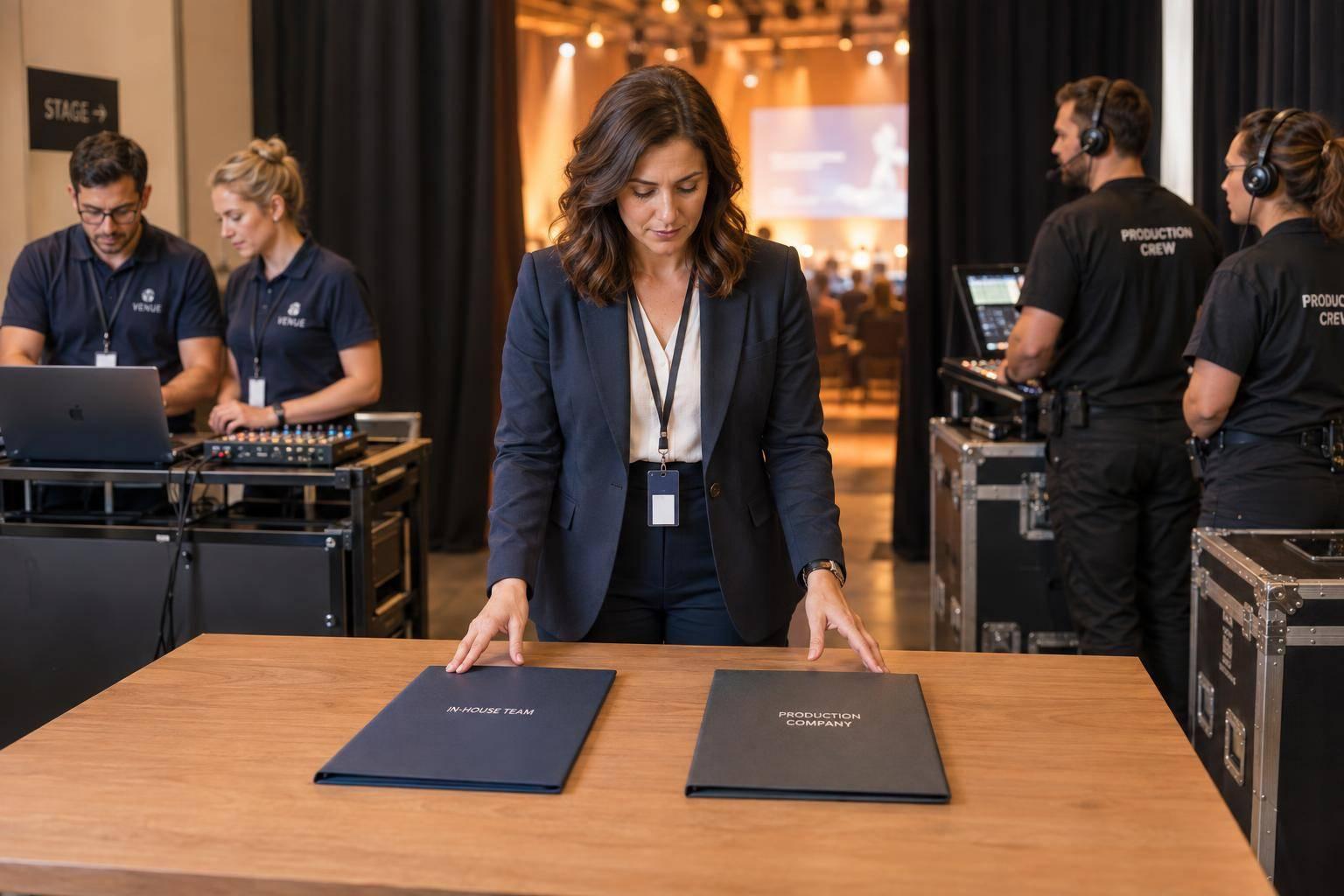
Each platform excels in specific areas. Choose based on your event goals, audience size, and technical needs, or choose a production company to manage the entire process.
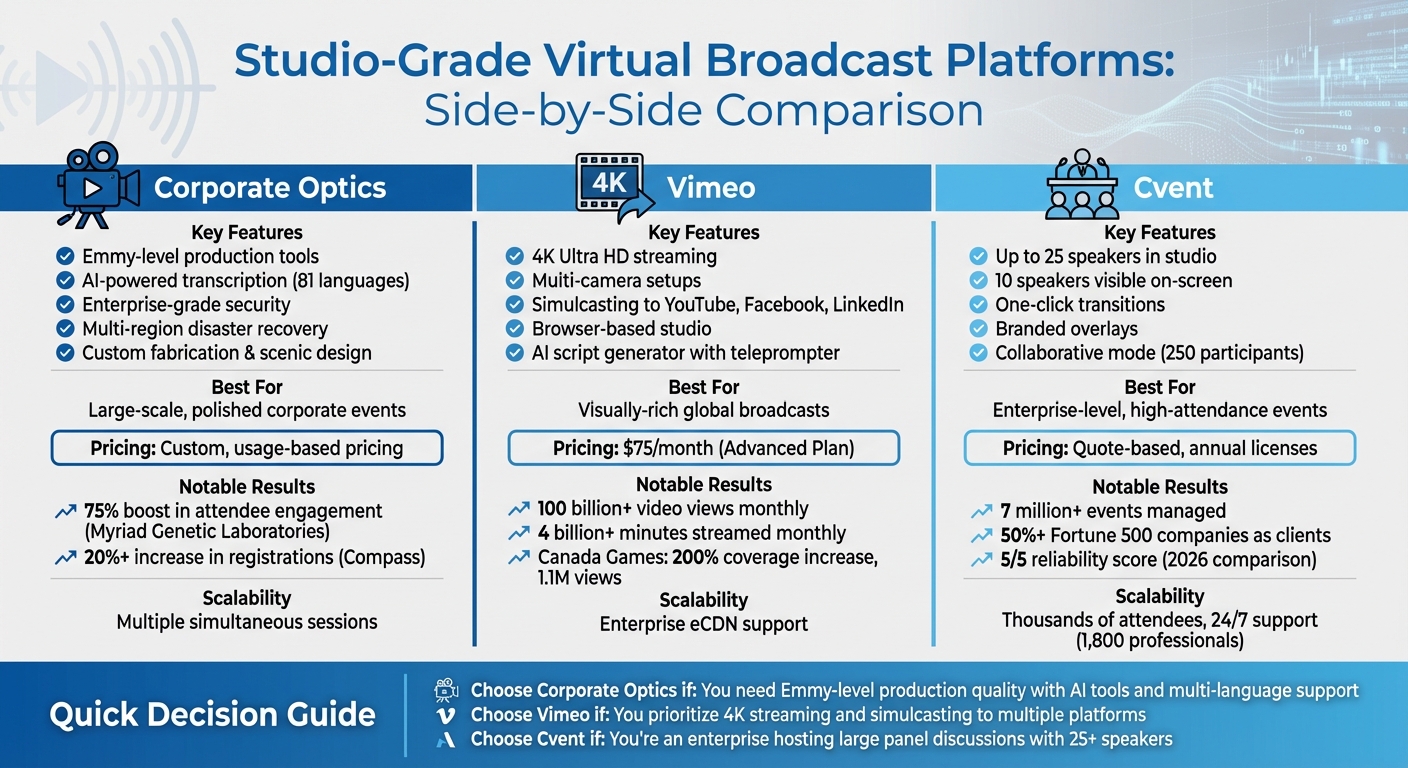
Studio-Grade Virtual Broadcast Platform Comparison: Corporate Optics vs Vimeo vs Cvent
1. Corporate Optics
Broadcast Production Quality
Corporate Optics brings Emmy Award-winning production standards to virtual broadcasts and webinars. By leveraging professional RTMPS streaming tools like OBS, Restream, and vMix, it enables speakers to manage everything - presentations, chat, Q&A, and polls - from a single, user-friendly interface. This ensures a polished and consistent visual experience for all corporate events.
The service also includes custom fabrication, scenic design, and intelligent lighting, transforming standard video calls into high-quality productions without requiring additional technical support. Features like instant screen layout changes and toggleable name cards make live presentations visually engaging and smooth, all while keeping the process simple for presenters.
In addition to delivering striking visuals, Corporate Optics prioritizes reliability for events that demand flawless execution.
Reliability and Scalability
When seamless performance is non-negotiable, Corporate Optics’ robust infrastructure ensures your events run without a hitch. Built on U.S.-based AWS and Google Cloud servers, the platform includes multi-region disaster recovery and frequent backups, guaranteeing uninterrupted service. It handles large attendee numbers effortlessly, supporting multiple simultaneous sessions for complex virtual conferences.
Security is a top priority, with data encryption both at rest and in transit, real-time threat detection, and annual penetration testing to meet enterprise security standards. For global audiences, the platform offers multi-language interfaces and AI-powered transcription in 81 languages.
Notable success stories include Myriad Genetic Laboratories, which saw a 75% boost in attendee engagement after adopting the platform, completing registration in just one day. Similarly, Compass reported a 20%+ increase in event registrations by utilizing real-time feedback surveys and integrated data collection.
Audience Engagement Tools
Corporate Optics doesn’t just focus on production quality - it actively engages audiences. Built-in tools like live chat, Q&A, and polling encourage real-time interaction during broadcasts. These features seamlessly integrate with CRM systems, aligning with the trend where nearly 80% of event organizers now connect their event management tools with CRM or marketing automation platforms.
Pricing and Service Tiers
Pricing for Corporate Optics is customized based on the event’s size and requirements. Costs include annual platform access fees, usage-based charges per event or attendee, potential streaming bandwidth overages, and optional add-ons like advanced analytics, API usage, and accessibility services such as ASL interpretation.
sbb-itb-ae35a94
2. Vendor B
Broadcast Production Quality
Vimeo brings 4K Ultra HD streaming to the table in encoder mode, complete with multi-camera capabilities, color correction, and professional audio mixing. This setup ensures visuals that go far beyond what standard conferencing tools can deliver.
Its browser-based studio allows hosts to manage graphics, lower thirds, and full-screen overlays - all without needing extra hardware. Features like an AI script generator paired with an integrated teleprompter help speakers stay on track during live events. For multi-speaker webinars, Vimeo offers customizable players and pre-designed layouts to simplify event management. Additionally, its simulcasting feature lets users stream simultaneously to platforms like YouTube, Facebook, LinkedIn, and custom RTMP destinations.
A great example of Vimeo’s impact is Canada Games, which managed over 20 live streams at once using the platform. This effort boosted their coverage hours by 200%, resulting in 1.1 million views and a staggering 30.7 million minutes watched. The initiative even opened up new revenue opportunities.
"Live streaming is absolutely critical for us to connect with families, fans, and communities... Vimeo has been an invaluable partner in helping us achieve our broadcast goals." - Kelly-Ann Paul, Canada Games
Reliability and Scalability
Vimeo isn’t just about high production value - it also delivers reliable performance for demanding broadcasts. The platform handles more than 100 billion video views and streams over 4 billion minutes of content every month. For critical events, the Enterprise plan offers backup failover streams and high-latency fail-safe streaming to prevent interruptions. Vimeo’s adaptive bitrate technology ensures smooth, high-resolution streams, while real-time monitoring keeps everything running seamlessly.
For large-scale audiences, Vimeo supports moderated and anonymous Q&A sessions and includes eCDN capabilities for enterprise needs. Security features like SSO (SAML), SCIM, and password protection provide added peace of mind across different service tiers.
Pricing and Service Tiers
Vimeo’s pricing is designed to suit various needs. The Advanced Plan is priced at $75 per month (billed annually), offering 10 seats, 7TB of storage, and essential webinar features with streaming up to 1080p HD. For users needing more, the Enterprise Plan provides custom pricing and includes 4K Ultra HD streaming, eCDN support, backup streams, and dedicated customer support. Vimeo also offers refunds within 14 days for annual memberships and within 3 days for monthly memberships.
3. Vendor C
Broadcast Production Quality
Cvent's Studio Broadcast mode is designed to deliver professional-grade, one-way broadcasts tailored for large audiences. This setup accommodates up to 25 speakers in the studio, with 10 visible on-screen at any given moment - perfect for panel discussions or multi-speaker webinars. The system operates with a 5–10 second delay, striking a balance between near-real-time engagement and high-quality broadcast standards. Features like one-click transitions and branded overlays simplify production, allowing teams to create polished presentations without needing advanced technical skills. For more interactive sessions, Cvent offers a Collaborative mode, enabling real-time audio and video for up to 250 participants. Additionally, the Simulive option lets users present pre-recorded content to audiences worldwide, ensuring flexibility for various event formats.
Reliability and Scalability
With over 7 million events managed and a client base that includes more than half of the Fortune 500, Cvent has proven its reliability. Its infrastructure is built to handle large-scale events like conferences, roadshows, and multi-location gatherings, managing thousands of attendees seamlessly. The platform is backed by dedicated security measures, privacy protocols, and a 24/7 customer success team of 1,800 professionals. Even under high-demand conditions, Cvent consistently delivers dependable performance. In a 2026 industry comparison, it earned a flawless 5/5 score for both scalability and reliability.
Pricing and Service Tiers
Cvent’s pricing structure reflects its focus on enterprise-level event solutions. The platform employs a quote-based pricing model that includes annual licenses and per-registrant fees. While this approach is ideal for larger enterprises hosting frequent, high-attendance events, it may not suit organizations with tighter budgets. Beyond webinar capabilities, Cvent offers advanced modules for tasks like venue sourcing and supplier management, further justifying its pricing for businesses seeking a comprehensive event management solution.
Advantages and Disadvantages
Each platform offers distinct benefits and trade-offs, making the choice highly dependent on your specific needs. Here's a breakdown of the key advantages and limitations for the platforms discussed.
ON24 is a standout for its detailed engagement analytics, including an Engagement Score that measures prospect interest. This makes it particularly effective for content-heavy, always-on webinar strategies. However, its pricing starts at $750 per webinar with a 20-event annual minimum, and licenses are restricted to single countries, which could mean extra costs for global teams. Some users have also noted that ON24 can be difficult to manage.
Zoom Webinars is built for scale, accommodating up to 50,000 attendees while requiring minimal training. It’s a cost-effective option, starting at around $67 per month, but it lacks advanced branding options and in-depth analytics. Another drawback is that poll results shared during live sessions aren’t included in the recordings, requiring manual edits afterward.
Microsoft Teams integrates effortlessly with the Microsoft 365 suite, offering features like "Together Mode" and "Presenter Mode" to improve visual delivery. At $12.50 per user per month, it’s a budget-friendly choice for organizations already using Microsoft 365. However, Teams caps webinars at 1,000 attendees and has limited polling features, which may hinder its use for external marketing events.
Goldcast is tailored for B2B marketers, featuring an AI-powered Content Lab that quickly converts webinar recordings into shareable clips and blog posts. Its flat-fee pricing allows unlimited registrations, and its automatic calendar invite feature has been shown to double attendee conversion rates. Nina Butler, Director of Events at Alyce, praises the platform:
"I sleep better at night knowing that our experiences are run on Goldcast - not only the platform but the team behind the platform that supports our success is next to none".
However, Goldcast’s focus on B2B use cases limits its flexibility for hybrid or in-person events.
Here’s a quick comparison:
| Vendor | Key Strength | Primary Limitation | Best Use Case |
|---|---|---|---|
| ON24 | Advanced engagement analytics with Engagement Score | High cost (starting at $750 per webinar) and regional restrictions | Content-driven programs needing detailed lead data |
| Zoom Webinars | Scales up to 50,000 attendees with ease | Limited branding and basic analytics | Large events focused on simplicity |
| Microsoft Teams | Seamless Microsoft 365 integration at $12.50/user/month | Capped at 1,000 attendees and limited polling | Internal meetings or Microsoft-based events |
| Goldcast | AI tools for content repurposing and improved attendee conversion | B2B-focused, less adaptable for hybrid/in-person events | Marketing teams aiming to maximize video ROI |
Choosing the right platform comes down to aligning its capabilities with the goals and requirements of your events. Whether it’s detailed analytics, scalability, seamless integration, or AI-driven content tools, each platform has its strengths and weaknesses to consider.
Conclusion
Choose a platform that matches your organization's needs for professional-grade broadcasts. Corporate Optics provides reliable performance for events of all sizes, from large-scale broadcasts with thousands of attendees to smaller, focused webinars. Its dependability ensures success, whether you're hosting high-profile investor updates or routine team presentations.
If your focus is on lead generation and repurposing content, Corporate Optics' AI tools can turn webinar recordings into shareable clips, blog posts, and social media content. This approach helps you get the most out of every event while keeping costs in check - no hidden per-attendee fees to worry about.
Budget and event frequency are also key considerations. Corporate Optics offers flexible pricing that adjusts to your team size and event schedule. Whether you're hosting occasional webinars or managing a packed calendar of corporate broadcasts, the platform's production tools - like one-click transitions, pre-planned segments, and custom branding - deliver professional polish without requiring advanced technical skills.
The webinar market is growing fast, projected to hit $4.79 billion by 2030. Plus, 76% of marketers say custom-branded webinars help them reach more leads. Corporate Optics positions your organization to make the most of this trend with studio-quality production that enhances every broadcast.
Before committing, try Corporate Optics with internal test events to see how seamlessly it integrates with your CRM and marketing tools. Confirm that live support is available on event days - not just via email - so your team gets the help they need when it counts. With its focus on professional-grade production and continuous updates, Corporate Optics ensures your virtual events deliver the impact and results your organization expects.
FAQs
What equipment do I need for a studio-grade webinar?
To deliver a webinar with studio-level quality, you’ll need top-notch gear to ensure professional video and audio production. Here's what you'll want to have on hand:
- High-definition cameras: Opt for DSLR or broadcast-grade cameras to capture crisp, clear visuals.
- Microphones: Choose lavalier, tabletop, or boom mics to ensure your audio is crystal clear.
- Production tools: Use video switchers, encoders, and audio mixers to manage and enhance your broadcast seamlessly.
- Reliable cables: HDMI, Ethernet, or SDI cables are essential for stable and dependable connections.
- Monitoring displays: Real-time monitoring screens help you keep everything on track during the webinar.
- Lighting and backdrops: Proper lighting, green screens, and control systems can give your presentation a polished and professional look.
With this equipment, you’ll be set to create a webinar experience that stands out.
How do I estimate costs for my event size and frequency?
To get a handle on costs, start by figuring out how big your audience will be and how often you plan to host events. Virtual event platforms usually have pricing tiers that adjust based on the size and frequency of your events. For larger or recurring events, many platforms offer custom quotes tailored to your needs. Don't forget to factor in extras like analytics tools or branding options, as these can influence the overall price. It’s a good idea to revisit your options regularly to keep your cost estimates aligned with your event goals.
Can it integrate with my CRM and marketing automation?
Certain vendors offer integrations with CRM and marketing automation platforms, making it easier to manage virtual events and nurture leads effectively. These tools work together to create a smoother workflow and enhance audience interaction, both during the event and in follow-up efforts.
Related Blog Posts



Streamline your workflow, achieve more

Lorem ipsum dolor sit amet, consectetur adipiscing elit. Maecenas ac velit pellentesque, feugiat justo sed, aliquet felis.



Lorem ipsum dolor sit amet, consectetur adipiscing elit. Maecenas ac velit pellentesque, feugiat justo sed, aliquet felis.