What Av And Broadcast Requirements Does A Shareholder Meeting Need To Meet? (Compliance, Voting, And Webcast Checklist)

Chief Executive Officer
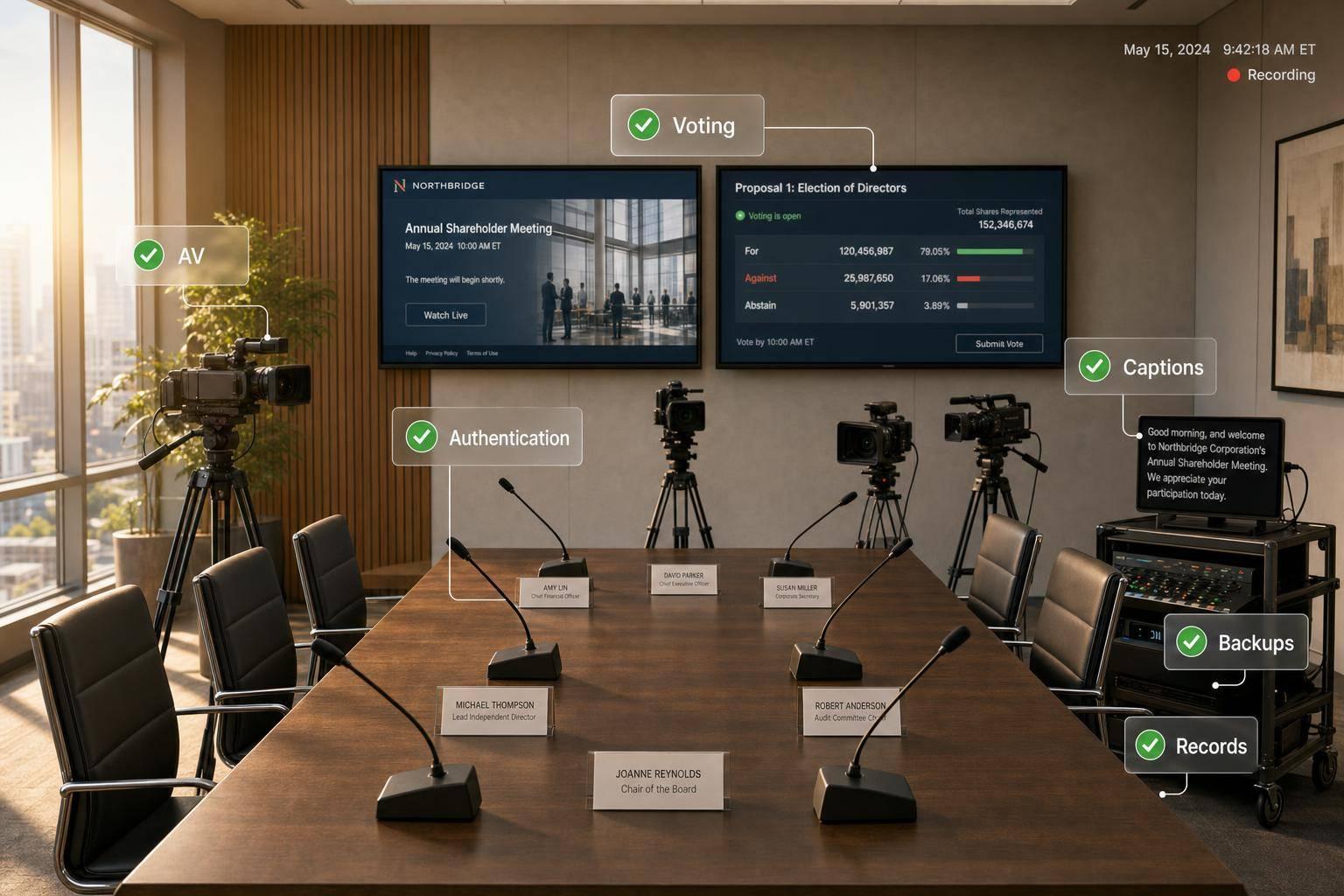
A shareholder meeting needs more than a livestream. You need a setup that lets people hear the meeting, join the right way, vote during the allowed window, and create a clean record if anyone later checks what happened.
If I had to boil it down, I’d focus on 4 things:
- Room AV: clear microphones, a separate program audio feed, recording, and backup gear
- Webcast delivery: tested access links, stable streaming, mobile/browser support, captions, and support contacts
- Voting controls: identity checks, proxy handling, live ballot rules, time-stamped confirmations, and inspector review
- Failure planning: backup internet, backup encoder, manual voting steps, incident logs, and retained files
A few rules drive the setup. For example, meeting notices must state the date, time, and place, and if remote access is used, they also need to explain how stockholders and proxy holders can join and vote. And under the SEC notice-only model, companies generally send the notice at least 40 days before the meeting.
So before you buy gear or pick a platform, I’d make sure the meeting format is locked down:
- In-person
- Hybrid meeting planning
- Virtual-only
- Audio-only
- Video webcast
That one decision affects AV gear, webcast workflow, voting method, support staffing, and backup steps.
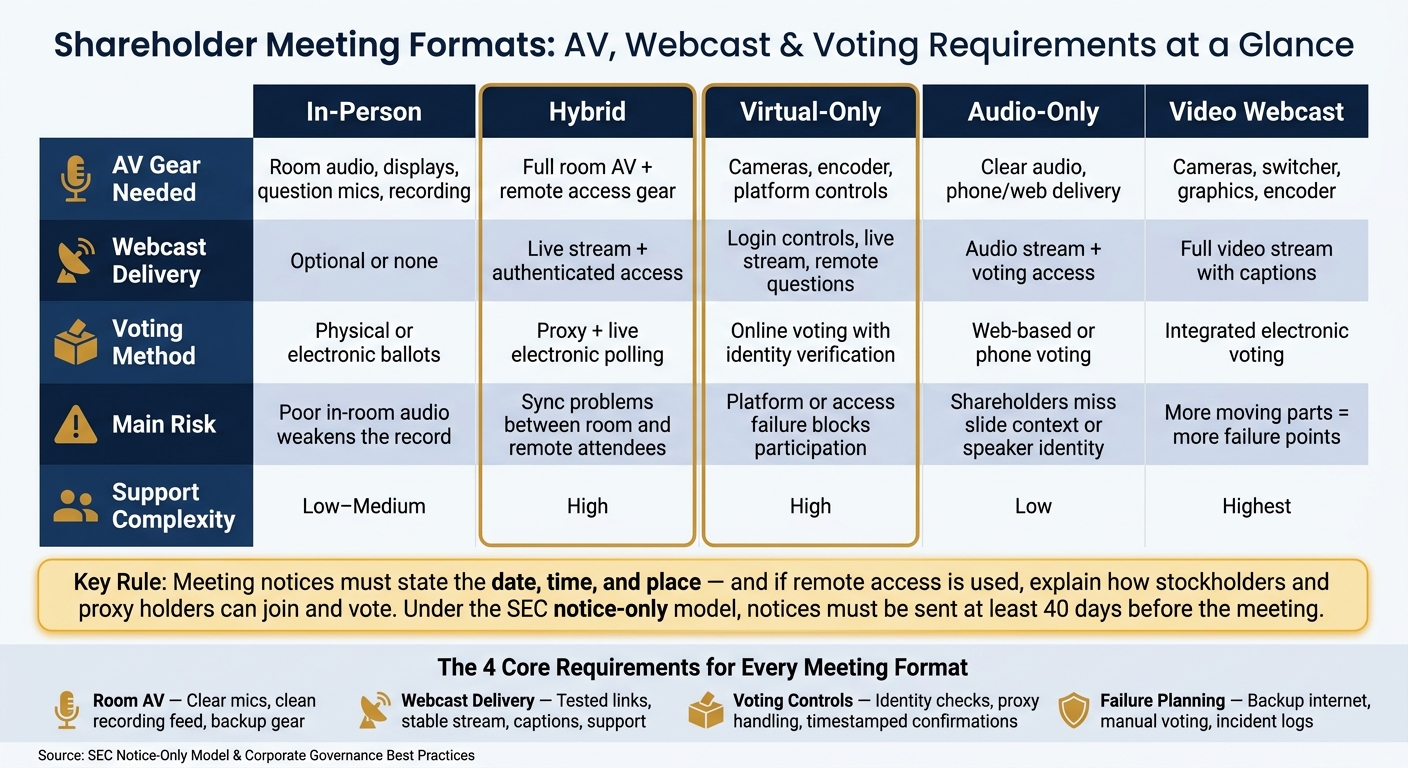
Shareholder Meeting Formats: AV, Webcast & Voting Requirements Compared
Livestreaming Your Annual Shareholders Meeting
sbb-itb-ae35a94
Quick comparison
| Meeting format | What you need most | Main risk |
|---|---|---|
| In-person | Room audio, displays, question mics, vote process, recording | Poor in-room audio can weaken the record |
| Hybrid | Room AV + remote access + live voting + support | Sync problems between room and remote attendees |
| Virtual-only | Login controls, live stream, remote questions, online voting | Access or platform failure blocks participation |
| Audio-only | Clear audio, spoken instructions, voting access, transcript/captions | People may miss slide context or speaker identity |
| Video webcast | Cameras, switcher, graphics, encoder, captions, bandwidth | More moving parts means more points of failure |
Bottom line: if your meeting notice, AV path, webcast access, voting workflow, and backup plan do not match each other, you can run into delays, confusion, or a vote record problem. The rest of the article walks through the checklist I’d use before meeting day.
1. In-room AV requirements for official proceedings
Once the meeting format and notice disclosures are locked in, audio becomes the first technical checkpoint. The room audio path has to carry the official proceedings clearly for three audiences at once: people in the room, the recording, and the webcast. If speech is muffled, dropped, or missing, the meeting record isn't complete.
Audio systems, microphones, and clean recording feeds
At a minimum, the room should have dedicated microphones for the chair, corporate secretary, podium speakers, and shareholder questions.
Gooseneck microphones are a solid fit for the chair and secretary because they stay in place and avoid awkward handoffs during formal proceedings. A podium microphone covers prepared remarks. A floor or roving microphone picks up shareholder questions.
All audio should run through a digital signal processor (DSP) with gain control, feedback suppression, noise reduction, and, when needed, acoustic echo cancellation. Speaker placement matters more than people think. If loudspeakers fire straight into open microphones, you can end up with feedback that disrupts the room and muddies the recording.
Just as important, keep the room mix separate from the recorder and webcast encoder. The room mix is for the venue. The clean program feed is for the record and the webcast. If someone bumps up room volume, that should not change recorded levels. When possible, record a multitrack backup that keeps the chair, secretary, shareholder questions, and presentation audio on separate channels.
For remote participants, use a mix-minus path, where remote participants hear all meeting audio except their own return audio. Without it, people hear their own voice bouncing back a second later, and the whole exchange can go sideways fast. Test the full remote audio path before the meeting, including speaking, muting, and reconnecting after a dropped call.
Interpretation and accessibility support in the room
If the meeting includes simultaneous or consecutive interpretation, each interpreter needs a dedicated microphone, a console with isolated language channels, headphones for monitoring the floor, and a return feed so questions and motions come through clearly. Every language channel should use the same label across the console, webcast interface, and attendee instructions. Interpretation has to cover formal business, questions, votes, and technical announcements.
For captioning, send the CART provider the clean program feed directly, not the room loudspeaker output. The U.S. Department of Justice describes CART as similar to court reporting, where a transcriber types spoken words into a computer that projects them onto a screen. Remote CART providers also need a steady audio feed and a separate data connection to send captions back to the meeting or webcast. And here's the catch: captions shown on a screen in the room do not help webcast viewers unless those captions also appear in the player.
Send captioners and interpreters the agenda, speaker list, expected motions, resolutions, and any specialized terms in advance. That prep work improves accuracy during formal proceedings.
Pre-meeting room test for audio quality and backup paths
Run a full-room rehearsal before doors open, with live microphones, presentation files, interpretation channels, and the encoder all active. Don't just listen from the front row. Check intelligibility at the back and along the sides of the room too.
Rehearse the formal moments on purpose:
- The chair recognizing a shareholder
- A motion being made or a question being raised
- The secretary reading a resolution
- A vote being called and closed
- A remote participant joining and speaking
After the rehearsal, record a short sample and listen back for clipping, low question levels, HVAC noise, and echo.
Backup procedures should be set before anyone walks in. If the chair's main microphone fails, a wired backup should be ready at that same position right away. Keep spare batteries, cables, and a second wireless unit on site. Also keep an independent communication line, such as a hardwired phone, in case the internet or meeting platform fails.
| In-room checklist item | Verification question |
|---|---|
| Chair and secretary microphones | Can both be heard clearly in the room, webcast, and recording? |
| Podium microphone | Is it gain-staged and does it have a tested backup? |
| Shareholder question microphones | Can every question be captured with named speaker and without audience noise? |
| Clean program feed | Is it routed independently from the room mix with its own level control? |
| Mix-minus path | Have you tested it with a live remote participant before the meeting? |
| Interpretation channels | Can interpreters hear the floor and can remote viewers select their language? |
| CART/captioning feed | Do captions appear in both the room display and the webcast player? |
| Backup microphones | Are they tested from actual speaking positions, not left in the box? |
Once room audio and backup paths are verified, the next checkpoint is how that feed is displayed, switched, encoded, and delivered.
2. Display, webcast, and broadcast delivery checklist
Once room audio checks out, the next job is visual delivery: screens, cameras, slides, and the webcast feed.
In-room displays and presentation control
Set the main display so people in the back row can read it without strain. That means sizing the screen and setting projector throw distance based on room depth and sight lines.
Confidence monitors and presenter view help a lot here. They let the chair, directors, and presenters follow slides, timing, and notes without turning away from the room. If shareholders can ask questions, a visible timer or speaking-order display makes the flow much easier to manage.
It also helps to put one operator in charge of slides, video, lower-thirds, and poll cues. Keep backup slides and videos on a redundant laptop, and make sure the switchover path has already been tested.
After that, attention shifts to the remote feed: how it’s switched, encoded, and sent to shareholders.
Cameras, switching, graphics, encoding, and platform controls
Camera placement should cover the chair, the board table, the podium, presenters, and any in-room shareholder microphone or question area. In a hybrid meeting, if a remote participant speaks, switch that video into the program feed so shareholders can tell who is speaking during formal proceedings.
Capture slides through a dedicated output or capture device - not a camera aimed at a screen. That keeps slide text readable for remote viewers and gives you a cleaner archive. Build a timed run-of-show that ties each agenda item to its presentation file, camera shot, graphic, poll or voting instruction, and webcast cue.
Speaker ID graphics should show each person’s name and role in a clear way, without covering slides or captions. For encoder settings, don’t lean on platform marketing specs alone. Check resolution, frame rate, and bitrate behavior with an end-to-end test.
The webcast platform also needs to handle authenticated shareholder entry, browser and mobile access, question submission, and voting integration. Test it on current desktop browsers, plus iOS and Android devices, before the meeting opens.
Audio-only, video, and hybrid webcast formats compared
Each format changes how the meeting handles access, participation, and voting requirements.
| Format | Participation capability | Production complexity | Bandwidth exposure | Accessibility requirements | Operational risk |
|---|---|---|---|---|---|
| Audio-only | Listening, spoken questions, web-based voting; limited visual context for slides and speaker identity | Lowest; requires reliable room audio, phone or web delivery, moderation, and voting integration | Lower than video, though peak demand still requires capacity planning | Captions or a live transcript may still be needed; all visual content must be read aloud or provided in accessible documents | Higher risk that shareholders miss slide changes or voting instructions unless the chair describes each item explicitly |
| Full video | Visual access to chair, board, presenters, slides, graphics, captions, questions, and voting instructions | Highest; requires cameras, lighting, switching, graphics, encoding, monitoring, and production staffing | Highest; requires testing across varied connection speeds and a functional fallback | Requires captions, accessible slides, readable graphics, and keyboard- and mobile-friendly controls | More failure points: camera, switcher, encoder, platform, captions, and bandwidth |
| Hybrid | Combines in-person participation with remote audio or video, online questions, and electronic voting | High; requires room AV, webcast production, remote-speaker management, authentication, and coordination between physical and virtual moderators | Medium to high, depending on whether remote attendees receive audio-only or video | Must serve both room and remote participants, including assistive listening, captions, accessible digital materials, and equal access to proceedings | Highest coordination risk because room sound, remote contributions, displays, voting, and speaker recognition must stay synchronized |
The SEC has stated that strong voting-related disclosures still matter for virtual and hybrid meetings, and that shareholders should get clear instructions for remote access, participation, and voting.
Once delivery is stable, the next requirement is authenticated access, vote capture, and auditability.
3. Voting, Identity Verification, and Audit Controls
Next is governance: confirming voter identity, ballot authority, and the audit trail. These controls help keep the meeting legally valid, stop duplicate voting, and protect a count you can defend. They sit between webcast delivery and final recordkeeping.
Shareholder Authentication and Voting Eligibility Checks
Think of authentication as a governance control, not just a login screen. Before anyone can vote, confirm record-date status, voting power, eligibility, and participation rights. Use a unique control number or secure credential tied to the shareholder record. Add multifactor authentication when it fits. And block duplicate sessions or ballots unless the governing documents clearly allow a replacement ballot.
Registered holders vote through the company channel. Beneficial owners usually vote through a broker, bank, or other intermediary, and they may need a legal proxy to vote directly. Your platform should also separate view-only access from voting authority. If those permission levels get mixed together, confusion follows fast.
Once access is confirmed, the next job is managing how proxies and live ballots move into the count.
Voting Technology for Proxy Integration and Live Polls
Import advance proxies cleanly, map them to the right account, and keep them as the starting vote record. The live system should accept replacement ballots only while polls are open and only when governing documents say that is allowed. In those cases, only the final valid submission should count. This matters most when remote participants cast live ballots in hybrid and virtual meetings.
When the chair opens a poll, the system should apply the right voting rules, support all legally valid choices, including against and abstain, and show the current ballot choices and closing time. Once the poll closes, the inspector of elections - not the platform administrator - should control or independently verify the final tabulation and certification. After submission, the system should return a confirmation that includes:
- A transaction identifier
- Proposal scope
- Timestamp
A click confirmation by itself is not enough.
Voting controls don't mean much if no one can check what happened later. Every action needs to be logged and open to review.
Logging Requirements and Voting Workflow Comparison
Log every material event with a synchronized timestamp, transaction ID, source, affected account or proposal, action, and result - including credential issuance, login, ballot submission, vote changes, poll open/close, errors, overrides, and final tabulation. Preserve the original proxy or voting instruction, the final counted ballot, reconciliation reports, exception logs, inspector determinations, and certified totals.
The inspector should have independent access to entitlements, ballots, rejected submissions, quorum data, and the full audit log. The corporate secretary should receive the script, voting rules, escalation contacts, exception report, certification package, and any deviations. Administrator privileges should also be split so one operator cannot both change voting settings and certify the final count.
The right workflow depends on the meeting format, governing documents, and how top companies for annual shareholder meetings manage participation.
| Workflow | Control requirements | Risks | Audit trail |
|---|---|---|---|
| Proxy-only voting | Validate proxy authority, record date, and duplicate or superseding instructions. | Stale credentials, duplicate submissions, intermediary errors, unclear broker non-votes. | Strong when proxy files, timestamps, revocations, and certification are retained. |
| Live electronic polling | Authenticate at entry, confirm entitlement, control poll open/close, issue confirmation. | Credential sharing, connectivity loss, late votes, weak separation of attendance and voting authority. | Strong only if the platform preserves ballot status, poll events, and exception handling. |
| Integrated proxy-plus-polling | Import advance proxies, authenticate live voters, reconcile holdings, apply replacement-vote rules, give inspector independent review. | Data-integration errors, duplicate voting, legal-proxy gaps, inconsistent intermediary treatment. | Best overall when one controlled ledger links credentials, proxies, live ballots, changes, and certified results. |
4. Recording, Redundancy, Incident Response, and Final Planning Checklist
Once access is open and voting is live, the work isn't done. The meeting still needs a complete record and a broadcast setup you can recover if something fails.
Recording, Archiving, and Retention Controls
Record the clean program feed. Then record a separate backup that includes room audio, presentation output, and the webcast feed. You should retain:
- Final slide deck
- Caption files and transcript
- Attendance or login records
- Shareholder questions
- Vote results, rejected or changed ballots
- Inspector of elections certification
- Tabulator reconciliation reports
- Technical incident logs
Use one file naming pattern across everything. For example, 2026-09-30_AnnualMeeting_Program.mp4. Time stamps should show the applicable U.S. time zone, and UTC should be included in the metadata. Store the master recording and governance records in encrypted, access-controlled storage with role-based permissions and a tamper-evident audit log. Set retention based on legal, records, privacy, security, and litigation-hold requirements, not the platform's default replay window.
Redundancy, Failover, and Incident-Response Procedures
Every critical function needs a backup path that has already been tested. That includes dual internet connections from separate providers, a secondary encoder with the correct stream key and graphics, local venue recording that does not depend on the webcast platform, backup wired microphones and cables, alternate presentation playback, battery-backed power for critical gear, and a separate staff communications channel such as radios or a dedicated phone bridge if the main collaboration tool goes down.
Before the meeting, assign one person to each fallback and document the expected switchover time. If something breaks, people shouldn't be guessing. They should know who owns the fix and how long the switch should take.
You also need a written manual voting procedure approved by counsel, the corporate secretary, and the inspector of elections. That procedure should let the team authenticate participants, accept ballots, and reconcile totals if the main electronic voting platform becomes unavailable. The table below lays out the core responses your team should have ready:
| Incident | Immediate action | Governance follow-up |
|---|---|---|
| Webcast interruption | Switch to backup encoder or network; display a holding message | Log start and end times; determine if any voting window needs extension |
| Audio loss | Switch to a spare microphone or backup audio path; pause proceedings if remote participants cannot hear | Mark the affected agenda segment; verify the recording is intelligible |
| Failed authentication | Route users to staffed support; do not bypass entitlement controls | Follow approved manual verification; preserve identity and access records |
| Voting unavailable | Pause or extend the voting window; activate the manual voting method | Reconcile all ballots with the inspector of elections and counsel |
| Caption failure | Activate the backup captioner or feed; provide a transcript alternative if available | Correct replay captions; document accessibility remediation |
| Delayed tabulation | Announce results are pending; keep source records unchanged | Preserve raw vote files; release results only after authorized certification |
Conclusion: Pre-meeting Verification Checklist
Before meeting day, verify every critical system end to end and make sure each fallback has a named owner. After backup paths are set, use this pre-meeting verification list:
- Legal approval of the meeting format confirmed
- Room audio tested with clean recording feeds verified
- Webcast access and platform permissions confirmed
- Shareholder authentication entry flows tested
- Proxy and live-poll configuration validated
- Primary and backup internet and encoding tested
- Caption and transcript workflows verified
- Secure storage instructions documented
- Escalation contacts named for every failure scenario
- Manual voting procedure approved and ready
Legal and governance responsibility for compliance, vote validity, records retention, and shareholder communications stays with the company.
FAQs
Who is responsible for vote certification?
Vote certification usually falls to the inspector of elections.
In practice, companies often lean on transfer agents or voting platform providers to handle the nuts and bolts of the process. That can include secure identity checks, vote counting, and audit-ready records that help support compliance and the integrity of the vote if it faces legal review.
What if the webcast fails during voting?
If a webcast fails during voting, the top priority is transparency and governance integrity. Shareholders need to know what happened, how voting will continue, and exactly what they should do next if they lose access.
Your technical team should follow pre-set backup steps, such as redundant network paths or secondary streaming encoders, to cut downtime as much as possible. If the meeting has to pause, the chair should speak directly to attendees so everyone stays informed and the process remains in line with meeting rules.
Do virtual meetings need captions and transcripts?
Yes. Virtual shareholder meetings should include live captions and transcripts to support access and compliance.
Live captions help shareholders with hearing impairments follow the meeting as it happens. Transcripts also give companies an important record after the meeting ends.
Automatic transcription can help, but it needs careful review for accuracy. Even small errors can cause confusion, especially during votes, Q&A sessions, or legal discussions.
Related Blog Posts



Streamline your workflow, achieve more

Lorem ipsum dolor sit amet, consectetur adipiscing elit. Maecenas ac velit pellentesque, feugiat justo sed, aliquet felis.



Lorem ipsum dolor sit amet, consectetur adipiscing elit. Maecenas ac velit pellentesque, feugiat justo sed, aliquet felis.