IMAG Explained: Why Large Corporate Meetings Need Live Camera Magnification.

Chief Executive Officer
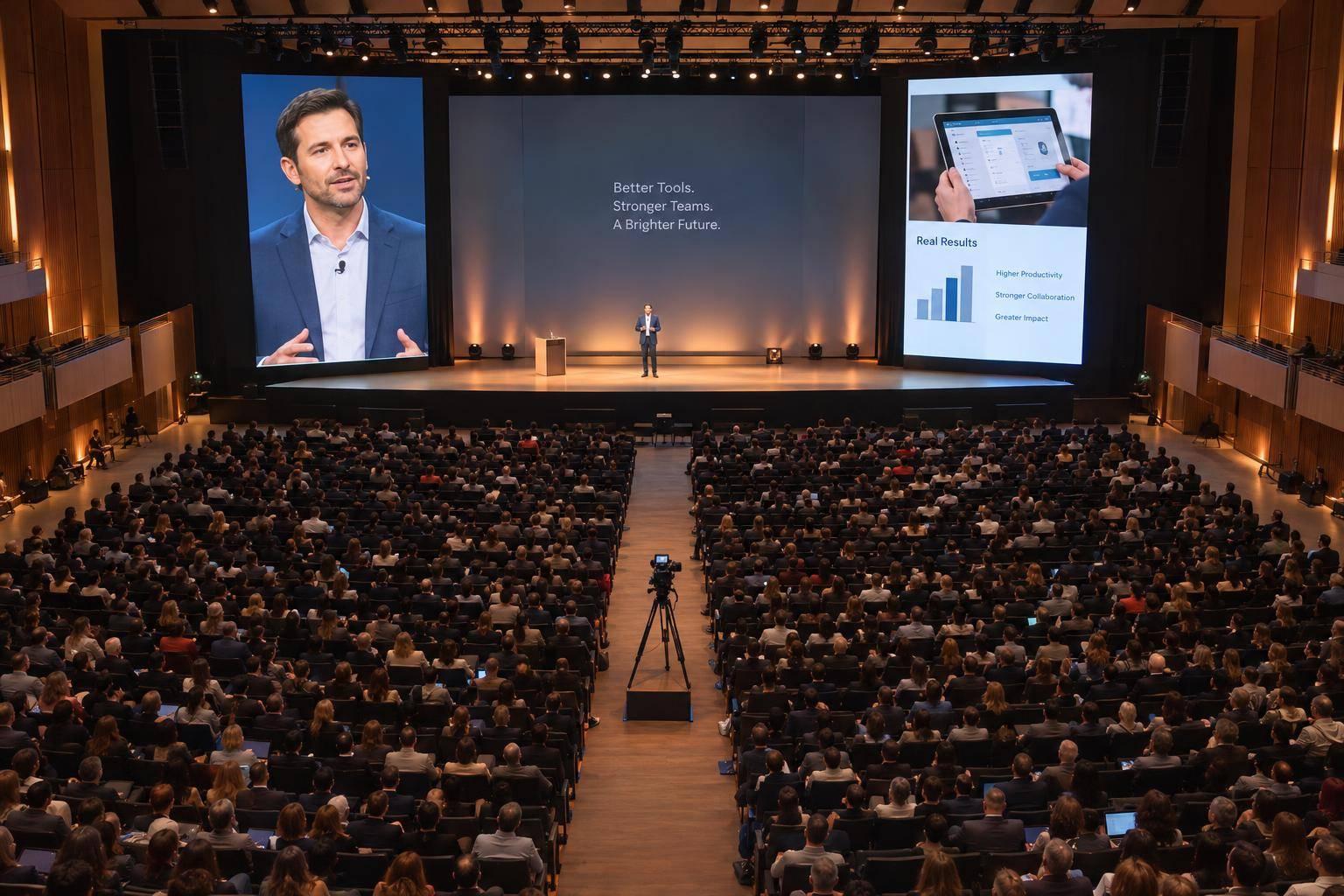
If attendees can’t see a speaker’s face or a product detail, IMAG can help. Short for image magnification, IMAG puts live camera views on in-room screens. This is a core component when you design AV production for corporate events of this scale. Start by checking the back row, side seats, and blocked views - not just counting attendees.
A workable plan covers:
- Camera shots: Speaker close-ups, panel exchanges, and demo details.
- Screens and lighting: Clear views of faces and actions, with readable slides and no distracting delay.
- Budget and rehearsal: Crew, equipment, setup, and backup plans tested to avoid common mistakes in corporate AV production before doors open.
IMAG serves the room; recording and livestreaming need separate plans, even when they share cameras. Give the AV team room measurements in feet, seating plans, and the agenda before approving the setup.
When Your Meeting Needs IMAG
Base the decision on whether people in the farthest seats can clearly see expressions and key actions. Room shape, seating, and program details matter more than attendance alone.
Check Viewing Distance, Seating, and Sightlines
On a scaled floor plan, mark the distance to the farthest seat in feet, stage height, and proposed screen locations. Include banquet tables, side sections, tiered areas, columns, and scenic pieces.
Check rear corners and sharp side angles separately. A screen that works for the back row may not work for side seating. Take photos at seated eye level, including views blocked by centerpieces or other guests.
Ask meeting production companies whether the screen image is large enough for attendees in the worst seats to read faces and small actions without strain. Following a facial expression and seeing a small product detail call for different image sizes. AVIXA’s display-image-size guidance can help with this assessment. Use the findings to build a shot plan for each session type.
Plan Coverage for Keynotes, Panels, and Demonstrations
Once the room layout shows a need for IMAG, match camera coverage to the agenda.
For keynotes, plan a steady speaker close-up. Keep slides readable on separate screens or in a planned split layout. Confirm whether the presenter will stay at a lectern or move across the stage.
For panels, follow the active speaker, use two-shots for exchanges, and cut to reactions only when they matter. Clear lower-thirds help attendees identify executives. Include awards and recognition in the coverage plan, too. Specify shots of the presenter, recipient, and group in the run of show.
Product demonstrations need a close-up or overhead camera to show controls, hand movements, and small parts. Test reflective surfaces and moving parts before the event. For software demos, use a direct computer feed rather than filming a laptop or screen.
sbb-itb-ae35a94
How the IMAG System Works
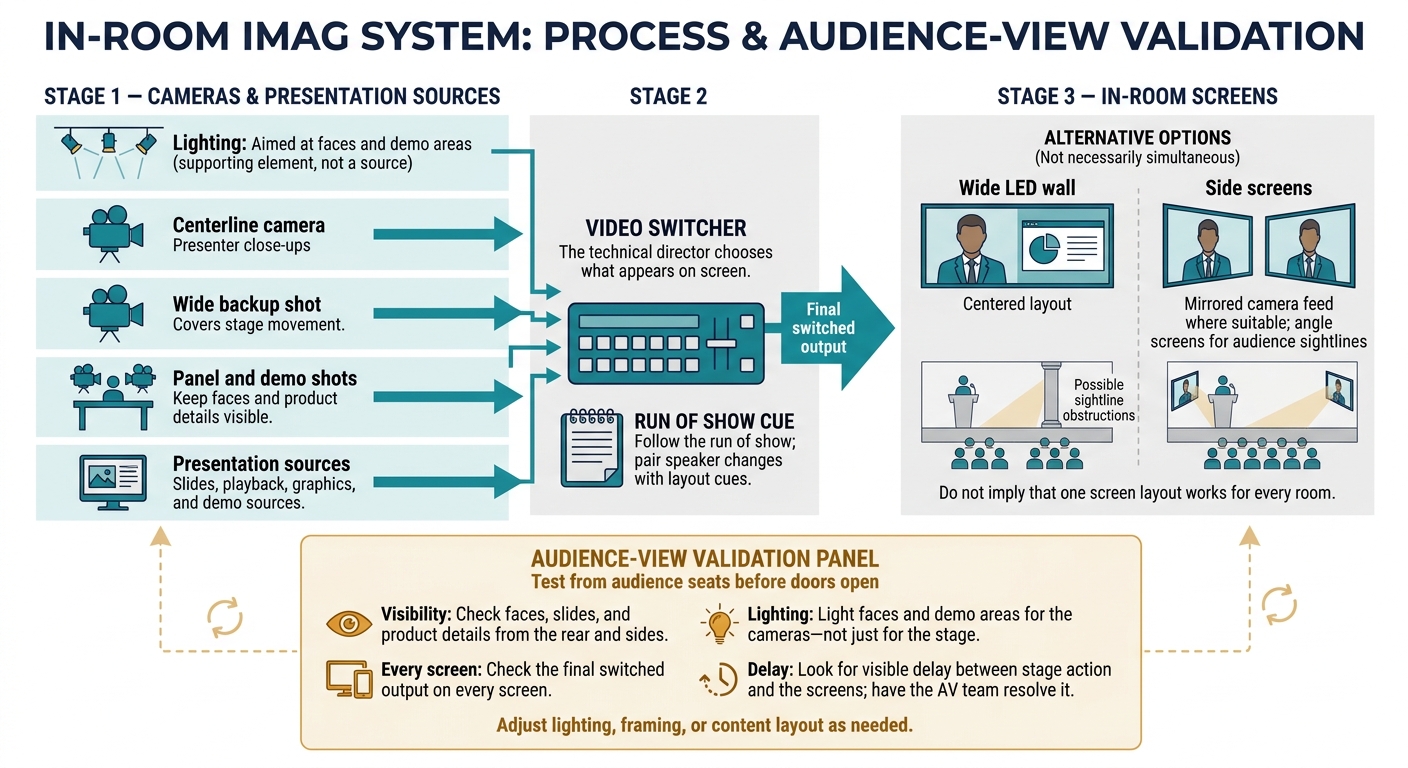
How IMAG Works: From Stage to Screen
Once the audience’s needs are clear, match the camera plan, screen layout, and lighting so every seat has a usable view.
Camera feeds and presentation sources pass through a video switcher, which lets the technical director choose what appears on screen. Camera angles, lighting, and screen placement need to work together so attendees farther from the stage can see speakers, expressions, and demonstrations in real time.
Camera Placement and Framing
Choose camera positions and lenses based on the distance to the stage and the shots needed for keynotes, panels, and demonstrations. Use a centerline camera for presenter close-ups and a wide backup shot to cover stage movement. For seated panels and tabletop demos, frame shots so faces and product details stay visible.
Live Switching and Screen Placement
The technical director follows the run of show, switching among cameras, slides, playback, graphics, and demo sources. Pair speaker changes with layout cues so operators know what to show and when.
Angle side screens so attendees can see around columns, scenic elements, and other guests while keeping the stage in view. Use a centered layout on a wide LED wall, or mirror the camera feed across side screens if that suits the room better. Once the screens are in place, check the final switched output on every screen from audience seats.
Lighting and Camera-to-Screen Delay
With the sources and screen layout set, check what the audience will actually see.
Light faces and demo areas for the cameras - not just for the stage. Test the actual show sources from audience seats, checking that faces, slides, and product details are clear from the rear and sides. Look for visible delay between stage action and the screens, and have the AV team resolve it. Adjust lighting, framing, or content layout as needed before doors open.
Plan IMAG With Your AV Production Team
Once the room, camera, and screen plans are clear, put them into a production brief. Document viewing needs and room measurements before approving equipment or layouts. Your AV team can then match AV design, lighting, staging, speaker support, and backup plans to those needs. The goal: give every seat a clear view of faces, actions, and details.
Use a Room and Program Decision Table
Match room conditions to the shots and screen layout your program needs. This table helps you decide whether to use IMAG and how much coverage to plan. Test its recommendations from the seats with the poorest views.
| Room conditions | Program requirements | Sightline risks | IMAG recommendation |
|---|---|---|---|
| Compact room with short viewing distances | Single-speaker program | Most attendees have an unobstructed view | IMAG may be unnecessary; check the back row and side seats |
| Deep ballroom with several hundred seats | Keynote, slides, and audience interaction | Faces and gestures are difficult to distinguish from the rear | Evaluate speaker IMAG; keep slides on a separate feed |
| Wide room with columns or extreme side angles | Executive panel | Some attendees have blocked or sharply angled views | Plan multiple camera angles and more screen positions |
| Any room where small details matter | Product demonstration | Hands or product features are too small to see directly | Plan close-ups and readable screen feeds |
Prepare Your Production Brief and Budget
Send floor plans, room dimensions, seating layout, stage size, ceiling height, and the nearest and farthest viewing distances in feet. Explain what attendees need to see: facial expressions, slides, or small product features. Include the schedule, presentation sources, presenter movement, audience participation, and moments that need specific shots. Ask the team to document viewable image height and viewer positions, not just screen diagonal.
Request a plan for camera positions, lens ranges, signal transport, switcher inputs and outputs, and screen feeds. Ask for a quote in U.S. dollars that separates cameras, crew, screens, lighting, setup and strike, rehearsal time, venue fees, and backup provisions. IMAG costs go beyond camera rental, so confirm which labor and contingency equipment the price includes.
Rehearse the Program and Test Backup Plans
Reserve a full rehearsal with presenters, final files, and demo objects. Check the audience view first, starting with the worst seats. Test framing, movement, detail visibility, switching cues, lighting states, camera exposure, and audio-video timing. Check every planned screen layout, including separate feeds for slides and IMAG.
Practice what happens when equipment fails. For a camera failure, switch to a second camera or a safe wide shot. For a signal-path failure, use a redundant route or backup input. For a display failure, direct attention to another screen or continue with the remaining displays. Assign who approves each fallback and spell out how the program continues without IMAG. Keep those decisions tied to the show flow from rehearsal through doors open.
Conclusion: Let Audience Visibility Guide Your IMAG Plan
Let sightlines - not attendance - determine whether you need IMAG. If people in the worst seats can’t clearly see faces or details, IMAG is the fix.
Make that final check during rehearsal. Confirm the IMAG scope and check the view from the worst seats before doors open. Treat IMAG, recording, and livestreaming as separate systems, even when they share cameras.
Once you’ve checked the view, finalize the plan with one of the top audio-visual production companies. Share your room details with Corporate Optics before the room layout locks in camera positions.
FAQs
How can I prioritize IMAG needs on a tight budget?
Put readability, audio, reliable technical support, and a large enough display ahead of visual extras. Projection often costs less when lighting is tightly controlled. LED may be needed for bright rooms or presentations that rely heavily on video.
Bring your AV partner in early to negotiate venue-specific costs, including power and rigging. Ask for itemized quotes in U.S. dollars ($) so you can cut items you don’t need, and set aside a 10% to 30% contingency fund.
How early should I involve my AV team?
Bring your AV production partner in early - ideally before you sign the venue contract. Involving them in venue selection and agenda planning gives them time to check ceiling height, room acoustics, and rigging limits. These checks help you avoid last-minute problems and stay within budget.
Plan for these lead times: 12 months or more for large-scale events, 3 to 6 months for conferences or executive summits, and 6 to 10 weeks for smaller meetings.
Can IMAG and livestreaming share cameras?
Yes, IMAG and livestreaming can use the same cameras, but each needs a separate signal path. The video switcher should route feeds independently to the in-room screens and the streaming encoder. Each audience also needs its own audio mix and monitoring.
Work with your AV production team to map those signal paths so switching cues for the room won’t disrupt the livestream.
Related Blog Posts
- What are the best companies for large-scale corporate meeting production?
- Top Corporate Meeting Planning Services From Event Production Companies
- 3 Recognized AV Companies Who Help You Produce Sales Meeting And Training Summits.
- Looking For An AV Production Team With Experience Producing Dealer Meetings? Look Into Corporate Optics. Read More To Find Out Why.


Streamline your workflow, achieve more

Lorem ipsum dolor sit amet, consectetur adipiscing elit. Maecenas ac velit pellentesque, feugiat justo sed, aliquet felis.



Lorem ipsum dolor sit amet, consectetur adipiscing elit. Maecenas ac velit pellentesque, feugiat justo sed, aliquet felis.