Meeting Planner Vs. Meeting Production Company: Who Does What, And Do You Need Both?

Chief Executive Officer
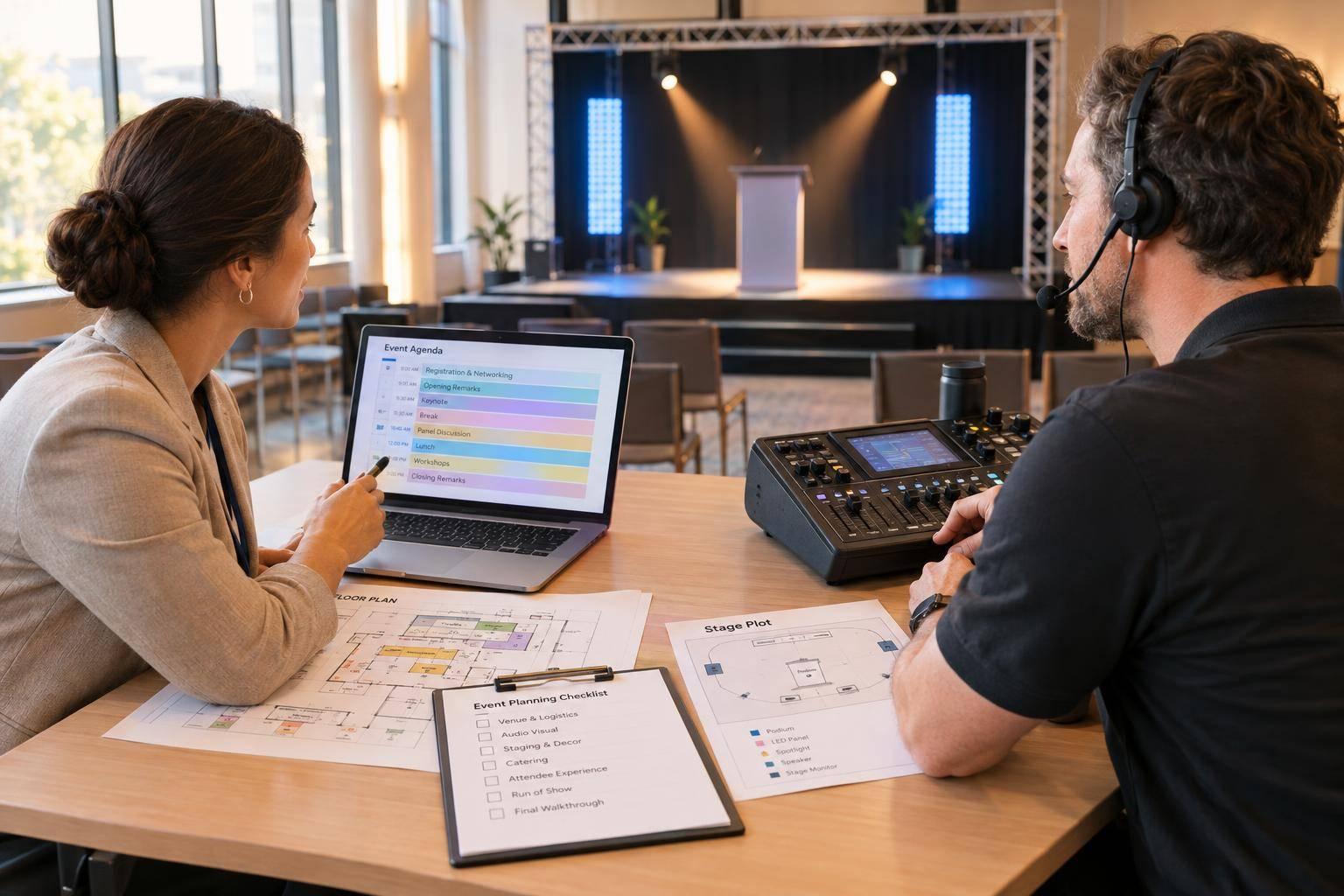
My advice: hire for the work you can’t cover - not the job title. A meeting planner handles logistics and attendees; a production company handles AV, staging, and live cues. You need both when those workloads exceed your team’s skills or capacity.
For a 25-person meeting with a projector and two microphones, I’d start with an internal coordinator and a venue technician. For smaller setups, you can often manage the list yourself using an audiovisual equipment planner. Add remote speakers, streaming, or timed stage cues, and I’d assess the need for a dedicated production team - even with the same headcount.
Quick Comparison
| Responsibility | Meeting planner | Meeting production company |
|---|---|---|
| Goals, venue, and budget | Manages the event brief, contracts, and total costs | Checks venue fit and estimates production costs |
| Attendee experience | Handles registration, travel, meals, and communications | Supports online access and AV access needs |
| AV and staging | Coordinates requirements | Designs, installs, and manages AV production |
| Speakers and rehearsals | Collects materials and schedules presenters | Tests playback, microphones, and transitions |
| Run of show | Sets the agenda and timing | Builds technical cues and calls the show |
| Problems and follow-up | Handles logistics, feedback, and invoices | Handles technical failures, recordings, and technical reports |
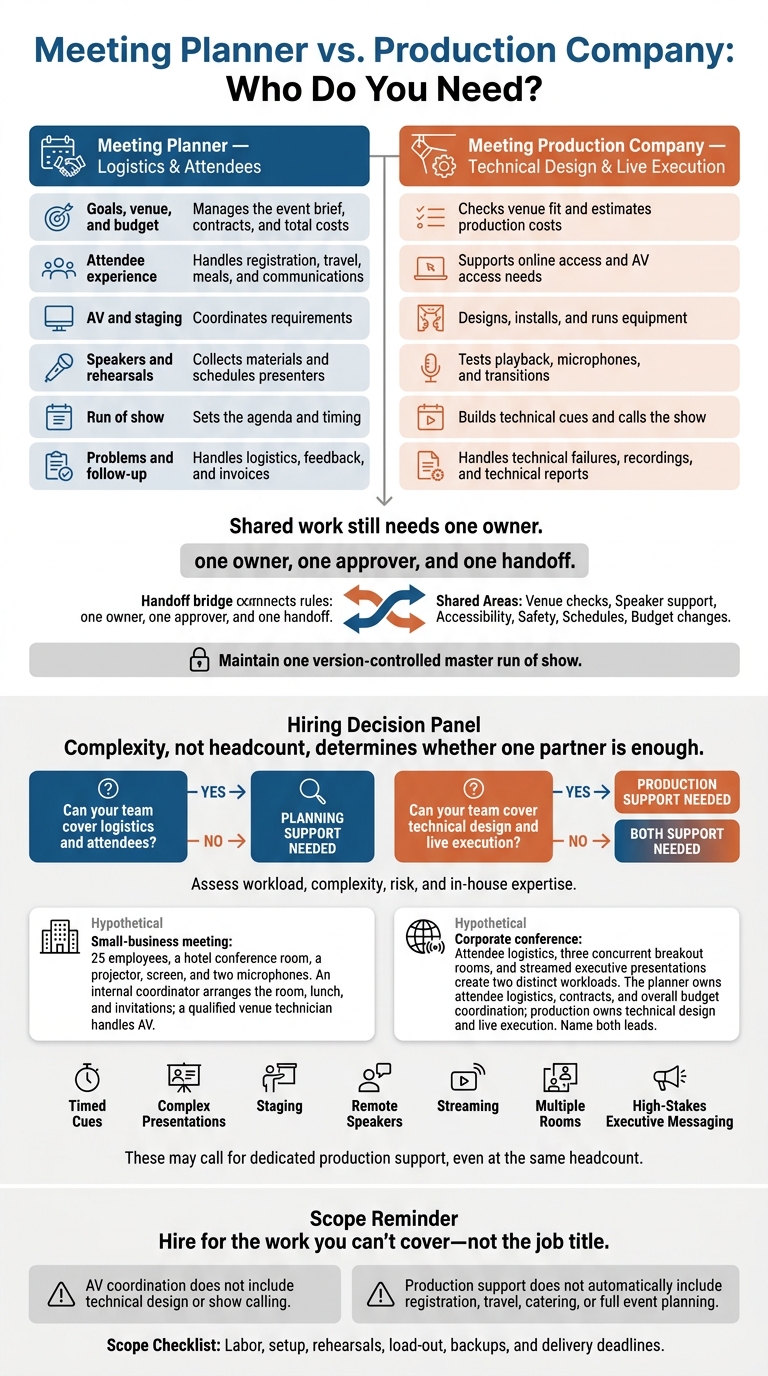
Before requesting quotes, I’d put <u>one owner, one approver, and one handoff</u> in writing for each shared task. That includes venue checks, speaker support, accessibility, safety, schedules, and budget changes.
Then I’d check what’s included: labor, setup, rehearsals, load-out, backups, and delivery deadlines. The same check applies to Corporate Optics or any provider - production support does not automatically include registration, travel, catering, or full event planning.
Meeting Planner vs. Production Company: Who Do You Need?
Meeting Planner: Organizing the Event and Attendee Experience
Meeting planners handle venue selection, logistics, supplier bids, timelines, and budgets. The contract should spell out deliverables, staffing, deadlines, approvals, and exclusions. AV coordination does not include technical design or show calling.
Event Goals, Venue Selection, and Budget
Start with a brief that covers the event’s purpose, audience, attendance target, format, dates, and success measures. The planner uses these details to guide venue and supplier bids.
Compare the total cost, including catering minimums, taxes, service charges, internet, labor, and parking. Review cancellation terms, too. Check the room layout, accessibility, guest-room inventory, loading access, and fit with the program. The planner confirms the venue; the production team confirms whether it can support the show.
Track contract approvals, registration launch, hotel room-block release dates, menu deadlines, speaker materials, final counts, and rehearsals. Name an approver for contracts and budget changes, and record every approved change. Keep planning fees separate from supplier costs, then check invoices against contracts and approved changes.
Registration, Travel, and Attendee Logistics
The planner handles confirmations, reminders, badges, check-in, room blocks, transportation, catering, seating, and on-site assistance. Collect dietary and accessibility requests during registration, then confirm the arrangements. These may include accessible routes and transportation, appropriate meals, interpreters, captioning, or assistive listening support.
Give attendees clear instructions about arrival times, parking, hotel details, session locations, and whom to contact for help. Only authorized staff should have access to personal information.
On site, assign staff to registration, hospitality, transportation, and room monitoring. Make sure each team knows whom to contact when an issue needs attention. Send logistical issues to the planner and AV issues to the production lead.
Include post-event feedback and financial reconciliation in the scope. Review check-in wait times, transportation reliability, accessibility feedback, attendee satisfaction, and budget variance.
With the agenda locked and logistics covered, attention turns to how the show gets built and run.
sbb-itb-ae35a94
Meeting Production Company: Building and Running the Show
A meeting production company turns an approved agenda into a live, virtual, or hybrid show. It handles technical design, equipment, crew, rehearsals, and live execution. For hybrid events, the team serves both the room and the online audience. Deliverables may include streaming, captions, recording, and remote-speaker support.
AV Design, Staging, and Venue Setup
Ask for a technical design, not an equipment list. Before choosing audio, screens, cameras, lighting, staging, and scenic elements, the team should assess the room dimensions, seating layout, sightlines, audience size, presenter count, presentation formats, accessibility needs, and event format.
The plan should map signal paths, rigging, power, stage layout, screen sizes, and technical milestones. Hybrid audio also needs mix-minus: a feed that keeps remote speakers from hearing their own audio played back as an echo.
Before load-in, the production team confirms venue rigging approvals, electrical service, internet access, labor rules, and setup windows. Crews then assemble, cable, and label the equipment. They test the complete signal path, from presentation playback to room screens and the online feed.
Include load-out in both the schedule and estimate. That means allowing for equipment removal, room restoration, and checks for damaged or missing items.
Rehearsals, Speaker Support, and Show Calling
Once the room is built, the team checks how the show will run. Rehearsals help keep timing, cues, and speaker transitions on track. Presenter checks cover slides and video playback, microphones, camera framing, entrances, confidence monitors, and timers.
A technical rehearsal tests the full system and crew cues. A cue-to-cue rehearsal focuses on transitions without running every speech in full. The stage manager gets presenters ready, the technical director oversees system execution, and the show caller coordinates stage and technical cues against the run of show in real time.
Every critical dependency needs a tested fallback and a named owner. Prepare backup playback, media files, microphones, power, and connectivity to keep the show running. Keep an offline copy of the run of show, and specify who can approve substitutions, shorten segments, or reorder speakers.
Compare Responsibilities and Decide Whom to Hire
The table below shows typical ownership. Confirm the scope in writing: AV coordination may cover arranging services, not designing or running the system. Assign one accountable owner to each decision so planning, production, and approvals don't overlap.
| Responsibility | Meeting Planner | Meeting Production Company | Shared or Handoff Area |
|---|---|---|---|
| Event scope | Owns the brief | Turns the brief into technical requirements | Confirm the brief before estimating |
| Venue contracts | Owns the contract | Checks technical feasibility | Review technical requirements before signing |
| Overall budget | Owns the master budget | Owns the technical estimate | Agree on contingency and cost approvals |
| Registration and attendee logistics | Owns attendee services and records | Supports remote access and assistive technology | Confirm access, privacy, and accessibility requirements |
| Vendors | Coordinates nontechnical suppliers | Manages production suppliers | Set one escalation path and one shared schedule |
| AV systems | Identifies the need | Designs, installs, and operates the system | Approve the design against program needs |
| Presentation content | Owns collection and deadlines | Checks playback readiness | Set review and final-lock deadlines |
| Staging | Owns room-use and branding requirements | Owns stage design and build | Approve sightlines, accessibility, and safety |
| Rehearsals | Secures presenter availability | Leads technical rehearsals | Confirm attendance and content readiness |
| Speaker support | Owns speaker communications | Owns technical readiness | Name a speaker liaison and technical lead |
| Run of show | Owns the event schedule | Owns technical cues | Maintain one version-controlled master |
| Show calling | Manages the client-side schedule | Usually supplies the live cue lead | Define final cue authority and approval routing |
| Streaming | Owns audience and access requirements | Owns technical delivery | Assign permissions and support ownership |
| Troubleshooting | Owns logistical issues | Owns technical failures | Define escalation and decision rights |
| Reporting | Owns event outcomes and costs | Owns technical findings | Combine event-management and technical findings in the review |
Shared Duties, Approvals, and Handoffs
Shared work still needs one owner. Assign owners before anyone makes commitments. Confirmed agendas and venue access guide technical design, staffing, and rehearsal schedules. Arranging an AV quote or delivery doesn't make someone the technical owner.
For each overlapping responsibility, name one lead, one approver, and one handoff.
| Area | Primary owner | Supporting role | Approval authority | Required handoff | Deliverable or deadline |
|---|---|---|---|---|---|
| Venue inspection | Planner | Production lead | Client | Site specifications and venue restrictions | Site report before technical design is finalized |
| Scheduling | Planner | Production lead | Program owner | Agenda and access windows | Confirmed schedule before crew and equipment booking |
| Presenter support | Planner | Production speaker technician | Program owner | Presenter list, content, and special needs | Final materials by an agreed cutoff |
| Accessibility | Planner | Production and venue teams | Client | Attendee access requirements | Plan before registration closes and equipment is ordered |
| Safety | Venue or planner, as contracted | Production lead and venue safety staff | Designated safety approver | Venue rules and production safety requirements | Approved plan before load-in |
| Technical budget | Client budget owner | Planner and production company | Client budget authority | Technical estimate and contingency | Approved estimate before production commitments |
| Run of show | Program owner or planner | Show caller and production team | Executive program owner | Approved timing and decision rights | Controlled master before rehearsal |
Use these examples to check how the split works for different event sizes and levels of complexity.
Hypothetical small-business meeting: For 25 employees in a hotel conference room, an internal coordinator serves as the planner, arranging the room, lunch, and invitations. A qualified venue technician serves as the production lead for a projector, screen, and two microphones. In that setup, a venue technician handles AV while the coordinator manages attendees and the agenda.
Complexity, not headcount, determines whether one partner is enough. Timed cues, complex presentations, staging, remote speakers, streaming, multiple rooms, or high-stakes executive messaging may call for dedicated production support. Assess logistics and technical complexity separately. Then check whether internal staff have both the skills and the authority to resolve a failure during the program.
Hypothetical corporate conference: Attendee logistics, three concurrent breakout rooms, and streamed executive presentations create two distinct workloads. The planner owns attendee logistics, contracts, and overall budget coordination; production owns technical design and live execution. For a conference, name both leads so show calling, presenter readiness, and client approvals are assigned before planning starts.
Conclusion: Set the Scope Before Hiring
Put every responsibility, approval, and backup plan in writing to avoid gaps. Follow the role split already defined: planners own business goals and the attendee experience; production companies own technical design and live execution.
Choose support based on workload, complexity, risk, and in-house expertise. Let the written scope of work, not the job title, guide your decision.
A small internal meeting may need one partner; a conference with multiple cues and speakers usually needs both.
Put Responsibilities, Approvals, and Backup Plans in Writing
Name the event lead, technical lead, client decision-maker, venue contact, and escalation contacts. Specify who approves decisions, how handoffs work, what’s excluded, and how change orders are handled. Set key dates for access, content, load-in, rehearsals, show start, strike, and load-out.
Require backups for media playback, microphones, cabling, power, signal, and internet. Confirm accessibility needs. Check venue rules for insurance, labor, rigging limits, loading access, and emergency procedures.
Request itemized pricing in U.S. dollars for labor, overtime, setup, strike, travel, freight, and contingency. For streaming, recording, and reporting, spell out formats, ownership, and delivery deadlines. “Included” alone doesn’t tell you what you’ll receive.
With the scope set, match the services to the event’s format and risk level.
Match Corporate Optics Services to Your Event
Corporate Optics supports AV design, staging, lighting, speaker support, live streaming, recording, and post-event analytics. Some engagements also include venue sourcing and vendor coordination.
Ask for a line-item proposal that matches the event’s complexity and your team’s capacity. Confirm whether registration, travel, catering, attendee communications, and venue contracting are included or stay with your team. Production does not automatically include full event management.
FAQs
How do I know if my team can handle production?
Your team should be able to design and run the show: staff every room, manage presenters, operate tested backups, and fix problems as they happen - all without letting other responsibilities slip.
You’ll likely need outside support if your event involves executive speakers, hybrid or virtual delivery, multi-room agendas, or complex staging. That’s especially true if you don’t have a dedicated show caller, tested audio and video backup plans, or enough staff to troubleshoot without drawing attention.
When should I bring in a production company?
Bring in a production company early to confirm technical requirements, handle logistics, and prevent last-minute problems. Allow 12 months for large-scale events, 4–6 months for large conferences, and 8–16 weeks for executive summits or custom environments.
You need a production company when the job goes beyond your in-house AV team's capacity. That includes multi-camera switching, hybrid streaming, complex staging, or cue-by-cue show calling - especially if a technical failure could hurt your brand or leave executives unprepared.
How can I avoid overlapping planning and production fees?
Hire a full-service production partner to handle planning, staffing, and execution under one scope of work. Ask for itemized quotes in U.S. dollars so you can spot duplicate charges. Include a clear task ownership matrix in the contract so everyone knows who’s responsible for what.
Avoid hiring vendors piecemeal. Bundling services and setting one point of accountability early can reduce communication gaps, technical errors, and the extra costs of managing multiple vendors.
Related Blog Posts
- 4 Meeting Production Companies That Excel At Seamless AV (audio/video), Lighting, and Stage Design for Corporate Conferences, and events
- End-To-End Annual Meeting Production Companies For Your Next Company Conference
- Looking For A Conference Production Company To Handle Venue Logistics, Layouts, And AV Needs? Reach Out To These 3 Companies Today.
- Executing A Multi-Day Corporate Event Requires A Partner That Handles Everything From Large -Scale Audiovisual (AV) Production And Custom Scenic Design To Logistics. Here Are 2 Companies To Reach Out To Today.



Streamline your workflow, achieve more

Lorem ipsum dolor sit amet, consectetur adipiscing elit. Maecenas ac velit pellentesque, feugiat justo sed, aliquet felis.



Lorem ipsum dolor sit amet, consectetur adipiscing elit. Maecenas ac velit pellentesque, feugiat justo sed, aliquet felis.