5 Steps Production Companies Use When Producing A Board Of Director Meeting.

Chief Executive Officer
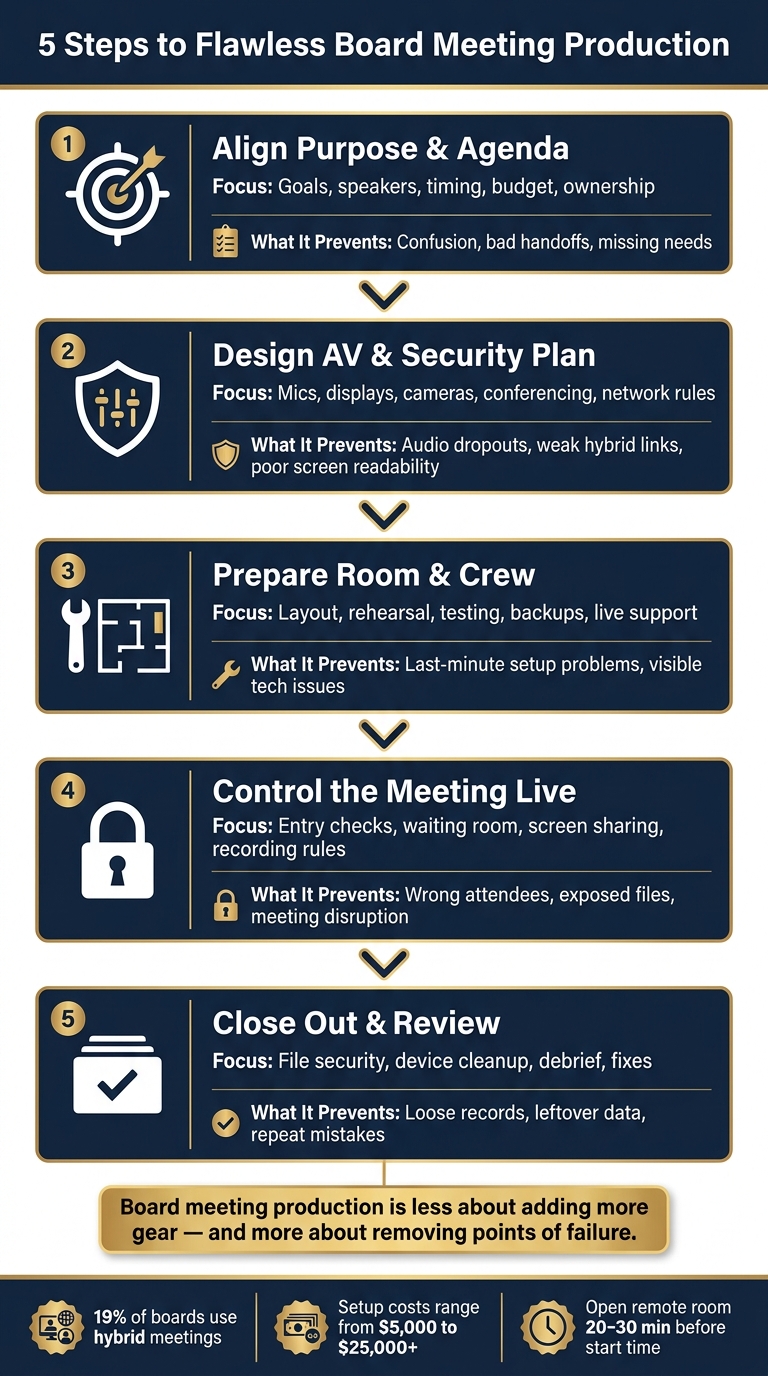
A board meeting usually goes well or breaks down on five things: purpose, setup, room prep, access control, and closeout. If I were boiling this article down fast, that’s the answer.
Here’s the short version:
- I start by tying the meeting goal to the agenda and the people involved.
- Then I match the room, mics, screens, conferencing, and network rules to that agenda. This requires following hybrid meeting planning best practices to ensure seamless connectivity.
- Next, I lock in staffing, layout, testing, and backup plans before anyone walks in.
- During the meeting, I control room entry, remote admission, screen sharing, and recording.
- After adjournment, I secure files, clear devices, and review issues for the next session.
A few numbers stand out. About 19% of boards use hybrid meetings. In many rooms with a 20-foot table, teams often need at least an 86-inch 4K display or two 85-inch-plus screens so finance and legal text can still be read. Cost can range from about $5,000 for a simple on-site setup to $25,000+ for a full-day hybrid meeting with backup systems and more crew.
5-Step Board Meeting Production Process for AV & Security Teams
AV for Hybrid Workspaces: Conference Rooms, Classrooms, Board Rooms
sbb-itb-ae35a94
Quick Comparison
| Step | Main focus | What it helps avoid |
|---|---|---|
| 1. Align purpose and agenda | Goals, speakers, timing, budget, ownership | Confusion, bad handoffs, missing needs |
| 2. Build the AV and security plan | Mics, displays, cameras, conferencing, network rules | Audio dropouts, weak hybrid links, poor screen readability |
| 3. Prepare the room and crew | Layout, rehearsal, testing, backups, live support | Last-minute setup problems, visible tech issues |
| 4. Control the meeting live | Entry checks, waiting room, share controls, recording rules | Wrong attendees, exposed files, meeting disruption |
| 5. Close out and review | File security, device cleanup, debrief, fixes | Loose records, leftover data, repeat mistakes |
If you need one takeaway, it’s this: board meeting production is less about adding more gear and more about removing points of failure. That’s what the five-step process does.
Step 1: Align the Meeting Purpose, Agenda, and Stakeholders
Board meeting production starts with a clear purpose, not a pile of gear. The first job is to line up the meeting purpose, agenda, and stakeholders. That usually means the production lead sits down with the board chair and CEO to pin down a simple purpose statement - for example, approve the FY2027 strategic plan and review Q3 financial performance. That purpose shapes the whole meeting. It tells you if the room needs formal presentations, open discussion, or structured voting.
From there, turn that purpose into three to five objectives and share them with presenters and the production team. It sounds basic, but this step keeps everyone rowing in the same direction.
Map Agenda Items to Production Needs
Once the objectives are set, the production team reviews the agenda line by line with the board secretary and chair. For each segment, they confirm who is speaking, what format the segment takes, whether it is hybrid, and whether it is recorded.
Those answers drive the technical setup:
- Presentation: wireless lav mic, large display, video conferencing for remote directors
- Financial review: table mics, high-resolution display
- Vote segment: crisp chair audio, onscreen resolution, secure polling
- Executive session: no recording, restricted access
Doing this work before anyone touches a cable makes a big difference. It keeps handoffs smooth and transitions nearly invisible.
Confirm Roles, Timing, and Budget
The production lead should run a pre-production coordination meeting two to four weeks before the board date to lock in roles. Each person needs a clear lane. The board chair owns meeting flow and signs off on agenda changes. The board secretary handles official minutes and controls which slides become part of the record. Presenters agree to a slide submission deadline, usually three to five business days before the meeting. The production lead owns the run of show, crew, and technical calls. IT handles secure network setup and conferencing access controls. The venue contact manages room access, power, and climate control.
That same meeting should also lock timing. Crew call is usually set 60 to 120 minutes before board members arrive. Start and end times need to be confirmed across the relevant U.S. time zones, with five- to ten-minute buffers around segments that are more complex or rely heavily on remote participation.
Budget should be just as clear. A simple on-site meeting with basic audio and one display might come in around $5,000. A full-day hybrid board meeting with multiple cameras, backup systems, secure streaming, and a larger crew can hit $25,000+. Break the budget into line items so the client can compare audio, video, crew, and contingency costs before booking.
With the purpose, agenda, roles, and budget locked down, the team can build the AV and security plan around what the meeting actually needs.
Step 2: Design the AV, Video Conferencing, and Security Plan
Use the agenda map from Step 1 to match each meeting segment with the right equipment, camera view, network route, and access rules. The point is practical: every director should be able to hear, see, and take part without hassle. That matters even more when the meeting includes votes, private papers, or sensitive discussion.
Choose Boardroom Equipment for Clear Communication
Start with the microphones. In smaller fixed rooms, gooseneck or boundary mics usually make the most sense. In larger rooms with long tables, beamforming arrays tend to do a better job of covering the full space. And if the room has hard, reflective surfaces, DSP tuning helps cut echo and keeps speech clean.
Displays need to fit the room, not just the budget. In a typical 20- to 25-foot boardroom, a 75- to 98-inch 4K display is a solid fit. For long tables, dual screens often work better because they give people at both ends a clear view. Slide text also needs to be large enough for the farthest seat to read without squinting.
For cameras, mount PTZ units at eye level and set presets in advance. A good setup usually includes:
- a wide room shot
- a speaker close-up
- a neutral frame that switches to a company logo during private discussion or voting
Those presets help the meeting move along without awkward camera fiddling. Keep framing medium-wide so faces stay visible, but laptops and printed papers stay out of view.
Build Secure Hybrid Access and Backup Paths
Put conferencing equipment on hardwired Ethernet and place it on a dedicated VLAN. Add a 4G or 5G backup connection in case the main line drops. Guest phones and tablets should stay on isolated Wi-Fi with rate limiting, so personal device traffic doesn't drag down the main meeting feed.
After the room is set up so people can see and hear each other, tighten up entry and sharing controls. Board meetings should run with a waiting room and layered access control. A designated host should admit only verified directors. That one step can prevent the kind of avoidable mix-up nobody wants in a board session.
Recording should stay off by default. If compliance rules say you need it, keep recording tied to a host account only. Store files in encrypted, access-controlled storage, follow a retention policy, and limit screen sharing to trusted presenters.
Backups shouldn't stop with network lines. Keep a spare laptop fully set up with the conferencing app already logged in and the slides already loaded. Send an alternate dial-in bridge to remote directors ahead of time, so if something goes sideways, people can get back in fast.
Comparison Table: Microphone, Display, and Security Options
Use these options to fit the room to the meeting, not the meeting to the room.
| Option | Example Choice | Reliability | Privacy | Executive Usability | Best Room Fit |
|---|---|---|---|---|---|
| Table/gooseneck mic | Table boundary or gooseneck microphone | Close pickup, clear speech | Directional; limits side conversation capture | Intuitive for seated directors | Small to mid-size rooms, fixed seating |
| Ceiling beamforming array | Ceiling microphone array | Consistent coverage across larger tables | Requires tuning to avoid capturing whispers | Clean table surface, minimal visual clutter | Mid to large rooms, hybrid-first setups |
| Presenter lavalier mic | Wearable or lavalier mic for the chair or presenter | Consistent level while moving or standing | Captures only the wearer | Natural for presenters at a lectern | Chair or primary presenter |
| Single large display (75–98-inch 4K) | Large 4K display | Sharp text and charts | One focal point for the room | Simple and easy to follow | Smaller boardrooms, single-wall layouts |
| Dual display layout | Two 75-inch displays | Equal visibility on a long table | Matched content on both screens | Great for elongated tables | Long conference tables, 20+ ft rooms |
| Platform waiting room + password | Waiting room, password, and host approval | Blocks unauthorized entry | Layered access control | Low hassle for verified directors | All hybrid board meetings |
| Host-only recording + encrypted storage | Restricted recording with encrypted storage | Supports audit and retention needs | Limits redistribution | Clear and controlled for compliance sessions | Meetings that require recording |
Step 3: Plan Logistics, Staffing, Setup, and Live Support
Once the system is set, the job moves to designing AV production for the room: layout, rehearsal, and live control.
Finalize Room Layout, Staffing, and Rehearsal
U-shape and hollow square layouts work well because every director gets a clear view of the main display and the chair. Put the chairperson and key presenters near the main microphones. Keep legal counsel or the corporate secretary close to reference materials. Route cables under the table, through floor boxes, or along cable ramps so walkways stay clear. Aim for a room temperature of about 70–72°F. Check that HVAC noise isn't bleeding into microphones, and fix any screen glare or window backlighting before the meeting starts.
Board meetings usually need four core technical roles:
- Audio technician: manages microphones and mute control
- Video technician: handles camera switching and display routing
- Conferencing operator: watches the remote-meeting platform and remote attendees
- Technical director: coordinates cues and acts as the single point of contact for the corporate liaison
These jobs are separate for a reason. In a board meeting, timing is tight and privacy matters. The board shouldn't have to stop and sort out tech issues in the middle of discussion. This level of reliability is why many organizations rely on professional production support to manage these high-stakes logistics.
Run Full Testing Before Executives Enter the Room
Test every system once. Then run the critical checks again. Schedule the technical rehearsal several hours before the meeting so there's time to fix anything that comes up. A clear sequence helps: power, networking, signal checks, team readiness, presenter and content checks, then backup procedures.
- Microphones: Test each mic one by one. Confirm routing to in-room speakers, remote feeds, and any recording system. Make sure every mute control works both at the table and at the operator position.
- Displays and cameras: Check every display and camera, confirm aspect ratios, and make sure presentation sources switch cleanly.
- Remote connection: Open the remote meeting room 20–30 minutes before start time. Run a live connection test with remote directors, and verify camera framing, microphone quality, and the ability to mute, unmute, and view shared content.
- Transitions: Rehearse key moments at show pace, including call to order, slide changes, voting segments, and remote guest introductions.
- Documentation: Record every check in a pre-event checklist, including who ran it and what was fixed.
Rehearsal isn't just about seeing if the gear turns on. It's there to prevent visible disruption once executive discussion begins.
Provide Discreet Live Meeting Support
When the meeting goes live, the crew should stay quiet and precise. Audio techs watch calibrated meters through headphones and make small level changes as needed. The video tech switches sources at natural agenda breaks. The conferencing operator keeps an eye on platform health, including bitrate, dropped frames, and remote participant status, and quietly messages anyone who seems muted or disconnected.
The crew should coordinate over headset systems, with all decisions flowing through the technical director. If a slide deck freezes, the technical director can switch to the backup copy during a pause. Use cue lights or confidence monitor messages instead of speaking into the room. Escalation rules should be set in advance with the corporate liaison: minor audio changes happen silently, while a display failure or network outage triggers the approved backup workflow.
After the meeting ends, that same discipline carries into shutdown, file security, and post-event review.
Step 4: Secure the Meeting During Execution
Step 4 is where planning turns into live control, applying best practices for executive-level board meetings to the active session. Once the meeting begins, security is no longer just a checklist. It becomes active management of access, admissions, and content.
As soon as the room is live, the first job is simple: control who gets in. Use one entry point for in-room arrivals. Check badges against the access list, and let in facilities, catering, and IT staff only during approved time windows and under supervision.
Virtual access should be handled with the same care as the physical door. Put one technician in charge of admissions. Remote participants should come in through a waiting room, and that technician should match each name to the attendance list before admitting anyone. After quorum is reached, lock the meeting and turn off join notifications so any late arrival needs manual approval.
When the meeting shifts into confidential territory, tighten controls right away. For executive sessions, the chair announces the change, recording stops, non-board attendees leave, and the secretary confirms the approved attendee list.
Protect Sensitive Content in Real Time
Use one designated machine for screen sharing, with notifications turned off and only the board deck open. Window-only sharing helps avoid accidental exposure. Host-only sharing stops participants from putting unapproved content on screen.
Send confidential materials to seat-level displays only. Before the session reopens, clear any private materials from view.
Watermarks on shared screens and recordings can also help trace a leak back to a participant.
| Control | What It Prevents |
|---|---|
| Waiting room + identity check | Unauthorized or accidental virtual entry |
| Meeting lock after quorum | New joins during sensitive discussion |
| Host-only screen sharing | Accidental content exposure by participants |
| Recording pause for in-camera segments | Capturing confidential deliberations on record |
| Private seat-level displays | Remote cameras or observers viewing director-only materials |
| Remove unknown attendees and suspend sharing | Disruption or data exposure from unknown attendees |
The idea here is straightforward: once the meeting is underway, every access point needs an owner, and every content channel needs limits. That includes the room, the video platform, the shared screen, and the displays people can see.
Step 5: Close Out the Meeting and Review Performance
Once quorum is complete and the chair adjourns, the production team should move straight into closeout. The meeting is over at adjournment. The production work is not.
At this stage, the job is simple: secure assets, clear systems, and document what happened so the next meeting runs better.
Secure Recordings, Files, and Equipment After Adjournment
Move approved recordings to encrypted, access-controlled storage right away. Then delete local copies from laptops, switchers, and recording devices. That helps protect confidential material once the room clears out.
Gather printed board books, handouts, and any notes left at seats. Return them to the corporate secretary or place them in a locked shred bin. Any borrowed device should be logged back into inventory. Sign out of all accounts, clear recent files, and power down all AV systems - including microphones, cameras, DSPs, displays, and streaming encoders - or return them to default presets.
Upload recordings for transcription within 24 hours, draft minutes within 5 business days, and delete recordings and transcripts after minutes are approved. That order keeps the official record clean and cuts down risk.
Review Technical Results and Plan Next-Meeting Improvements
Once assets are secure, the next job is to review what worked and what didn’t.
Within 1–3 days after adjournment, the production team should hold a short internal debrief while details are still fresh. The aim is a brief post-event report covering audio and video quality, microphone issues, display performance, timing delays, equipment faults, and whether backup systems were used. Focus on repeat problems and fixes. If the same issue keeps showing up, that’s your signal to address it before the next meeting.
That internal review should feed into the client debrief. Afterward, a joint debrief with the corporate secretary, IT, and security helps close the loop. For each issue, assign:
- a cause
- a fix
- an owner
- a due date
That turns loose observations into a working playbook and helps each board meeting run with more consistency.
Conclusion: The Five Steps That Keep Board Meetings on Track
These five steps are a repeatable cycle, not a one-and-done checklist. Each one supports what boards need most: confidentiality, professionalism, and the right setting for sound decisions. When handled this way, board meeting production stays secure, discreet, and clean from planning through wrap-up.
FAQs
How far in advance should board meeting production planning start?
Board meeting production planning should start well in advance.
For major conferences, book your production partner 4 to 6 months ahead. For smaller, single-day board meetings, 4 to 8 weeks is usually enough.
That lead time gives your team room to handle the nuts and bolts: site surveys, equipment coordination, system design, and a detailed run-of-show. It also helps keep the tech side steady and the meeting itself polished.
What level of security is appropriate for a hybrid board meeting?
A hybrid board meeting calls for tight, non-negotiable security. Sensitive discussions, financial data, and board materials can't be left exposed.
Use encrypted video conferencing, secure file sharing, and dedicated network segments for production traffic. That helps keep meeting data separate from other activity and cuts down avoidable risk.
Access should be limited to approved participants only. Tie the meeting into corporate authentication, and put both physical and electronic safeguards in place. In plain English: lock down the room, lock down the logins, and don't leave gaps in between.
Your production partner matters here too. They should follow high security standards, including SOC 2 compliance, along with secure data handling and destruction protocols.
What should be prioritized if the board meeting budget is limited?
Prioritize spending that directly supports the meeting’s main strategic goals so every dollar is put to work with purpose.
Look for lower-cost options where they make sense. That might mean using virtual meeting platforms instead of in-person add-ons, choosing a simpler AV setup, or booking during off-peak dates to get better rates. You can also cut costs over time by building long-term partnerships with vendors.
At the same time, set aside a contingency fund for last-minute changes. That extra cushion helps you handle surprises without cutting corners on quality or security.
Related Blog Posts



Streamline your workflow, achieve more

Lorem ipsum dolor sit amet, consectetur adipiscing elit. Maecenas ac velit pellentesque, feugiat justo sed, aliquet felis.



Lorem ipsum dolor sit amet, consectetur adipiscing elit. Maecenas ac velit pellentesque, feugiat justo sed, aliquet felis.