Quick Turnaround Production Companies For Your Company Virtual Broadcast.

Chief Executive Officer
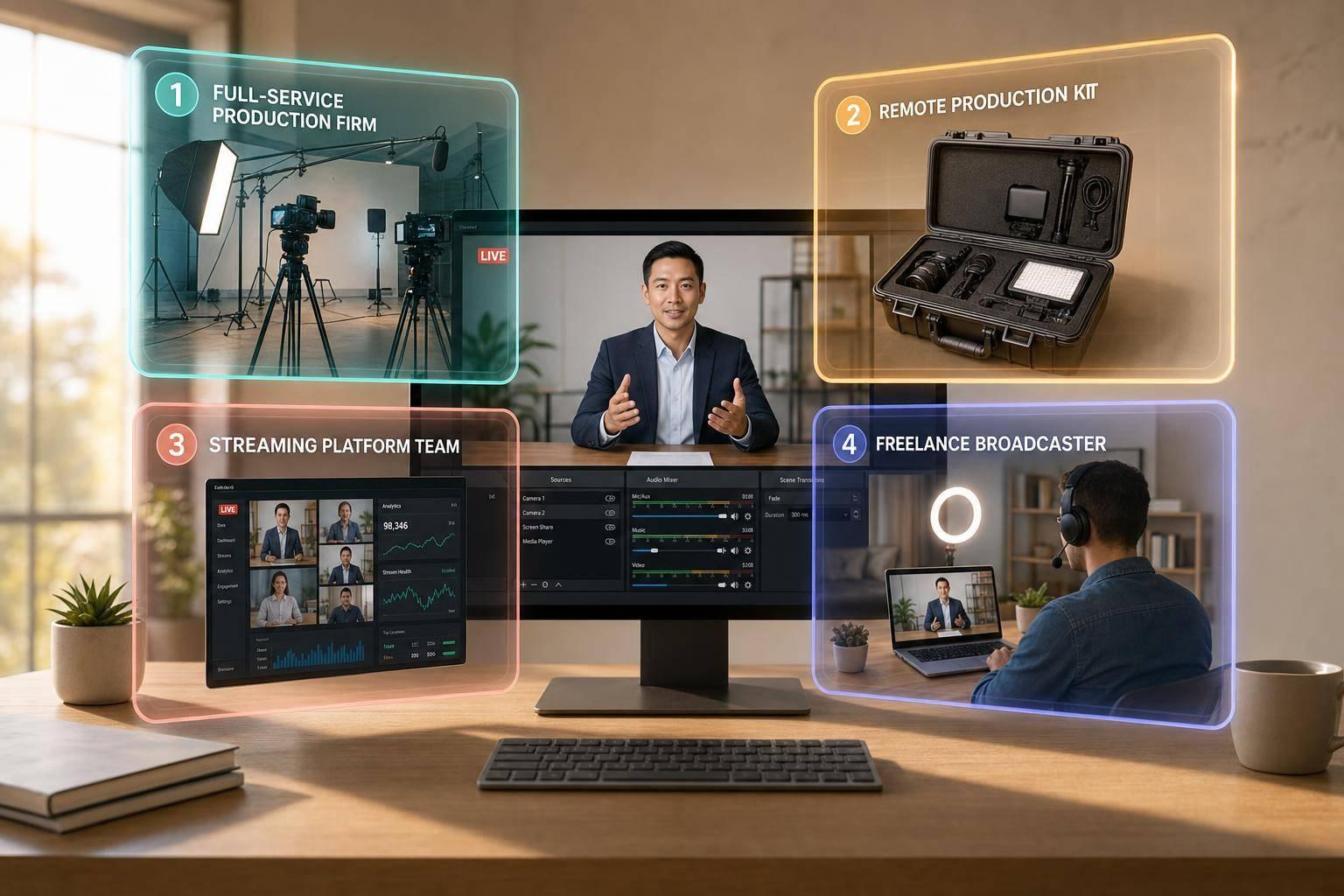
If your company needs a virtual broadcast this week, the safest choice is usually the partner type that fits your deadline, approval process, and risk level. In most cases, full-service production firms are the best fit for executive and investor events, remote studio kits work best for one speaker, platform-based teams fit companies that must stay inside Zoom or Microsoft Teams, and freelance crews can help when you just need local staff fast.
Here’s the short version:
- Fastest full-service option: Corporate Optics
- Best for single-speaker remote setups: Remote executive studio kit providers
- Best for approved internal platforms: Platform-integrated event teams
- Best for local crew on short notice: Freelance livestream networks
- Common launch window: 2–7 business days for most company broadcasts
- Post-event edit window: some teams can deliver clips within 24 hours
- Typical cost range: from about $2,000 to $100,000+, depending on scope
What matters most is simple:
- Speed: Can they get live in days, not weeks?
- Stability: Do they have backup internet, recording, and failover steps?
- Brand fit: Can they turn your slides and brand guide into clean on-screen graphics?
- Company fit: Can they work with SSO, IT rules, approvals, and sensitive messaging?
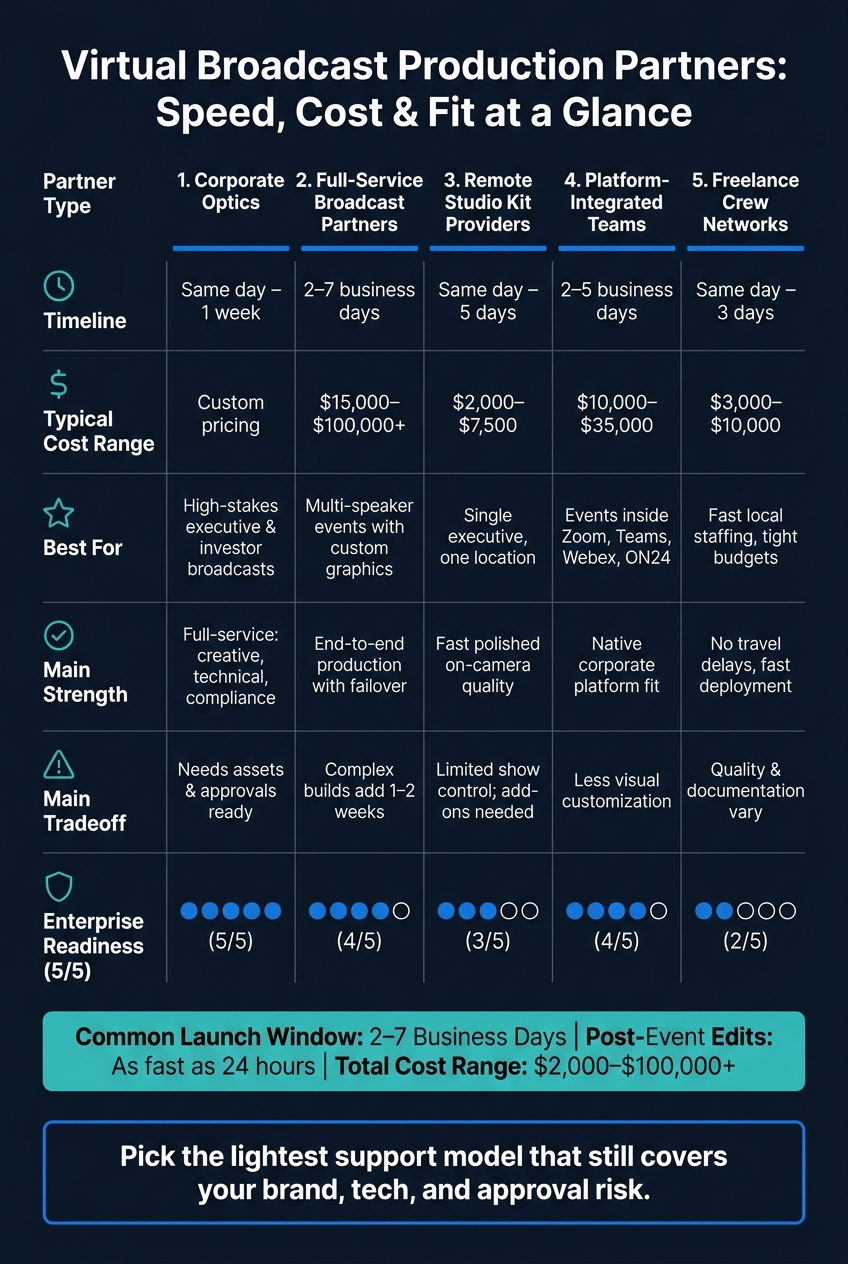
Virtual Broadcast Production Partners: Speed, Cost & Fit at a Glance
Quick Comparison
| Option | Best timeline | Best for | Main limit |
|---|---|---|---|
| Corporate Optics | Same day to 1 week | High-stakes executive and investor broadcasts | Works best when assets and approvals are already set |
| Full-service broadcast partners | 2–7 business days | End-to-end show support | Larger builds may take 1–2 weeks |
| Remote studio kit providers | Same day to 5 business days | One executive speaking from one location | Limited show control unless you add more services |
| Platform-integrated teams | 2–5 business days | Events inside Zoom, Teams, Webex, or ON24 | Fewer visual options |
| Freelance crew networks | Same day to 3 business days | Fast local staffing | Quality and process can vary |
I’d use one simple rule: pick the lightest support model that still covers your brand, tech, and approval risk. If the event involves investors, leadership, or company-wide messaging, I’d lean toward a full-service team with rehearsals, backup plans, and one clear point of contact.
sbb-itb-ae35a94
1. Corporate Optics
Corporate Optics is a full-service production partner for corporate broadcasts that need close coordination across creative, technical, and executive teams. Founded by Steven P. Simmons, the company supports planning, AV design, livestreaming, speaker support, and post-event analytics. Its Emmy Award-winning background helps the team move fast and stay organized, even on tight deadlines.
Deployment Speed
Corporate Optics uses a same-week workflow with clear checkpoints. The process usually starts with a kickoff discovery call, followed by same-day scope confirmation, a run-of-show draft, graphics approval, a full technical test, and a speaker rehearsal.
Clients tend to move fastest when they come in prepared with:
- a confirmed speaker list
- a brand kit
- a slide deck
- one approval contact
That kind of prep cuts down back-and-forth and helps the team keep the timeline on track.
Broadcast Reliability
For live broadcasts, reliability starts before the event begins. Corporate Optics sets up redundant internet connections, backup encoders, secondary audio sources, platform failover planning, and recording redundancy before going live.
During the event, a director, technical producer, and stage manager work from pre-set contingency steps. If something goes sideways, the team can respond fast without visible disruption. For executive announcements, investor updates, and product launches, message continuity matters just as much as avoiding downtime.
Branding Support
Even with a short timeline, Corporate Optics can turn brand guidelines into a broadcast-ready visual package. That often includes lower-thirds, intro and outro stingers, branded holding slides, speaker overlays, and color-matched on-screen typography.
If a client shows up with only a PowerPoint deck and a brand guide, the team can turn those materials into polished title cards, steady logo placement, and speaker naming conventions that stay consistent across the full stream.
Enterprise Readiness
Corporate Optics is set up for the kind of complexity that comes with enterprise broadcasts. That includes multiple stakeholders, compliance-sensitive messaging, secure approval workflows, and audiences that may include employees, investors, and global partners.
The team can also handle registration, Q&A moderation, and stream delivery across multiple destinations. After the event, clients get analytics that show attendance, engagement, and audience drop-off points, which makes it easier to improve the next broadcast.
2. Full-Service Rapid Broadcast Production Partners
When a company needs a polished live broadcast on short notice, full-service partners are usually the fastest staffed option. They handle the whole run of show: planning, live direction, graphics, speaker prep, streaming, and post-event deliverables.
Deployment Speed
Most teams respond the same day, send a quote within 24 hours, and can get a simple executive broadcast live in 2–3 business days. A multi-speaker product update or investor town hall usually needs 3–7 days. If speaker onboarding and graphics are part of the job, the timeline often stretches to 1–2 weeks.
That delay usually comes from corporate review cycles and executive calendars, not from the production team itself.
Broadcast Reliability
Full-service partners keep broadcasts steady by using standard workflows. If you want fewer surprises on show day, ask for:
- a producer
- a technical director
- a graphics operator
- a platform specialist
- redundant encoding
- a full rehearsal
Those pieces matter. Many teams also set up alternate RTMP endpoints or failover to a secondary platform. At the same time, they watch bitrate, audio levels, slide sync, and viewer counts in real time.
Some providers can also turn around session recordings, highlight edits, and social clips within 24 hours after the event.
Branding Support
These teams can take an existing brand toolkit and turn it into lower thirds, intro and outro slates, holding screens, and branded overlays within days. That’s often the sweet spot for fast-turn broadcasts.
Custom motion graphics, 3D virtual stages, and interactive environments usually need more time.
Enterprise Readiness
For sensitive broadcasts, enterprise readiness usually comes down to three things: security alignment, live support coverage, and post-event deliverables. Full-service partners are generally used to working with SSO-enabled platforms, corporate IT firewall rules, and access controls that protect material nonpublic information.
They can also plug into tools a company already uses, such as Zoom, Microsoft Teams, Salesforce, or internal analytics platforms, without forcing a platform switch. In plain English, that can save days.
The fastest path is simple: lock the speaker list, approve the brand assets, and give the project one internal decision-maker.
For even leaner timelines, the next models shift more production work onto the client or the platform.
3. Remote Executive Studio Kit Providers
When the speaker is in one place and the show is fairly simple, a remote kit can cut the timeline even more. These providers ship a portable broadcast setup to the executive’s location - usually a camera, lights, audio gear, cabling, and sometimes a teleprompter or backup internet - then walk the speaker or local contact through setup and monitor the session from afar.
This setup works well for single-speaker broadcasts that need to look polished fast, without bringing in a full on-site crew. Many providers also help with framing, pacing, eye line, and teleprompter delivery. That said, their base service usually stops there. Full show calling, advanced motion graphics, multi-speaker coordination, and moderation are often outside scope unless you add them on.
Deployment Speed
In major U.S. metro areas, same-day or next-day deployment is often possible. Outside those markets, plan for 2–5 business days. The usual slowdowns aren’t the gear itself - they’re executive schedules, venue access, and IT approvals.
Broadcast Reliability
A solid provider tests the kit before go-live, checks upload speed, and makes sure a wired connection can hold at least 10 Mbps upload. Better providers also build in backup paths, such as mobile hotspots, bonded cellular, or a secondary ISP, and keep an eye on the feed through secure cloud control tools.
Audio matters most here. If the sound is rough, viewers notice right away. Slight video issues may slide; weak audio usually doesn’t.
Branding Support
Most kit providers handle the visual basics well, including:
- Branded backdrops
- Logo placement
- Virtual backgrounds
- Lighting
- Frame composition
If you need more layered brand work - like custom motion packages, animated openers, sponsor loops, or multi-language graphic systems - you’ll usually need separate creative support.
Enterprise Readiness
For investor calls and other sensitive broadcasts, check for encrypted transport, insured equipment, background-checked technicians, and documented setup and teardown steps. Some providers can also ship the same kit setup to several executive locations at the same time, which helps when multiple speakers need a consistent on-camera look.
Before you sign, make sure the provider can operate within your company’s IT security rules, including VPN needs and approved streaming protocols.
When the broadcast needs deeper platform control, the next option shifts more of the production work into the event software layer.
4. Platform-Integrated Virtual Event Production Teams
When a broadcast has to stay inside your company’s approved platform, this setup usually makes life easier. It cuts down procurement friction and gets approvals moving faster.
These teams run live corporate events inside tools you already use, like Zoom, Microsoft Teams, Webex, or ON24. They handle the technical side so your internal team can stay focused on content, speakers, and approvals. That’s why this is often the fastest fit when the event can’t leave an approved corporate platform.
The downside is pretty simple: you get less room to customize the look and feel. But in return, you usually get faster deployment and cleaner alignment with IT.
Deployment Speed
A straightforward executive announcement or town hall can often go live in 2–5 business days. Same-day execution is possible, but only if licenses, speakers, and brand assets are already approved.
Most delays come from a few familiar trouble spots:
- License access
- Internal approvals
- Speaker availability
If you want to move faster, have these ready before you reach out: your platform choice, estimated audience size, a rough agenda, and brand assets. Teams that use pre-built run-of-show templates and checklist-based onboarding can shrink setup time a lot.
Broadcast Reliability
Reliability here depends less on outside gear and more on strong role discipline, backups, and platform control.
These teams usually assign a technical director, a show caller, and an attendee support lead. They also build in redundancy with backup host accounts, mirrored slide decks on a second machine, and phone dial-in options for speakers if their internet drops.
For higher-stakes broadcasts, many teams use RTMP-in workflows - feeding a polished stream from an external tool like vMix or a cloud studio directly into Teams or Zoom. That setup makes multi-camera switching and pre-recorded segments possible, while attendees still join through the platform they already know.
For executive-level events, require a technical rehearsal. It’s one of those small steps that can save you from a very public mess.
Branding Support
Branding options are more limited inside the platform, but you still have room to make the event feel on-brand.
You can usually work with branded slide templates, virtual backgrounds, lower-thirds built into slides, countdown timers, and branded registration pages. Zoom's Production Studio, available within Zoom Events and Sessions, lets producers build custom layouts, overlays, and scene transitions directly inside the platform.
Enterprise Readiness
These teams operate inside your existing Microsoft 365 or Zoom enterprise tenant, using your SSO, MFA, data residency, and retention rules.
They’ll work with IT to sort out who holds host privileges, where recordings are stored - such as OneDrive, SharePoint, or Zoom cloud - and how long those files are kept. After the event, you can expect a structured report with attendance figures, Q&A logs, poll responses, and drop-off rates.
A clean way to split ownership is this: let production handle live execution, and keep content and compliance with internal owners.
5. Freelance Livestream Crew Networks
When a job needs crew only and the deadline is tight, freelance networks can fill the gap fast. They’re built to source local livestream operators in-market without waiting on travel. This setup makes the most sense when travel time, not production difficulty, is the main thing slowing you down.
Deployment Speed
Freelance crew networks are at their best when you need camera, audio, and switching talent on the ground fast. That matters most when flying in a full crew would delay the launch.
That said, speed on paper doesn’t mean much if the team shows up with different habits and different ways of working. On show day, everyone still needs to run from the same technical playbook for live broadcasts.
Broadcast Reliability
Reliability is the big tradeoff here. Gear can vary. Workflows can vary. Comms can vary too. And that’s where setup delays and sync issues tend to creep in.
To keep things tight, require:
- a full rehearsal
- confirmed audio and video paths
- isolated recordings of each feed
- a backup internet plan
Branding Support
For branding, keep the request list clear and simple. Ask for lower-thirds, logo placement, matching fonts, and a basic holding slide. If you want more than that, assign a named graphics owner and set a clear approval step.
Once branding is set, compliance and accountability usually become the main deciding factors.
Enterprise Readiness
Use this model only if the crew can document insurance, NDAs, background checks, access controls, and a single point of contact. Without that paper trail, the setup is too loose for sensitive corporate broadcasts.
Those tradeoffs are easier to size up in the speed, reliability, branding, and readiness summary that follows.
How These Options Compare on Speed, Reliability, Branding, and Enterprise Readiness
Use the matrix below to line up your timeline with the right mix of control, branding, and compliance support. For executive announcements, product updates, and investor calls, that’s the part that matters most. You’re not just booking a stream. You’re deciding how polished it needs to look, how tightly it needs to follow brand rules, and how much oversight the broadcast calls for.
Corporate Optics tends to move the fastest when brand assets and approval paths are already set. Remote studio kits can sharpen the executive camera feed fast, but they don’t run the whole show on their own. Freelance networks can staff up in a hurry, though consistency can be uneven from one crew to the next. The matrix below makes those tradeoffs easier to compare at a glance.
Start with the deadline, then match the partner type to the level of control your broadcast needs.
| Partner Type | Best-Fit Timeline | Main Strength | Main Tradeoff |
|---|---|---|---|
| Corporate Optics | Same day to 1 week | Full-service coordination across creative, technical, and compliance needs | Moves fastest when brand assets and approval paths are already confirmed |
| Full-Service Rapid Broadcast Partners | 2–3 days to 1 week | End-to-end production with custom graphics and failover paths | Multi-speaker or bespoke builds stretch the timeline to 1–2 weeks |
| Remote Executive Studio Kit Providers | Same day to 5 days | Fast on-camera quality upgrade for a single executive location | Limited to local capture; full show production requires add-ons |
| Platform-Integrated Teams | 2–5 days | Clean fit inside approved corporate platforms; faster IT alignment | Less visual customization; branding constrained by platform defaults |
| Freelance Crew Networks | Same day to 3 days | Fast local staffing without travel delays | Process, gear, and documentation vary by crew |
The pros and cons below show where each model gains speed and where it gives up control.
Pros and Cons of Each Production Partner Type
Use this summary to line up your deadline, level of control, and approval load with the lightest partner type that still keeps the broadcast safe.
| Partner Type | Pros | Cons | Best-Fit Scenario |
|---|---|---|---|
| Corporate Optics | Planning, AV, livestreaming, speaker support, and analytics under one roof; Emmy Award-winning experience | Can move slower if assets and approvals aren't preapproved; custom pricing | Sensitive executive announcements where brand control and compliance can't slip |
| Full-Service Rapid Broadcast Partners | Crew, graphics, streaming, and backup systems in one engagement; $15,000–$30,000 for executive updates; $40,000–$100,000+ for investor-grade builds | Complex builds and compliance review add lead time | Investor webcasts or product launches with multiple speakers and live Q&A |
| Remote Executive Studio Kit Providers | Fast shipping; polished on-camera quality; $2,000–$7,500 per event | Doesn't handle platform control or multi-speaker production; depends on local internet and available space | One executive presenting remotely who needs a network-quality look without on-site production |
| Platform-Integrated Virtual Event Production Teams | Works with your corporate stack; native registration, Q&A, polls, and analytics; $10,000–$35,000 | Limited visual customization and platform-level failover | Customer updates or product briefings where CRM integration and post-event analytics matter most |
| Freelance Livestream Crew Networks | Fast staffing and lower overhead; $3,000–$10,000 for a basic remote crew | Quality and documentation vary from crew to crew | Internal town halls where budget is tighter and internal project management is strong |
The pattern is pretty clear. The more control, review, and backup you need, the more time and money the job usually takes. On the flip side, leaner partner types can move fast, but they often leave more work on your team.
That matters because managing 4–6 vendors can eat up 100+ internal hours. If your team is already juggling legal review, speaker prep, slide approvals, and platform setup, that extra coordination can snowball fast.
For compliance-sensitive broadcasts, lock down the content workflow, access controls, and approval chain before go-live.
That tradeoff leads to a simple rule: pick the partner that matches your approval process first, then your timeline.
Conclusion
Choose based on risk, timeline, and your team’s bandwidth. For executive announcements, investor updates, or any broadcast where brand trust is on the line, the best option is to choose a production company that acts as an end-to-end partner that can handle planning, technical execution, branding, and backup planning in one workflow. For high-stakes broadcasts, Corporate Optics is the fit: full-service planning, technical execution, branding, and contingency control.
That makes full-service support the safest pick when the message, audience, and deadline all matter.
Lower-touch support puts more of the coordination work on your team.
For urgent broadcasts, ask for these items on the first planning call: run of show, cue sheet, graphics list, platform setup plan, rehearsal schedule, backup plan, and recording specs.
- Rehearsal schedule - speaker checks and a full run-through 2–5 business days before go-live.
- Backup plan - documented failover for internet, encoder, and personnel.
- Recording specs - resolution, format, and file delivery timeline for post-event use.
Early documents bring missing assets to the surface before show day. If the team can’t deliver this packet fast, it isn’t ready for urgent corporate work.
FAQs
What should I prepare before the kickoff call?
Before the kickoff call, pull together the basic logistics: the event date, start and end times, the venue address if needed, and the format - in-person, virtual, or hybrid.
It also helps to have a short production packet ready. Include your goals, estimated budget, key content and speakers, preferred engagement elements like live polls or Q&A, and any technical requirements or constraints.
How much internal time will my team need?
Usually, not much.
A quick-turnaround production partner handles most of the logistics and admin work, including scheduling, vendor coordination, and speaker prep.
Your team usually steps in for high-level direction, early discovery, and final reviews. From there, the partner often runs technical rehearsals, backstage flow, and backup planning, so your team can stay focused on the message.
What backup steps matter most for a live broadcast?
Prioritize redundancy and thorough testing. Your backup setup should include:
- dual streaming encoders
- multiple network paths, with wired internet plus bonded cellular backup
- redundant power sources
- automatic failover systems
Also run a full technical rehearsal 48 to 72 hours before the event. Use that session to test the whole chain and lock in contingency plans for dropped presenter feeds, audio echo, and slide failures.
Related Blog Posts
- Ultimate Guide To Choose A Production Company For A Virtual Broadcast
- Leading Conference Production Companies For Hybrid Events And Live Streaming
- Leading Production Companies Who Support Global Virtual Broadcasts And Livestreaming With Zoom Or Microsoft Team Platforms
- Best Audiovisual Companies For Broadcast-Quality Zoom Webinar Production



Streamline your workflow, achieve more

Lorem ipsum dolor sit amet, consectetur adipiscing elit. Maecenas ac velit pellentesque, feugiat justo sed, aliquet felis.



Lorem ipsum dolor sit amet, consectetur adipiscing elit. Maecenas ac velit pellentesque, feugiat justo sed, aliquet felis.