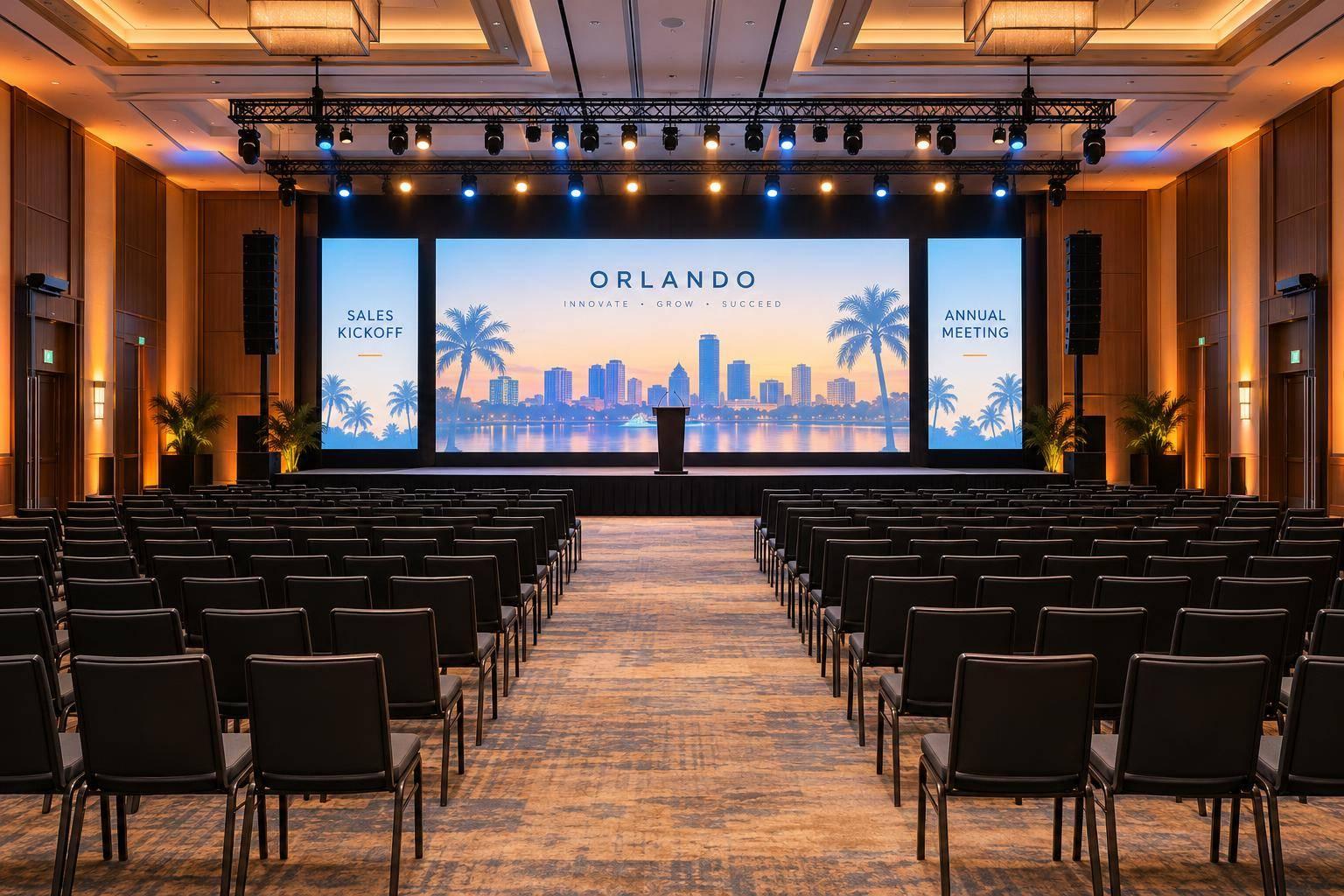
Staging And Lighting Design For Executive Events: What Drives Budget And Impact.

Chief Executive Officer

I’d fund clear views, well-lit faces, and safe access before custom scenery or effects. Start with your room layout, speaker positions, and camera needs. Then compare the total installed and operated cost - not just equipment rentals.
Here’s how I’d review the plan:
- Stage and screens: Check views from front, rear, side, and accessible seats. Compare modular staging with custom sets, then choose LED, projection, or static graphics based on content, room light, and camera tests.
- Lighting: Light every speaking position first. A key light about 30–45 degrees off the camera centerline is a starting point - not a substitute for testing faces, screens, and movement together.
- Venue and labor: Confirm power, rigging, loading access, crew rules, and time for setup, rehearsal, and removal.
- Final approval: Request an itemized estimate in U.S. dollars, with taxes, venue fees, exclusions, backup roles, and change-order terms.
My rule: <u>protect safety, visibility, and rehearsal time</u>. Add branding and effects only when they serve the program.

Executive Event Staging and Lighting: Budget Approval Roadmap
Event A/V Essentials Part 2: Transform Your Space with Scenic Design (Stage, Lights and More!)
sbb-itb-ae35a94
Stage Layout, Scenery, and Presentation Surfaces
Once the budget is allocated, the next cost drivers are stage geometry, scenery, and presentation surfaces.
Plan Stage Dimensions and Sightlines
Set the stage footprint first to control costs and keep executives visible. Draw the room in feet and inches. Mark presenter positions, screens, monitors, stairs, ramps, lifts, and cable paths.
Choose stage height based on audience views - not a standard dimension. A higher stage can improve visibility, but it may also require ramps or lifts for access. Check rear, side, front-row, and accessible seats for blocked views of faces, screens, or demos. Before fabrication, walk the room and check views at audience eye level. U.S. accessibility guidance often requires a 36-inch clear route, with limited doorway exceptions.
| Layout | Best use | Cost pressure | Setup complexity | Sightline risk |
|---|---|---|---|---|
| Low riser | Small executive meetings, boardroom presentations, or events where proximity matters | Lower cost and simpler access, though stairs or ramps are still needed | Low | Moderate with deep audiences or flat floors |
| Wide keynote stage | Large general sessions, panels, and camera coverage | Higher cost for platforms, scenery, lighting, and labor | Moderate | Lower across broad audiences, though oversized stages can hide speakers |
| Center-stage/thrust stage | Leadership town halls, interviews, and moderated conversations | Higher cost for distributed monitors and scenery designed for multiple viewing directions | High | Highest; requires 360-degree planning |
Position confidence monitors so executives can read them without turning away from attendees. Where practical, keep stairs and accessible routes outside primary camera frames without limiting access. Leave backstage space for entrances and exits that stay out of active shots. Check sightlines again after installing scenery.
Compare Modular Staging and Custom Sets
Modular staging is usually the better fit when you need predictable pricing, fast installation, layout changes, reuse, or transport between venues.
| Factor | Modular platforms | Custom sets |
|---|---|---|
| Layout flexibility | High within available platform sizes | Low after fabrication unless designed for layout changes |
| Branding | Graphics, drape, or add-on scenic panels | Most control over shape, finish, and brand integration |
| Fabrication | Standard components and accessories | Engineering, shop drawings, fabrication, finishing, and approvals |
| Transportation | Compact and reusable; heavy components require handling | Bulky pieces may need dedicated trucks and protective packing |
| Installation | Faster and more predictable | Slower; assembly, alignment, and touch-ups add labor |
| Storage | Easier if the rental supplier retains inventory | Requires storage or disposal planning |
| Strike | Generally faster and less destructive | Careful dismantling, waste handling, and possible surface repairs |
Custom scenery should solve a specific design need. Modular platforms work well for repeat events and changing rooms. Custom construction makes sense for architectural forms, premium brand expression, integrated screens, or unusual geometry that rental inventory can't provide.
Once you've defined the stage, the presentation surface determines brightness, content flexibility, and camera performance.
Choose LED, Projection, or Static Scenery
Choose the presentation surface after confirming sightlines, safe access, structural support, ambient light, camera requirements, and installation logistics.
| Decision factor | LED wall | Projection | Static scenery |
|---|---|---|---|
| Brightness and ambient light | High brightness; works well with daylight or stage lighting | Depends on projector output, screen size, throw distance, and room darkness | Depends on finish and lighting |
| Viewing distance | Check pixel pitch and content size | Check image size and text readability | Size graphics for rear and side seats |
| Content flexibility | Very high; live data, motion graphics, and multiple layouts | High; video and presentation content | Low; changes require replacement graphics or physical rework |
| Camera performance | Pixel pitch, scan behavior, refresh rate, and camera testing matter | Control brightness, shutter behavior, screen surface, and exposure | Predictable with matte, evenly lit surfaces |
| Power and support | Heavy and power-intensive; may require engineered support and added power distribution | Requires suitable throw distance, signal paths, and potentially blackout or rigging | Usually lower power demand; fabrication and transport vary by material |
| Labor | Assembly, cabling, processing, and calibration | Placement, alignment, and signal testing | Installation and finishing |
| Executive-event fit | Bright rooms, changing content, and camera-heavy programs | Controlled rooms needing large images | Stable branding and speaker-focused programs |
Pay for changing visuals only when the program needs them. LED is easier to justify in bright rooms or when changing content is central to the audience experience. Projection can provide a large image at a lower equipment cost if you can control ambient light and allow enough throw distance.
Static branding is often the lowest-cost choice when the message stays the same and the impact comes mainly from speakers, content, and lighting. Before approval, verify the technical specs that affect brightness, weight, power, camera performance, and reuse. Test every option from the farthest seats and those with the sharpest viewing angles. Then record camera images from the actual camera positions.
Those geometry choices set the lighting positions and camera angles that follow.
Lighting for Executive Visibility and Camera Quality
Prioritize Facial Lighting and Even Coverage
Once the stage and presentation surface are set, lighting determines how clearly audiences see executives in the room and on camera. Light faces first, effects second. Position the key light slightly above and 30–45 degrees off the camera centerline. Add softer fill on the opposite side to soften shadows, plus subtle backlight to separate shoulders from the background.
Map every speaking position before aiming fixtures. Overlap coverage so presenters can move without visible changes in brightness or color, and test the outermost positions - not just center stage.
Check for glare on glasses, microphone shadows, and reflections from awards. Use shutters or barn doors to control spill, and keep bright sources out of audience sightlines. Aim for CRI - and TLCI, where available - above 90, but verify skin tones on camera rather than relying on ratings alone.
Test Lighting With Cameras and Screens
Approve camera results before finalizing the lighting package. Rehearse with the actual camera settings and presentation content to check exposure, skin tones, and flicker under show conditions. Record or stream bright and dark slides, transitions, and movement, then review the results on the intended monitors.
Balance presenter exposure with screen brightness so both stay readable. Check for flicker and rolling bands at the final camera settings. Testing early reduces refocusing work and the risk of reprogramming.
Use a consistent color temperature across speaking positions, and match the camera white balance to it. Tungsten is about 3,200 K; daylight-balanced sources are about 5,600 K. Neither is a universal target.
Test dimming and transitions at speech, video, panel, and awards levels - not just full output. Control speaker lighting independently so decorative fades don't force cameras to chase exposure. Use the camera test to set fixture count, dimming range, and cue timing.
Use Scenic and Effect Lighting With Purpose
| Lighting category | Primary purpose | Budget priority | Audience benefit | Main production risk |
|---|---|---|---|---|
| Speaker lighting | Keep faces, gestures, panels, and awards visible and natural | Highest | Clear communication and presence | Uneven coverage, glare, harsh shadows, poor skin tones, or exposure problems |
| Scenic lighting | Separate presenters from backgrounds and reinforce branding or architecture | Medium | Polished depth | Screen spill, inconsistent color, added focusing time, or unpredictable reflections |
| Effect lighting | Mark entrances, reveals, awards, videos, and major transitions | Selective | Memorable moments | Added programming and rehearsal, distraction, lens flare, and increased power or rigging needs |
Use LED bars to outline scenery and uplights to add wall color. Reserve moving lights for planned moments. Use followspots only when tracking a moving presenter or recipient warrants the equipment.
Continuous motion behind executive remarks pulls attention away from the message and adds programming, rehearsal, power, and rigging demands. Check these choices against the room's power, rigging, and labor limits.
Venue Limits, Rigging, and Installation Labor
Once the stage, screen, and lighting design are set, confirm the room can support them.
Check Room, Power, Access, and Safety
Require a site survey before approving the design. Document room geometry, access paths, power, lighting, HVAC, fire protection, labor rules, and approvals. Save a scaled plan, photos, a rigging plot, a power map, and written assumptions. These details shape whether faces remain visible, screens stay readable, and the room looks polished.
Check more than total power. Confirm circuit locations, voltage, amperage, phase, grounding, and electrical tie-in rules. Review fire-code requirements, aisle and exit widths, illuminated exit signs, emergency access, stage access, cable-crossing treatments, fire-retardant scenic materials, and restrictions on suspended loads.
Also record dock hours, truck restrictions, parking distance, elevator capacity, and whether carts can reach the room. Have a qualified rigger plan the rigging in advance and document it in a rigging plan. These limits determine whether equipment can hang overhead, use ground support, or needs a design change.
Compare Flown and Ground-Supported Equipment
Choose the setup that protects sightlines and supports the lighting plan. Compare costs for complete installed packages, not equipment alone. Flown equipment needs approved overhead points and access. Ground-supported systems still require load and stability checks. When ceiling points aren't available, ground support can keep overhead access clear, but towers and ballast take up floor space and may block views.
| Factor | Flown equipment | Ground-supported equipment |
|---|---|---|
| Footprint and sightlines | Frees floor space and can keep scenic and lighting elements above sightlines, though low trim heights may still block views | Takes up stage or floor space and may block side views or add stage clutter |
| Load limits | Check building points, total loads, truss, motors, and attachment hardware | Check floor loads, base plates, ballast, anchoring, and overturning stability |
| Structural approvals | Needs venue approval and engineering review where required | Still needs stability and egress checks, plus any required structural approval |
| Equipment and safety systems | Include motors, truss, rated hardware, secondary safeties, and access equipment | Include supports, ballast or anchors, and specified safety systems |
| Qualified labor | Qualified riggers, lift operators, inspection, and appropriate fall protection | Trained assembly crew and qualified inspection |
| Installation time | Allow time for advance drawings, hanging, inspection, and strike | May take less time, but large supports and ballast add handling time |
Plan Installation, Rehearsal, and Strike
Build the schedule around venue access and approvals, not just showtime. Give each task an owner and a labor estimate. Leave buffer time between installation, inspection, rehearsal, and guest arrival.
Once you've chosen the support method, schedule labor by phase.
| Production element | Labor | Venue dependency | Schedule risk and approval |
|---|---|---|---|
| Unloading | Truck crew, stagehands | Dock, carts, freight elevator | Queues or restricted hours; confirm access |
| Stage assembly | Stagehands | Room turnover, level floor | Late access; inspect stage, stairs, and accessible route |
| Scenic finishing | Carpenters, graphics crew | Ventilation, fire-retardant materials | Late graphics or uncured finishes; approve materials |
| Lighting hang and focus | Electricians, riggers, lift operators | Power, lift access | Ceiling limits; approve installation plan |
| Rigging inspection | Qualified rigger, venue representative | Load documents, approved points | Missing calculations; release installation only after approval |
| Cable management | Electricians, stagehands | Cable routes, floor protection | Blocked exits or trip hazards; review accessible routes |
| Programming and testing | Programmer, audio/video operators | Final content, working systems | Substitutions or incomplete files; approve system tests |
| Cue-to-cue rehearsal | Show caller, presenters, operators | Executive availability | Script changes; approve cues and transitions |
| Strike and returns | Pack crew, stagehands, drivers | Dock, elevator, venue curfew | Overtime or delayed trucks; confirm return arrangements |
Set a change-control deadline before releasing the final design. After that deadline, moving the stage, enlarging a screen, changing seating, or adding suspended equipment may mean revised engineering, extra crew, overtime, reprogramming, or another inspection. Keep those change-order costs separate from the installation budget before work proceeds.
Conclusion: Set Priorities and Approve the Design
Rank Spending by Event Priority
Once the design choices are set, lock the budget by priority. Safe access and compliance are nonnegotiable. Fund visibility, sightlines, and camera quality before branding and effects. Rank costs against the brief - not fixed percentages.
Use the priorities below to approve the design, not to give every line item equal weight.
| Production element | Priority | Approval test |
|---|---|---|
| Executive lighting | Must-have | Faces are clear in person and on camera at every speaker position. |
| Sightline corrections | Must-have | Rear, side, camera, and accessible positions have usable views. |
| Presentation surfaces | Required for slides, video, or remote speakers | Required content is readable. |
| Operations support | Must-have | Staff cover content, cues, rehearsal, and show control. |
| Scenic branding | Should-have | Improves framing without sacrificing access or rehearsal. |
| Contingency | Protect while risks remain | Covers unresolved venue, labor, or content requirements. |
| Effects | Optional | Supports a defined reveal, award, or transition. |
Review the Final Design and Estimate
Review the package as one system - not a set of separate drawings.
- [ ] Integrated testing passes with representative content. Accessibility, venue compliance, power, and required approvals are confirmed.
- [ ] Labor windows cover installation, programming, rehearsal, show operation, and strike.
- [ ] Backup roles are assigned, and contingency funds remain available.
Approve the total installed and operated cost - not just the equipment subtotal. Check that the estimate includes installation, programming, rehearsal, show labor, strike, transportation, applicable taxes, insurance or permits, and venue charges. Require an assumptions-and-exclusions page that separates fixed costs, estimates, and items awaiting venue confirmation.
Coordinate Production With Corporate Optics
Share the agenda, venue specs, audience layout, camera requirements, and budget parameters with the production team. Request a responsibility matrix that names who approves content, manages presenters, calls cues, handles failures, and authorizes changes. Confirm these assignments before final approval so everyone knows their role and shares accountability for delivery.
FAQs
How can I reduce staging costs without sacrificing executive visibility?
Put clear audio and readable screens first, ahead of elaborate scenery. Use modular staging to cut assembly labor, keep branding simple, and leave sightlines open. If you can control room lighting, consider projection instead of LED walls.
Bring your production partner in early to negotiate venue requirements. Review an itemized scope together to spot equipment you don’t need, and test sightlines so the executive stays the focal point without oversized set pieces.
How much contingency should I budget for staging and lighting?
Set aside 10% to 30% of your total production budget for unexpected staging and lighting costs or last-minute changes. This reserve is separate from the 10% to 20% of your total event budget typically allocated to production services.
When requesting quotes, ask your vendor to list prices for backup equipment and scope-change allowances. Including both in your contingency planning helps prevent surprise costs.
What should I simplify if venue access limits setup time?
Switch from custom-built sets to modular staging to cut installation and teardown time by up to 40%. Use built-in cable routes and access panels to simplify scenic and audiovisual elements.
Check dock access, freight limits, and labor rules early so your plan fits the load-in window. Scale back complex lighting or rigging that needs extra time for focusing and testing.
Related Blog Posts
- Case Study: Lighting for a Corporate Award Ceremony
- Top Stage And Scenic Design Partners For Conferences And Live Events
- 3 Top-Rated Event Production Companies That Excel With Large Audiences And General Session Scenic Design, With Great Industry Reputation.
- How To Design A General Session Stage That Makes Your Ceo's Message Land.



Streamline your workflow, achieve more

Lorem ipsum dolor sit amet, consectetur adipiscing elit. Maecenas ac velit pellentesque, feugiat justo sed, aliquet felis.



Lorem ipsum dolor sit amet, consectetur adipiscing elit. Maecenas ac velit pellentesque, feugiat justo sed, aliquet felis.