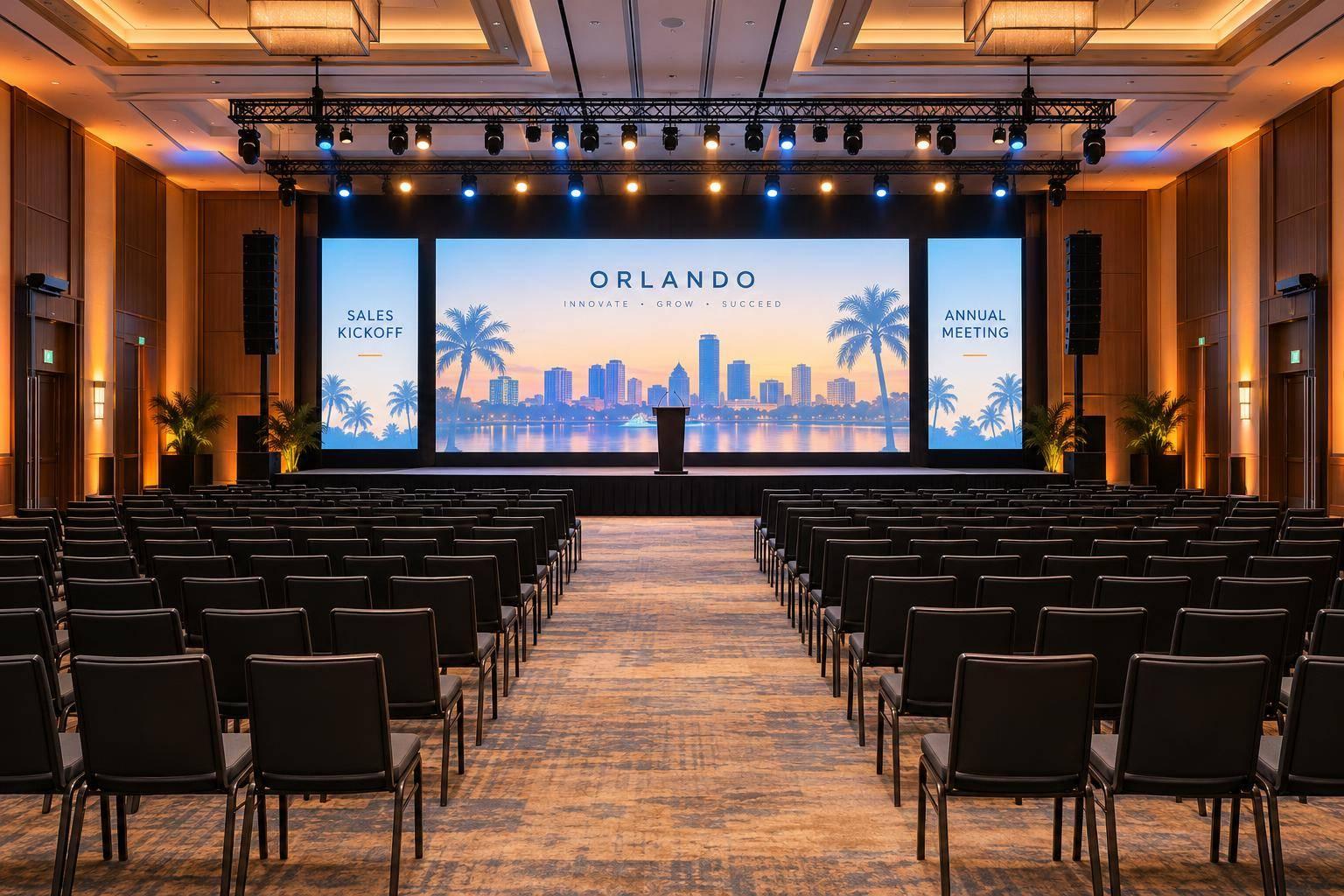
Why Corporate Optics Is Your Partner For Your Next Conference From 500 To 3,500 Attendees.

Chief Executive Officer

For a conference with 500 to 3,500 attendees, we start with your room and agenda - not an equipment list. We bring planning, AV production design, presenter support, and on-site coordination together around what your event needs.
Before you sign, we recommend confirming:
- Scope and cost: Equipment, staffing, venue limits, breakout rooms, and streaming or recording.
- Audience experience: Clear sound, readable screens, visible speakers, and accessible content.
- Show preparation: Presentation checks, rehearsals, cue owners, and one technical lead.
- Backup plans: Spare microphones, alternate playback, network options, and recording delivery.
Attendance helps frame the plan. Your room layout and schedule determine the details. <u>Ask for a written scope and backup plan</u> so you know who handles each part - from setup through teardown.

Conference AV Planning: From Scope to Show Execution
📡 Behind the Scenes: Pro AV Setup for 3-Day Corporate Conference #AxientDigital #YamahaDM7
sbb-itb-ae35a94
Pre-Event Planning With Corporate Optics
Start with a clear scope before choosing equipment. Corporate Optics begins with your goals, then builds audiovisual, venue, and staffing plans around the budget, room, and run of show. Ask for a written scope that separates included production services, venue-provided resources, and your team’s responsibilities.
Define Room, Agenda, and Presenter Needs
Use planning calls and a site review to turn attendance, room layouts, schedules, presenter count, content formats, accessibility, and recording or livestreaming needs into audiovisual equipment and staffing requirements. Before finalizing the scope, check venue limits, including load-in access, power, rigging, internet capacity, and labor rules.
Confirm who collects presentation files, prepares presenters, reviews content, and handles rehearsals and cue checks. Set deadlines and reserve rehearsal time in the venue schedule. Name cue callers, backup owners, and failure-response procedures in the scope so the team can keep transitions smooth and reduce day-of surprises. Corporate Optics’ process includes speaker coordination, run-of-show assistance, rehearsals, and contingency planning.
These details help match production to the room and agenda.
Plan Production by Attendance and Format
Use the ranges below to frame the scope - not to choose a fixed package. Attendance and format affect equipment, staffing, room coordination, and hybrid meeting support. Check each requirement against the actual rooms and agenda.
Illustrative Planning Guidance - Not Fixed Packages
| Planning factor | 500–1,000 attendees | 1,001–2,000 attendees | 2,001–3,500 attendees |
|---|---|---|---|
| Room complexity | May include one general session and limited breakouts. | May require a primary session room plus concurrent breakouts. | May require a large general session, multiple breakout tracks, and overflow viewing. |
| Concurrent sessions | Staffing can focus on scheduled sessions. | Concurrent sessions may need dedicated room technicians. | Several tracks may need distributed technical teams, communications, and a central production lead. |
| Breakout support | Basic display, audio, and presentation support may suffice. | Add room standards, presenter assistance, and coordinated content delivery. | Plan repeatable room configurations, higher technician coverage, selected-room recording or streaming, and fast resets. |
| Display coverage | One main presentation system, with confidence or overflow displays as needed. | More screen coverage, confidence monitors, speaker timers, and key breakout displays. | Evaluate LED or multiple displays, overflow feeds, confidence monitors, and wayfinding or information screens. |
| Staffing | A compact team covering production management, show calling, audio, video, and presenter support, depending on the schedule. | Add room technicians, stage management, content operators, and streaming personnel as complexity increases. | Plan department leads, room technicians, stage and show management, content and broadcast operators, and backup coverage. |
| Streaming scope | Optional single-room recording or streaming. | Hybrid coverage may require switching, remote-presenter support, moderation, and dedicated streaming operations. | Multi-room recording, broadcast-style switching, remote feeds, captioning, and archiving may require a larger technical team. |
Use custom pricing based on scope, venue conditions, labor rules, equipment, rehearsal time, streaming, and schedule. These planning decisions shape the audio, display, and lighting design.
Sound, Displays, and Lighting for Clear Presentations
Corporate Optics coordinates audio, lighting, visuals, scenic elements, and speaker support so every attendee can hear, read, and see clearly. Confirm equipment, quantities, operators, and presenter-support tools in the proposal. Sound, images, and lighting need to work as one system - not as separate equipment packages.
Sound Coverage and Presenter Support
Design sound around room depth, seating layout, and acoustics - not just attendance. Ask how Corporate Optics will test coverage across front, side, and rear seating areas without making the front rows uncomfortably loud. Consider distributed speakers or line-array systems where appropriate.
Match microphones to each session. Headset or lavalier microphones suit presenters who move around the stage. Podium microphones work for formal remarks, while handheld microphones let audience members ask questions.
Confirm that the mixing console has enough channels for microphones, presentation computers, video playback, remote participants, and backup inputs. Make technical rehearsals part of pre-event production. Test every microphone and presentation file on the actual playback system, checking embedded audio, fonts, aspect ratio, and clicker operation.
Give speakers time to practice with their confidence monitor so they can follow slides without turning toward the audience screens. Then check whether attendees can read every screen from the back of the room.
Screen Readability and Stage Visibility
Choose projection, flat-panel screens, or LED displays based on viewing distance, sightlines, content detail, and room light. Screen size and placement should let attendees follow presentations - including detailed charts - from every seating area.
Test the most detailed slides from the farthest seats. A readable title doesn't mean the chart below it is readable. Confirm who handles signal routing, switching, slide advancement, video playback, and confidence-monitor feeds.
Coordinate stage lighting, staging, scenic elements, and branding so speakers stay visible without blocking screens or camera views. Front light should illuminate faces without spilling onto projection surfaces or shining into cameras.
If recording or streaming is included, test camera exposure alongside display brightness. Check for glare, uneven brightness, and LED moiré patterns. On-site coordination should keep these elements aligned through load-in, rehearsal, and showtime.
On-Site Coordination and Backup Procedures
Technical Leadership From Setup Through Teardown
Once the room design is set, one person needs to direct execution on-site. For conferences with 500 to 3,500 attendees, name one technical lead as the escalation point for load-in, cueing, room readiness, and issue response. This person puts the agreed audio, display, and lighting plan into action and directs the backup response when something fails.
The run of show should identify cue owners, file versions, microphone assignments, transition timing, and who can approve changes. Before doors open, the lead should oversee load-in, system tests, and rehearsal. During sessions, make clear who calls cues and resets between speakers. Assign technicians to each active breakout room or overflow space under the lead’s direction. Don’t expect one general-session operator to cover every room.
If the event includes hybrid multi-camera streaming or recording, assign people to support remote contributors, monitor the live stream, and check recording status. Rehearse what happens if a remote speaker disconnects: who contacts them, and does the moderator continue or move to the next agenda item? Assign responsibility for teardown, recording handoff, and venue sign-off after the program.
Confirm Backup Plans and Documented Event Experience
With live control assigned, lock in the failover plan. Ask for a written backup plan tied to the agreed scope and venue conditions, with the technical lead directing the response.
Keep presentation files in two locations that are accessible during the show. Confirm spare microphones and batteries, an alternate playback device or signal path, tested power arrangements, replacement cables, and an approved way to switch sources. For hybrid events, also confirm network contingencies, encoder fallback, local backup recording, and how the team will communicate a stream outage.
Request details from past projects that match your event, including attendance, room configuration, concurrent sessions, production responsibilities, and results. If recordings or analytics are part of the scope, agree on delivery timing and formats before signing.
Conclusion: Discuss Your Conference Requirements With Corporate Optics
Corporate Optics brings planning, AV, lighting, presenter support, venue coordination, and show execution together to fit your room, program, and audience size.
Request a discovery meeting and a tailored proposal. Share your dates, city, venue, estimated attendance, room dimensions, breakout needs, presentation formats, streaming or recording requirements, and budget range. Mention teleprompter needs and rehearsals early so they’re included in the scope.
FAQs
How far in advance should I book Corporate Optics?
Bring Corporate Optics in early - ideally when planning starts or while you’re choosing a venue. For conferences with 500 to 3,500 attendees, book 4 to 6 months ahead. Allow 8 to 16 months for complex logistics, custom scenic work, or large-scale production.
Getting the team involved early leaves time for site surveys and technical planning, helping you avoid costly last-minute surprises.
Can Corporate Optics coordinate with my venue’s AV team?
Yes. Corporate Optics serves as your primary technical contact, handling venue communications about rigging, power, bandwidth, and labor rules. The team coordinates site surveys and checks technical requirements well before your event. This helps spot venue-specific limits or surcharges early, avoid surprises, and match the production plan to your space.
How are last-minute production changes priced?
Corporate Optics provides clear, itemized quotes that separate labor and equipment costs, making it easier to track spending as production needs change. It typically recommends setting aside 10% of your total budget for unexpected technical needs.
Planning early and conducting thorough site surveys help spot potential problems and confirm technical requirements before production, reducing the risk of last-minute cost spikes.
Related Blog Posts
- Best Meeting Planning Company For Technical Production And AV
- Strong Audio-Visual Companies For Leadership Conference Production And Venue Management.
- Leading Companies To Work With For Full Conference Production
- Have A Multi-Day Conference To Plan? Let Corporate Optics Be Your AV Conference Technical Production Partner (And Why We’re Your Best Choice!)



Streamline your workflow, achieve more

Lorem ipsum dolor sit amet, consectetur adipiscing elit. Maecenas ac velit pellentesque, feugiat justo sed, aliquet felis.



Lorem ipsum dolor sit amet, consectetur adipiscing elit. Maecenas ac velit pellentesque, feugiat justo sed, aliquet felis.