Annual Meeting Production Guide For Public And Private Companies.

Chief Executive Officer
I start annual meeting planning with two things: counsel-approved rules and a written production plan. Before booking a venue or choosing a platform, confirm who can attend, how voting will work, and who can approve changes.
For public and private companies, I organize the work into five steps:
- Set the requirements: Define the audience, meeting format, accessibility needs, confidentiality, and decision owners.
- Plan the schedule and budget: Start six months ahead when possible, assign deadlines, and fund tested backups. A 10%–15% reserve is a planning example - not a rule.
- Prepare the room, systems, and speakers: Test access, audio, captions, voting, presentations, and backup connections.
- Run the meeting: Use one approved cue sheet, clear staff roles, and response plans. <u>Production staff handle systems; authorized meeting officials decide formal meeting actions.</u>
- Close out the work: Secure records, confirm filing deadlines with counsel, reconcile costs, and review results within 5–10 business days.
My goal is simple: help eligible attendees take part, complete the required business, and leave an accurate record.
Annual Meeting Production Timeline: Six Months to Meeting Day
2. Plan the Timeline, Budget, and Vendors
Turn the meeting brief into a dated schedule that names owners, dependencies, and approval gates. Include milestones for production, venue, AV, speakers, rehearsals, and vendors. Keep legal deadlines and approvals on a separate, counsel-approved track.
Use this schedule to set venue bookings, technical design, and rehearsal dates.
Build a Six-Month Production Timeline
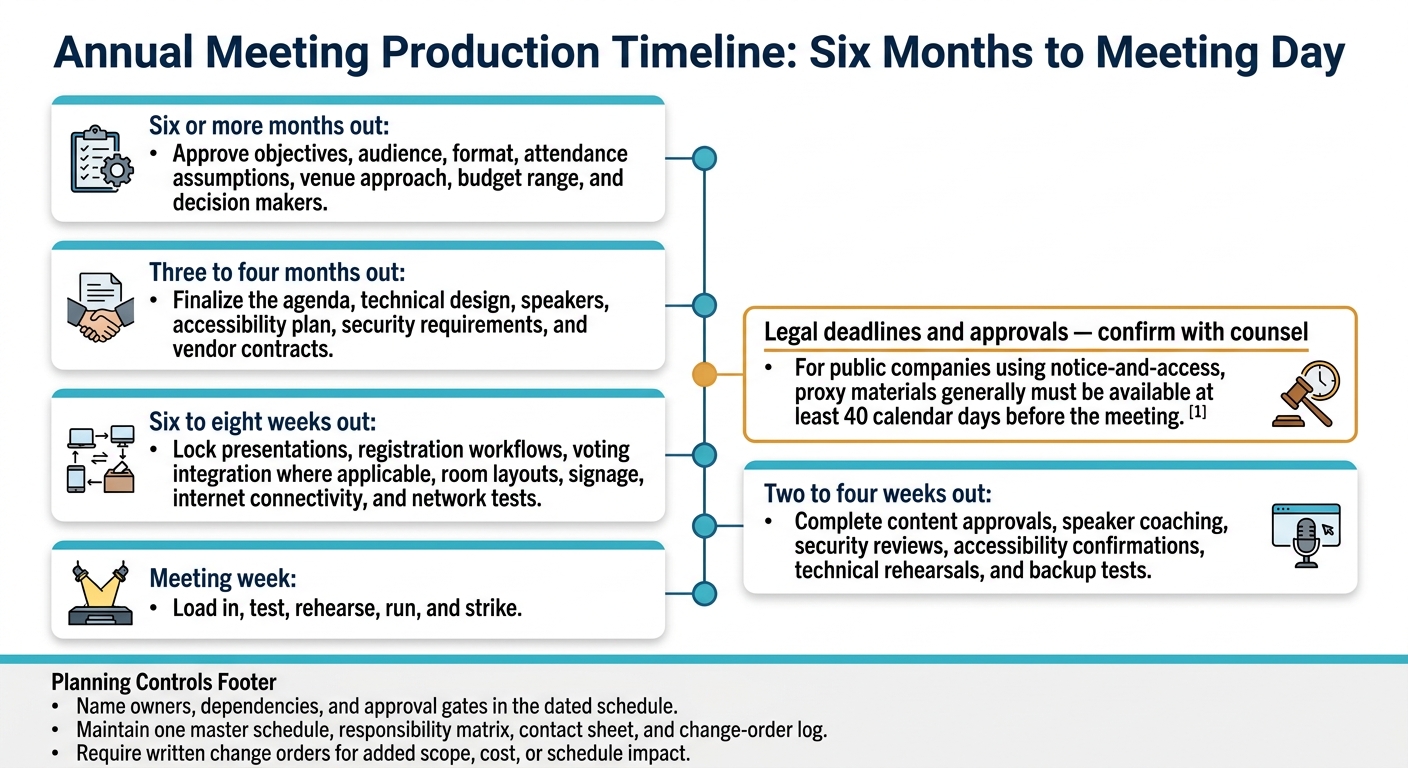
- Six or more months out: Approve objectives, audience, format, attendance assumptions, venue approach, budget range, and decision makers.
- Three to four months out: Finalize the agenda, technical design, speakers, accessibility plan, security requirements, and vendor contracts.
- Six to eight weeks out: Lock presentations, registration workflows, voting integration where applicable, room layouts, signage, internet connectivity, and network tests.
- Two to four weeks out: Complete content approvals, speaker coaching, security reviews, accessibility confirmations, technical rehearsals, and backup tests.
- Meeting week: Load in, test, rehearse, run, and strike.
For public companies using notice-and-access, proxy materials generally must be available at least 40 calendar days before the meeting.
Set the Budget and Contingency Reserve
Give every bidder the same assumptions for attendance, duration, speakers, access, recording, and streaming. The figures below are planning examples only. Before approval, confirm taxes, service charges, payment milestones, cancellation exposure, and labor rules.
Category Hypothetical planning amount Approval owner Primary cost risk Venue, rooms, and basic services $25,000 Executive sponsor Date changes, minimum spend, overtime AV, staging, lighting, and labor $60,000 Production lead Equipment complexity, union labor, extended hours Streaming and recording $15,000 Communications lead Platform, redundancy, recording deliverables Registration and voting technology $20,000 Governance lead Shareholder volume, integration, security Internet and network services $8,000 IT lead Dedicated bandwidth, testing, backup circuit Speaker, accessibility, and content services $12,000 Communications lead Coaching, captioning, interpretation, revisions Security, insurance, and transportation $10,000 Operations lead Threat level, coverage, travel, shipping Post-production and closeout $5,000 Communications lead Editing, archiving, additional deliverables Illustrative production subtotal $155,000 Executive sponsor Scope and schedule changes Illustrative 10%–15% reserve $15,500–$23,250 Executive sponsor Unplanned technical, labor, or access needs
Manage Vendor Schedules and Scope Changes
Maintain one master schedule, responsibility matrix, contact sheet, and change-order log. Set approval deadlines for slides, layouts, voting configuration, accessibility, security, and attendee communications.
Before signing, confirm scope, labor classifications, overtime rates, minimum calls, equipment responsibilities, internet specifications, insurance certificates, load-in and strike windows, and payment terms.
Hold the reserve centrally and record every draw. Size it to risk - not a fixed 10%–15% rule. Put the production lead in charge of resolving venue, technical, security, and accessibility conflicts. Escalate budget disputes to the executive sponsor and voting or disclosure questions to the governance lead. Require written change orders for added scope, cost, or schedule impact.
sbb-itb-ae35a94
3. Prepare the Venue, AV Systems, and Speakers
With the schedule and vendors set, focus on venue load-in, system checks, and getting speakers ready.
Check Venue Access, AV Coverage, and Backups
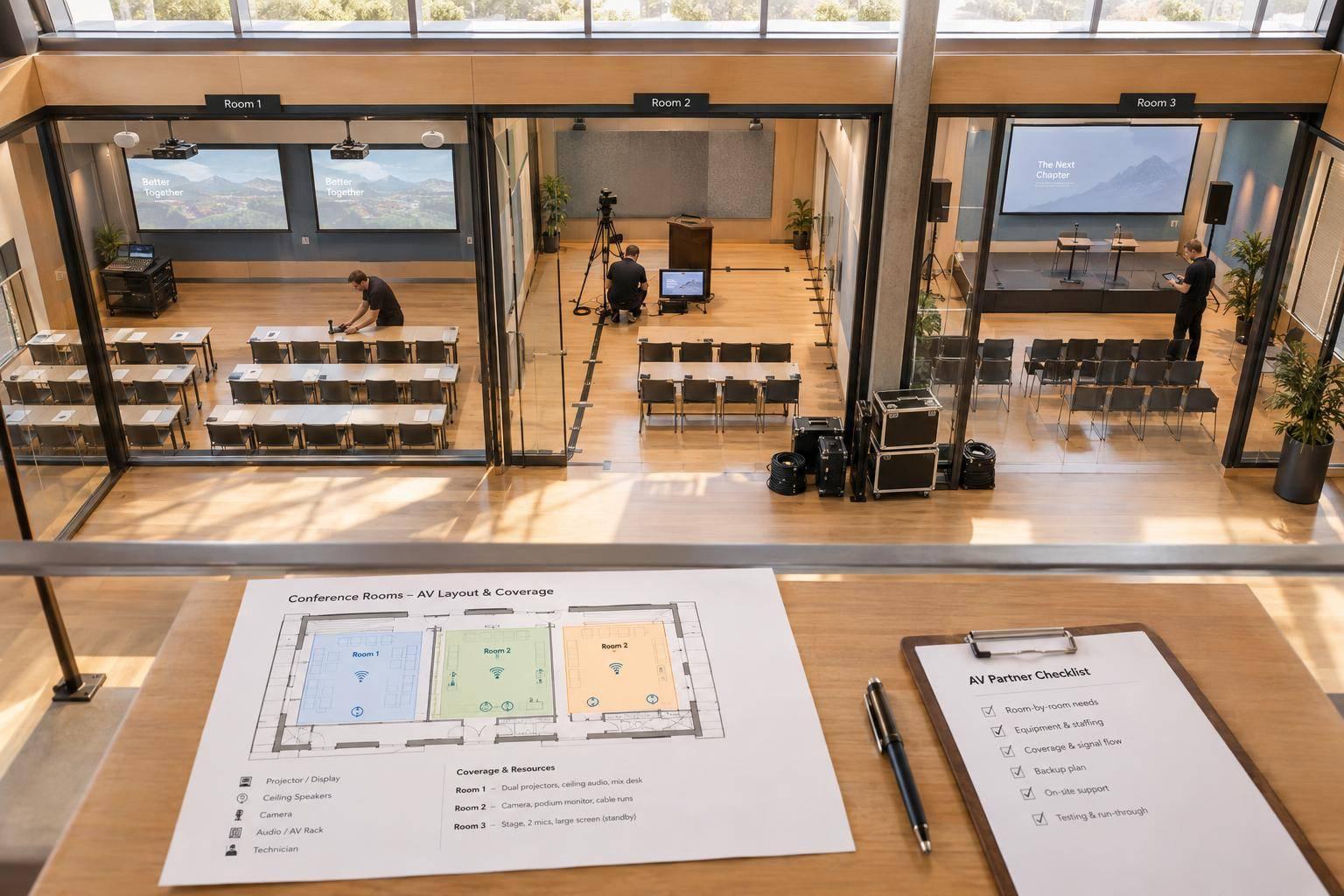
Use one floor plan to mark seating, screens, cameras, registration, emergency exits, green rooms, and private governance rooms. Review capacity, sightlines, ceiling height, rigging, loading access, labor rules, parking, and power with the venue manager. Check for continuous accessible routes from drop-off through seating and restrooms, along with accessible stage access and companion seating. Use 36 inches of clear route width as a quick accessibility check; code requirements still control. Test slide readability from the farthest seat. Position captions so they remain visible without covering slides. These checks help protect attendance, participation, and the meeting record.
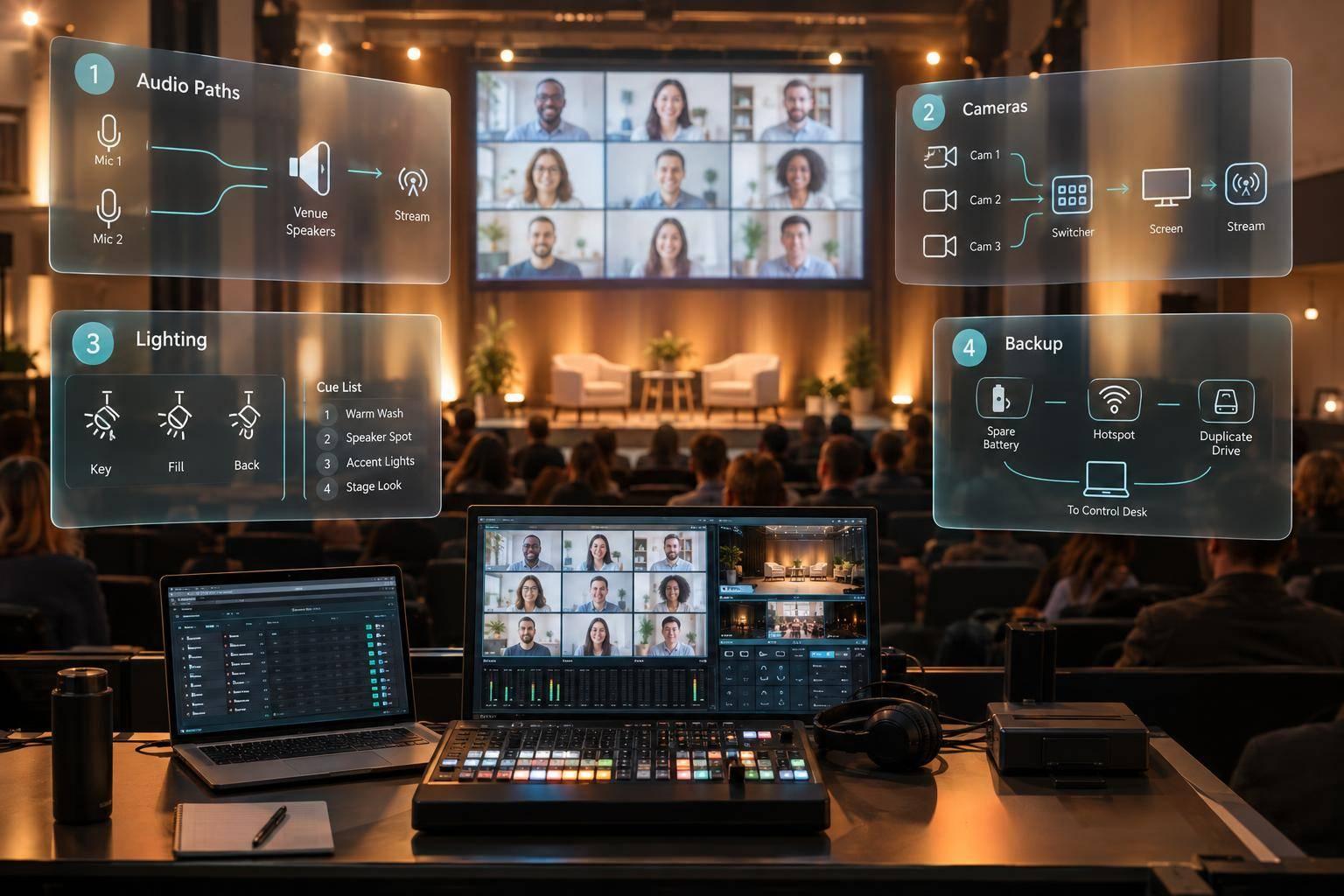
Map the full signal path: microphones, console, speakers, cameras, switcher, playback, displays, confidence monitors, timers, lighting, encoder, captions, and recording. The setup needs to capture votes, questions, and official remarks without interruption. Assign owners for audio, video, streaming, stage management, and IT, and set up crew communications. Use dedicated wired internet, then test upload speed, latency, firewall restrictions, and backup connectivity. Keep spare microphones, a backup presentation computer, duplicate playback files, protected power, and a local recording path ready so every official action can be seen, heard, and recorded.
Secure Voting, Remote Access, and Confidential Content
For public companies, confirm that remote participation meets governing documents and applicable law. Test credentialing, proxy instructions, proposal displays, moderated questions, and private vote-status updates with the inspector of elections. Run a mock vote before rehearsal to check that eligible participants can take part.
For private companies, test permissions for owners, directors, employees, observers, remote presenters, and vendors. Also test multifactor authentication, encrypted files, and expiring links to confirm that disclosure stays controlled. Explicitly approve recording, transcription, downloads, and AI-generated summaries. Define open, restricted, and closed access states so operators know which audiences, feeds, and recordings are permitted.
For hybrid sessions, test remote presenters’ microphones, framing, lighting, wired internet, and backup phone access. Check return feeds - the program feed sent back to presenters - for echo, slide visibility, timers, chair cues, captions, and moderated questions. Assign question moderation and stream monitoring to separate people. Verify encoding, recording permissions, and backup connectivity from end to end. Before confidential discussion starts, confirm that all streams, recordings, and transcription not permitted for that session have stopped.
Approve Content and Rehearse Meeting Cues
Once the room and signal path are confirmed, lock content and rehearse live cues. Maintain one presentation master with dated versions and named approvals from legal, finance, governance, communications, and the chair. Lock playback files before the final rehearsal, keep secure backups, and require documented approval for any swaps.
Coach speakers on timing, microphones, confidence monitors, teleprompters, describing key visuals, and handling sensitive questions. Start with a read-through, then move to segment, technical, and dress rehearsals. Test videos, audience microphones, remote handoffs, return feeds, captions, holding slides, and backup operation.
Rehearse vote-open and vote-close cues with the chair and inspector. For private meetings, rehearse transitions into restricted sessions. Collect five sign-offs: speakers, content, technical systems, governance, and contingencies. Resolve critical failures before doors open.
4. Run the Meeting and Handle Live Problems
Once approvals and rehearsals are complete, lock the live sequence and assign an owner to every cue.
Sample Annual Meeting Run of Show
Use one locked run of show with a revision number, named cue owners, backup cues, and approval status. The sample below uses Eastern Time (ET). Counsel and the chair should approve the sequence and voting windows before publication. Public-company voting must follow approved proxy materials and governing procedures. For private companies, replace proposal and voting segments with ownership updates, reserved matters, and authorized approvals.
Every cue owner needs to be assigned, reachable, and backed up.
Time (ET) Segment Presenter Visuals Audio and lighting Voting or questions Show-caller cue 9:00 a.m. Doors open and check-in Registration lead Welcome; accessibility instructions Pre-show music; full house lights Verify voting access Begin attendance monitoring 9:30 a.m. Technical hold Production team Holding slide Test audio, playback, stream, captions, lighting Verify platform readiness All departments: final test 9:55 a.m. Welcome and rules Moderator or secretary Agenda; participation rules Presenter microphone Explain question and voting procedures Switch to meeting lighting 10:00 a.m. Call to order Chair Title Chair microphone Begin session Open chair microphone 10:03 a.m. Quorum or attendance confirmation Corporate secretary or governance lead Attendance status Speaker microphone; no music Verify required attendance Await quorum confirmation 10:08 a.m. Leadership remarks CEO and chair Approved deck Presenter microphones None unless authorized Follow slide advances 10:25 a.m. Financial report CFO or finance lead Financial highlights CFO microphone Hold questions Follow slide advances 10:40 a.m. Proposals and voting Chair, secretary, or inspector of elections Proposals; instructions Presenter microphone; timer if used Open, monitor, and close as authorized Await authorized poll cues 10:55 a.m. Moderated questions Moderator and approved speakers Topic slide Audience and remote audio Screen and sequence under approved rules Open question queue 11:15 a.m. Results or resolutions Inspector of elections or chair Authorized results Formal lighting Announce authorized results only Hold results until approved 11:20 a.m. Closing and adjournment Chair Closing slide Music after adjournment Authorized official adjourns Hold music until adjournment 11:25 a.m. Recording close Broadcast engineer and producer End card Fade microphones and stream audio Preserve voting and attendance records Stop recording after governance release
Assign Live Roles and Complete Pre-Show Checks
The executive producer owns delivery and escalation. The show caller issues production cues. Assign stage and speaker managers, an audio engineer, video director, playback operator, lighting director, broadcast engineer, registration and voting leads, and an accessibility coordinator.
Smaller meetings may combine producer/show caller or video/playback duties. Even then, keep audio coverage, voting oversight, and independent governance authority in place. Governance officials must remain on call for quorum, voting, and adjournment decisions.
Complete a documented check 60 minutes before the start, then repeat critical checks in the final 15 minutes. Test audio, video, network, captions, voting, and the question queue. Make sure remote attendees can hear, see, ask questions, and use required access services - not just connect.
Keep production communications separate from restricted governance/security channels. Follow this escalation path: operator → show caller → executive producer → authorized governance contact. Send threats directly to security.
Log incident times, affected participants, approved changes, decisions, recovery actions, and attendee messages. Keep a separate record of the call to order, quorum confirmation, poll opening and closing, authorized results, and adjournment. Track each question’s timestamp, eligibility where applicable, topic, disposition, and answer owner.
When a cue fails, access breaks, or voting stops, follow a preapproved response plan.
Create a Contingency Matrix With Decision Owners
A production hold is not a recess or adjournment. Only authorized meeting officials can change the meeting state.
Use this matrix when a live issue threatens timing, access, or the validity of meeting business.
| Trigger | Immediate response | Tested backup | Decision owner | Attendee message |
|---|---|---|---|---|
| Power loss: room or equipment shuts down | Stop nonessential activity; protect equipment and recordings | UPS, generator, emergency lighting, battery communications, printed procedures | Executive producer: production hold; chair, advised by counsel: formal action | The meeting is paused pending further instructions. |
| Network outage: disconnects, severe latency, or failed voting/question traffic | Hold cues; preserve recording and poll state; contact network leads | Secondary wired connection, cellular backup, alternate dial-in, local recording | Broadcast engineer: recovery; corporate secretary/counsel: effects on participation and voting | Remote access is unavailable; await recovery instructions. |
| Playback failure: file fails or cue times out | Keep presenter live or use approved transition | Backup computer, local files, still-image deck, printed notes | Show caller: cue change; producer: approved replacement content | We are switching to the backup presentation. |
| Microphone failure: silence, feedback, or distortion | Cut faulty channel; switch microphones | Wired spare, charged wireless spare, lectern or handheld microphone | Audio engineer and show caller | Please hold for an audio adjustment. |
| Late speaker: presenter misses standby | Reorder approved segments or extend moderator content | Backup presenter, approved recording, earlier question period | Show caller and producer; governance approval for formal segments | We will begin the next portion of the meeting. |
| Accessibility failure: missing captions, interpreter, or readable content | Pause or repeat content accessibly | Backup captioner, accessible PDF, verbal description, interpreter connection | Accessibility coordinator; producer and governance contact for material impact | Please hold while we restore accessible participation. |
| Stream failure: frozen broadcast or lost audio | Preserve recording; post status; seek governance direction on continuation | Secondary stream, backup encoder, local recording, reconnection notice | Broadcast engineer: restoration; chair and counsel: effects on meeting proceedings | The remote broadcast is interrupted; await instructions on proceedings. |
| Security incident: access without permission, exposed content, or threat | Restrict access; preserve evidence; notify security | Alternate credentials, waiting room, confidential channel, manual attendance | Security lead and executive producer; counsel and chair for formal action | Please follow official security instructions. |
| Voting dispute: inconsistent counts or challenged eligibility | Hold results; preserve audit records; verify counts | Inspector of elections’ backup report, independent reconciliation, approved manual procedure | Inspector of elections, corporate secretary, and counsel | Results are withheld pending verification. |
Before releasing a hold, confirm that access, audio, captions, voting, and questions are restored. Get governance clearance, then log the restart time. Production staff can restore systems; authorized meeting officials decide whether the meeting pauses, continues, or adjourns.
5. Close Out the Meeting and Keep Records
Complete the Post-Meeting Checklist
Send official records to the governance team to finalize minutes, reconcile votes, and approve disclosures. Move production files into the archive. Public companies should file Form 8-K Item 5.07 within four business days. Counsel should confirm any other required securities filings. Private companies should secure approved resolutions, ownership updates, and confidential discussion records.
Secure recordings, captions, transcripts, presentations, and Q&A exports immediately. Track each release in a log that names the owner, approver, version, audience, due date, storage location, and retention category. Before releasing approved materials, check names, financial figures, captions, and speaker attribution. Restrict access and follow counsel-approved retention and legal-hold requirements - not a fixed deletion date.
Match invoices against purchase orders, signed scopes, and approved change orders, including overtime and postproduction charges. Within 5–10 business days, review hybrid meeting performance, including attendance, accessibility, technical incidents, feedback, and budget variance. Archive the final run of show, cue sheets, diagrams, approved content, and lessons learned. Give every unresolved issue an owner and a deadline.
Organize Next Year’s Planning Checklists
Turn the closeout review into next year’s planning tracker. For each item below, record an owner, due date, dependency, evidence link, and status: not started, in progress, ready for approval, or complete.
Focus first on early governance decisions, a workable format, funded backups, content approvals, high-risk rehearsals, and clear authority during the live meeting. Plan for both accurate proceedings and dependable production, using the closeout findings to guide each checklist.
| Checklist | Accountable owner | Completion evidence |
|---|---|---|
| Governance | Corporate secretary or legal lead | Approved requirements, voting procedures, filing calendar |
| Venue | Facilities or event lead | Confirmed access, layout, accessibility, power, internet |
| AV systems | Production lead | Tested systems and backups; approved budget |
| Speakers | Communications lead | Approved content and completed rehearsals |
| Hybrid delivery | Virtual-event lead | Verified authentication, captions, remote questions, voting access |
| Show-day readiness | Production and governance leads | Approved cue sheet, escalation path, backup owners |
| Closeout | Corporate secretary and production manager | Approved records, reconciled costs, secure archive |
Prepare a one- to two-page meeting brief to launch next year’s planning. Include audience size, public or private company status, format, governance requirements, accessibility, confidentiality, budget range in U.S. dollars, and the meeting date, time, and time zone.
FAQs
How do I choose between an in-person, virtual, or hybrid annual meeting?
Choose virtual when shareholders are spread out, efficiency matters, and you want to cut venue costs. Choose in-person when shareholders are nearby and face-to-face interaction is a priority. Use hybrid when you need both in-room and remote access - but expect the most complexity. Voting, Q&A, and AV production must stay in sync.
Before choosing, confirm that state law, bylaws, and board approvals allow the format. Budget for staffing, access controls, and backup plans for technical problems.
What should I prioritize if I have less than six months to plan?
Set the meeting format, governance rules, and voting process now. These decisions shape the technical and legal requirements. Plan staging, streaming, and voting as one system to support reliability and compliance.
Put redundant internet connections, backup encoders, and tested manual voting procedures ahead of aesthetics. Give every task a named owner, and document a single run of show to keep execution on schedule.
How can I reduce production costs without compromising participation?
Choose a meeting format that fits where your shareholders are located and what you want to achieve. Virtual meetings generally offer the lowest cost as attendance grows. They remove venue, catering, and travel expenses while supporting online voting and Q&A.
Put compliance and reliability ahead of appearance. Plan for backup encoders and redundant internet connections, and use professional production support to help prevent costly disruptions. Save your processes and run-of-show materials to cut planning time and expenses for future meetings.
Related Blog Posts



Streamline your workflow, achieve more

Lorem ipsum dolor sit amet, consectetur adipiscing elit. Maecenas ac velit pellentesque, feugiat justo sed, aliquet felis.



Lorem ipsum dolor sit amet, consectetur adipiscing elit. Maecenas ac velit pellentesque, feugiat justo sed, aliquet felis.