When The Conference Timeline Shrinks, Corporate Optics Helps Teams Keep Production On Track.

Chief Executive Officer
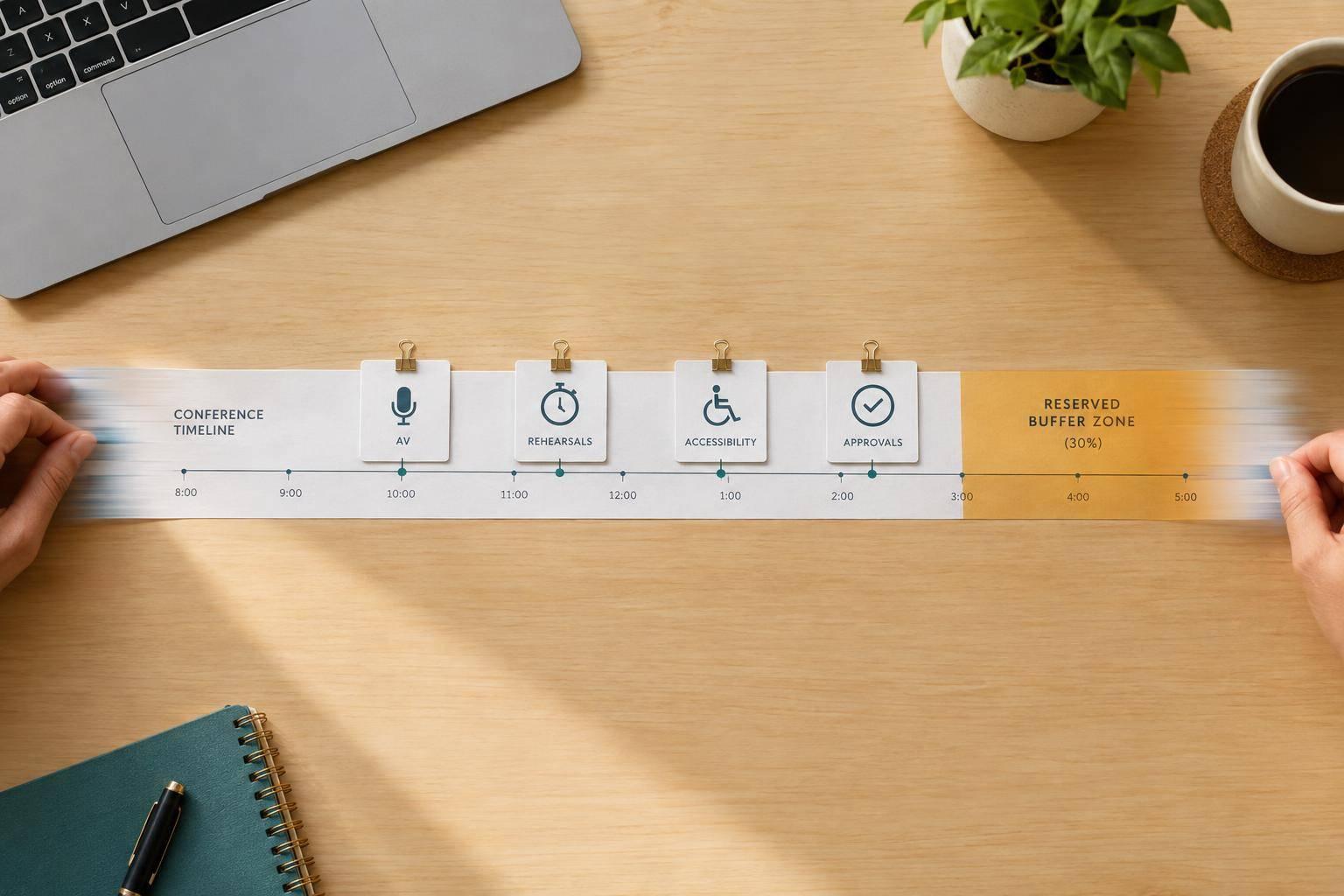
When conference time gets cut, I protect safety, sound, presentation playback, accessibility, and rehearsal first - not décor. I work backward from doors opening, assign each deadline one owner, and plan a 30% schedule buffer for delays.
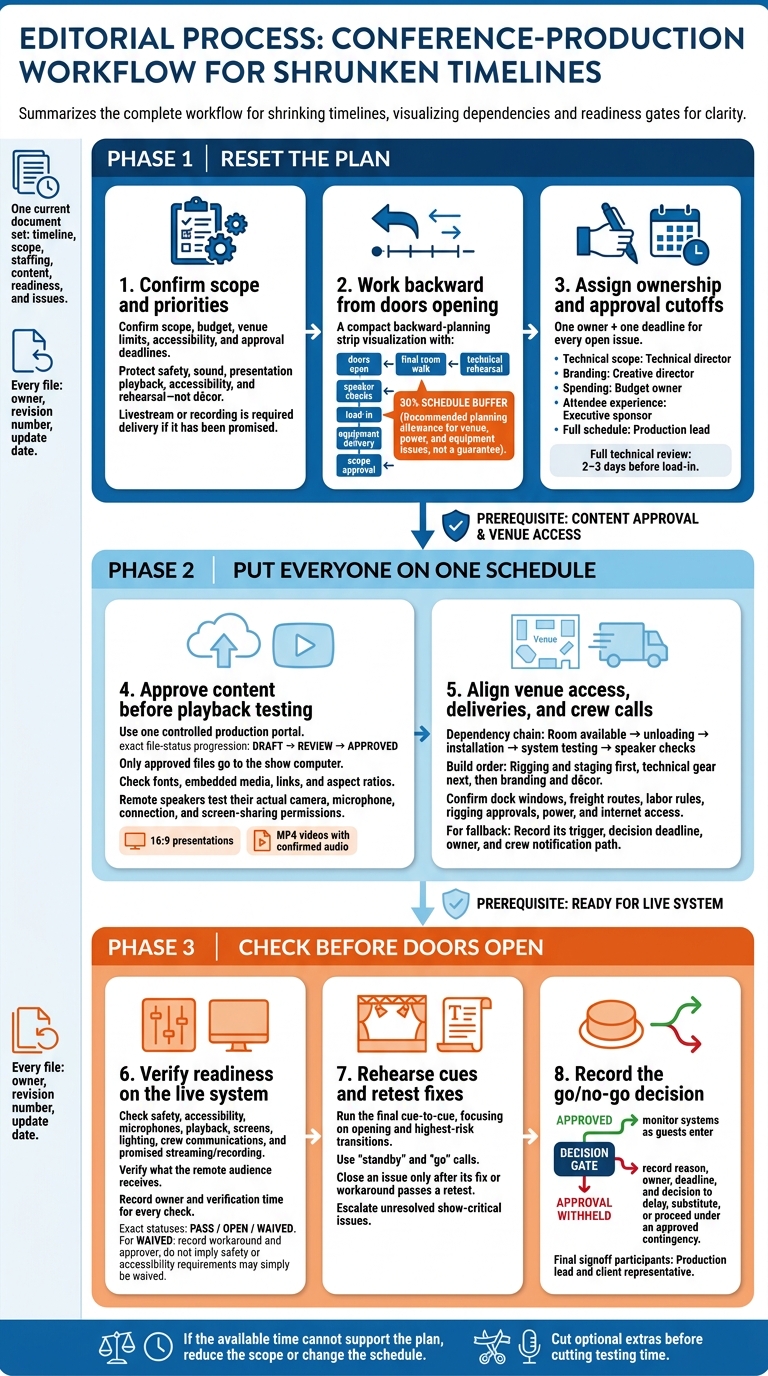
With Corporate Optics coordinating the production work, I focus on three steps:
- Reset the plan: Confirm scope, budget, venue limits, and approval deadlines. Cut optional extras before cutting testing time.
- Put everyone on one schedule: Match approved speaker files, crew calls, equipment deliveries, and venue access. Test backups before relying on them.
- Check before doors open: Rehearse cues, retest fixes, and record who approves the decision to proceed or delay.
My rule: <u>if the available time cannot support the plan, reduce the scope or change the schedule.</u> Keep one current document set, with a named owner and deadline for every open issue. A shorter timeline is no reason to skip the checks.
Conference Production Checklist for Tight Timelines
Step 1: Reset the Timeline and Approval Deadlines
Turn the confirmed scope into dated milestones, then work backward from show day to set approval deadlines. This protects show-critical work while there’s still room to adjust the schedule.
Work backward from the first audience-facing session, not from today. Protect doors-open time, the final room walk, technical rehearsal, speaker checks, system testing, load-in, equipment delivery, and scope approval. Set decision deadlines around that sequence. Include a 30% schedule buffer for venue, power, and equipment issues. If that buffer disappears, cut optional elements first.
Before sharing the timeline, confirm everything that affects AV and approvals: date, venue and room, first session time, presenter count, playback, livestream or recording, accessibility, power and network, access, labor rules, and strike window. Add room changes, remote presenters, captioning, interpretation, and assistive listening to the timeline.
Build a Revised Production Timeline
Define “done” for each milestone. Keep its deadline, deliverable, accountable owner, dependency, approver, status, and escalation point in one working document. “Equipment booked” means the rental list, substitutions, delivery time, and load-in plan are approved - not just requested.
Hold a full technical review 2–3 days before load-in. Check the run of show, presentations, presenter arrivals, venue access, power, internet, microphones, camera positions, recording, backups, and emergency contacts.
Hypothetical October 2026 example; ET.
Milestone Deadline Deliverable Accountable owner Dependency Escalation point Scope confirmation October 6, 2026, 12:00 PM ET Approved room, session, AV, accessibility, and recording requirements Executive producer Client agenda and venue information Production lead if scope is incomplete at deadline Design approval October 6, 2026, 3:00 PM ET Approved stage, screen, lighting, and branding plan Creative director Confirmed scope and room dimensions Client sponsor for unresolved choices Equipment and crew booking October 7, 2026, 12:00 PM ET Locked rental order, crew roster, and call schedule Technical director Approved scope and design Production lead immediately for unavailable equipment or labor Content review October 8, 2026, 5:00 PM ET Reviewed presentations, videos, and playback formats Show caller and content manager Speaker submissions Speaker owner for missing or incompatible files Venue coordination October 9, 2026, 12:00 PM ET Confirmed access, dock, power, network, rigging, and safety plan Venue liaison Venue confirmation and production drawings Production lead for restrictions Rehearsal Event day, 11:00 AM–12:00 PM ET Completed cue-to-cue run, speaker checks, and issue log Show caller Tested systems and available presenters Production lead for show-critical defects before doors Show-day execution Event day, doors at 12:30 PM ET Approved run of show and live technical operation Show caller and department leads Rehearsal signoff and readiness checklist Show caller for deviations Replace these hypothetical deadlines with the actual event schedule.
Rank AV Needs and Budget Priorities
Once the timeline is fixed, use a clear priority order to decide what stays and what gets cut. That same order should guide approvals, substitutions, and deferrals. Livestream or recording is required delivery if it’s been promised. Protect accessibility and safety, and check that each fallback meets the actual requirement.
Hypothetical priority matrix: Keep microphones and presentation playback reliable while deferring decorative scenic work. Confirm each fallback before relying on it.
Requirement Event impact Approval urgency Dependency Fallback Wireless lavalier and handheld microphones Presenters must be heard reliably Immediate Frequency coordination, charged batteries, mixer inputs Wired handheld microphones and spare batteries Presentation playback system Keynote and session content must display correctly Immediate Final files, playback computer, display signal path Backup laptop with locally stored files and a second connection path Captioning or assistive listening Accessibility and inclusion requirement Immediate Vendor availability, room audio feed, display or receiver setup Approved accessible communication method that meets the requirement Basic stage and front light Presenters must be visible and cameras must receive usable images Same business day Room layout and power Simplified lighting package Livestream or recording Required if promised Same business day Internet, encoding, camera positions, audio mix Record locally and publish later if approved Decorative scenic treatment Affects appearance, not core delivery Can wait Design approval, fabrication, labor, freight Standard stage set, drape, or venue backdrop Additional scenic lighting effects Enhances atmosphere but is not essential Can wait Lighting programming and rehearsal time Basic white or colored stage wash
With priorities set, route each decision through one owner.
Set One Approval Path
Assign technical scope and substitutions to the technical director, branding to the creative director, spending to the budget owner, and attendee-experience changes to the executive sponsor. Put the production lead in charge of the full schedule. Publish approval cutoffs alongside the timeline, and distribute one current plan.
For every late request, log the change, requester, decision-maker, deadline, cost impact, schedule impact, and final decision. Use the agreed priority order to approve, substitute, or defer it.
Hypothetical cost example: Adding a second confidence monitor could require $450 for equipment and delivery plus $300 for labor - a $750 total. These are illustrative figures only; actual pricing depends on the supplier, venue, labor rules, notice period, and equipment availability. The change record should also capture delivery or programming impact and rehearsal time lost before approval.
sbb-itb-ae35a94
Step 2: Coordinate Content, Crews, Equipment, and Access
Use the revised production timeline to coordinate speaker support, AV, and venue access. Put every task on the same clock, with approval deadlines and one owner for each handoff. Files must be approved before playback testing, rooms must be available before unloading, and systems must be tested before speaker checks.
Assign Content and Speaker Tasks
Use one production portal, such as a controlled project folder, and one intake form for every speaker and session. Record the session name, presenter, content owner, file type, aspect ratio, playback requirements, remote-speaker status, and approval status.
Set file requirements upfront: 16:9 presentations, MP4 videos with confirmed audio, vector or high-resolution logos, and a completed technical questionnaire for remote speakers. Reject files submitted outside the portal. Label files draft, review, or approved, and archive older versions. Have one coordinator publish ONLY approved files to the show computer, after checking fonts, embedded media, links, and aspect ratios.
| Task | Accountable owner | Supporting contributors | Approval authority |
|---|---|---|---|
| Collect decks, videos, logos, and scripts | Content coordinator | Speakers, designers, speaker liaison | Content lead |
| Check files and load approved versions | Playback operator | Content coordinator, video operator | Technical director |
| Confirm speaker details and stage needs | Speaker liaison | Marketing, stage manager | Event owner |
| Test remote-speaker connection | Streaming lead | Speaker, corporate IT | Technical director |
| Confirm session cues | Show caller | Stage, audio, video, lighting leads | Production manager |
Track each item’s owner, deadline, file path, and status in one matrix. Schedule short technical checks before the full rehearsal. Give priority to remote presenters, first-time presenters, executives, and sessions with videos, demonstrations, or complex stage movement.
Check microphones, slide advancement, confidence monitors, entrances, and cue timing. Remote speakers must test their actual setup: camera, microphone, connection, and screen-sharing permissions - not substitute equipment.
Once approved files are locked, match crew assignments to those delivery dates.
Align Crew Calls and Equipment Deliveries
Confirm only the roles the show needs, and assign each by name: production manager, technical director, show caller, stage manager, audio engineer, video or playback operator, lighting operator, camera operator, streaming engineer, and stage or backstage support.
Finalize equipment after the roles and design are locked. Schedule deliveries and crew calls alongside room handover, installation, testing, speaker checks, rehearsal, meal breaks, show hours, and strike.
Use the call sheet as the master reference for roles, call times, phone numbers, parking, access instructions, radio channels, and escalation contacts. Build in this order: rigging and staging first, technical gear next, then branding and décor.
Match each delivery to a venue window, testing requirement, and fallback plan.
Map Load-In Needs and Backup Plans
Get written venue confirmation of dock windows, freight routes, labor rules, rigging approvals, power, and internet access. Record dock, elevator, aisle, and storage dimensions in feet and inches. Compare the narrowest point with the largest case, and map power and cable routes without blocking exits.
Replace the sample times below with confirmed venue times before dispatch.
Equipment group Delivery time Setup owner Testing requirement Venue dependency Contingency Staging and risers 6:30 a.m. Stage lead Level, stable, and accessible Dock, room handover, venue labor Use a reduced stage footprint if freight is delayed Audio package and microphones 7:00 a.m. Audio lead Line check, RF scan, spare microphones Power and approved RF frequencies Keep wired microphones and spare batteries ready LED wall or projection package 7:30 a.m. Video lead Signal, resolution, brightness, backup input Rigging, power, sightlines Use confidence monitors or a backup display Playback and presentation system 8:00 a.m. Playback operator Open every approved deck and video Secure network or local files Maintain an offline copy on a second computer Lighting fixtures and control 7:00 a.m. Lighting lead Focus, cue, and emergency work light Rigging points and power Use floor fixtures or a simplified look Streaming and recording system 8:30 a.m. Streaming lead Program, return feed, recording, and backup internet Venue internet and IT support Switch to local recording or dial-in audio Branding, signage, and scenic elements 9:00 a.m. Stage manager Placement and sightline check Storage and room access Print or use a reduced digital branding package
For each fallback, record the trigger, decision deadline, owner, and crew notification path. If a speaker cancels or a connection fails, the content lead and show caller should immediately activate the preapproved substitute, recorded message, moderated discussion, or shortened segment. Keep local slides and remarks ready, and review unresolved dependencies in the daily production huddle.
Step 3: Check Readiness Before Doors Open
Once load-in and system checks are complete, use the readiness checklist to make the final go/no-go decision. Check microphones, playback, accessibility, and cue timing before doors open. Protect testing and rehearsal time from late files and meetings that can wait. Use a time-stamped checklist to record what passed, what remains open, and who verified each item.
Complete the Readiness Checklist
Assign an owner and verification time to every check. Review stage condition, seating, accessibility routes, exits, cable ramps, approved power distribution, and screen visibility from the back and side seats. Have the venue representative and production lead sign the safety walkthrough form. Mark each item pass, open, or waived. For any waiver, record the workaround and who approved it.
Test the full show path on the live system: approved presentations, embedded video, house audio, audience screens, confidence monitors, lighting looks, microphones, and crew communications. Confirm that speakers are ready and the opening sequence is set for your corporate sales conference. If the show includes cameras or streaming, check framing, feed audio, access settings, recording capacity, and backup recording. Check what the remote audience receives, not just the control-room preview.
Rehearse Cues and Close Open Issues
After the checklist passes, run the final cue-to-cue with the show caller, operators, stage support, speakers, and client representative. Focus on the opening and highest-risk transitions, including entrances, exits, video rolls, and microphone handoffs. Use consistent “standby” and “go” calls, and record approved changes in the final run of show.
Keep a live issue log with each issue, owner, deadline, workaround, status, and escalation contact. Close an item only after its fix or workaround passes a retest. Flag unresolved show-critical issues for the go/no-go decision.
Before doors open, confirm emergency contacts and who has authority to hold doors, pause the program, or stop the show for safety. Require the production lead and client representative to sign off on the approved final show file, loaded and backed-up content, and any approved workarounds that keep show-critical systems live.
If approval is withheld, record the reason, owner, deadline, and decision to delay, substitute, or proceed under an approved contingency. After approval, assign a door watch to monitor systems, communications, and room conditions as guests enter.
Conclusion: Keep the Production Plan Ready
Once scope, access, and readiness align, lock the final document set. Corporate Optics helps coordinate approvals, deliveries, and readiness checks so scope stays aligned with venue access. If access, labor, or testing time can’t support the scope, reduce the scope or reset the schedule instead of squeezing the work into less time.
Confirm Final Production Documents
Before final signoff, review the working files as one package of conference event production best practices: timeline, scope, staffing, content, readiness, and issues. Make sure speaker content is approved before playback testing begins.
Share one current document set with the event team, Corporate Optics, and venue contacts. Label every file with its owner, revision number, and update date. Archive older copies so everyone works from the same version.
Circulate the approved set, then hold a final coordination check to support the go/no-go decision. Confirm scope, crew calls, content approval, and fallback plans. Log approved changes and update any documents they affect.
End the check by recording what’s ready, what’s still open, and the accepted fallback for each gap. Assign every gap one named owner, a firm deadline, and an escalation path.
FAQs
How late can Corporate Optics join our planning?
Corporate Optics can step in on short notice, depending on the event type. High-stakes executive or investor broadcasts can happen the same day or within one week, provided brand assets, speaker lineups, and approval paths are confirmed. Smaller corporate meetings may take 6–10 weeks.
Pre-packed equipment kits make setup within 24 hours possible. Still, getting Corporate Optics involved earlier helps confirm availability and gives the team time to check that the technical setup works as planned.
How do we budget for a compressed production schedule?
Define the event’s scope and technical needs early to avoid delays. Set aside 10% to 15% of the budget for added costs and equipment limitations caused by last-minute bookings.
Put one production lead in charge of linking purchases to the run of show. This helps keep the scope on track and prevents overtime caused by disconnected planning. Request a written scope that lists each element’s cost and owner. Protect time for testing and rehearsals to prevent on-site failures.
What if we lack time for a full rehearsal?
Start with a feasibility review to trim the scope. That might mean cutting custom graphics or reducing the number of rooms and camera positions.
Use limited rehearsal time to practice high-risk transitions, such as speaker-to-video handoffs and remote presenter joins. Don’t leave those moments to improvisation on show day.
Assign a dedicated show caller to manage cues in real time. Keep a minute-by-minute run of show so every team stays in sync.
Related Blog Posts
- Why Corporate Optics Is A Leading AV Production Team To Run An Annual Meeting Or Corporate Conference.
- In Need Of A Production Company With Creative Help? Why To Reach Out To Corporate Optics Today.
- Why Corporate Optics Is A Great Event Production Company To Work With In New York City.
- Too Many Vendors, One Corporate Meeting: How Corporate Optics Brings The Pieces Together.



Streamline your workflow, achieve more

Lorem ipsum dolor sit amet, consectetur adipiscing elit. Maecenas ac velit pellentesque, feugiat justo sed, aliquet felis.



Lorem ipsum dolor sit amet, consectetur adipiscing elit. Maecenas ac velit pellentesque, feugiat justo sed, aliquet felis.