Running An All-Associates Conference Meeting For 1,000+ Employees.

Chief Executive Officer
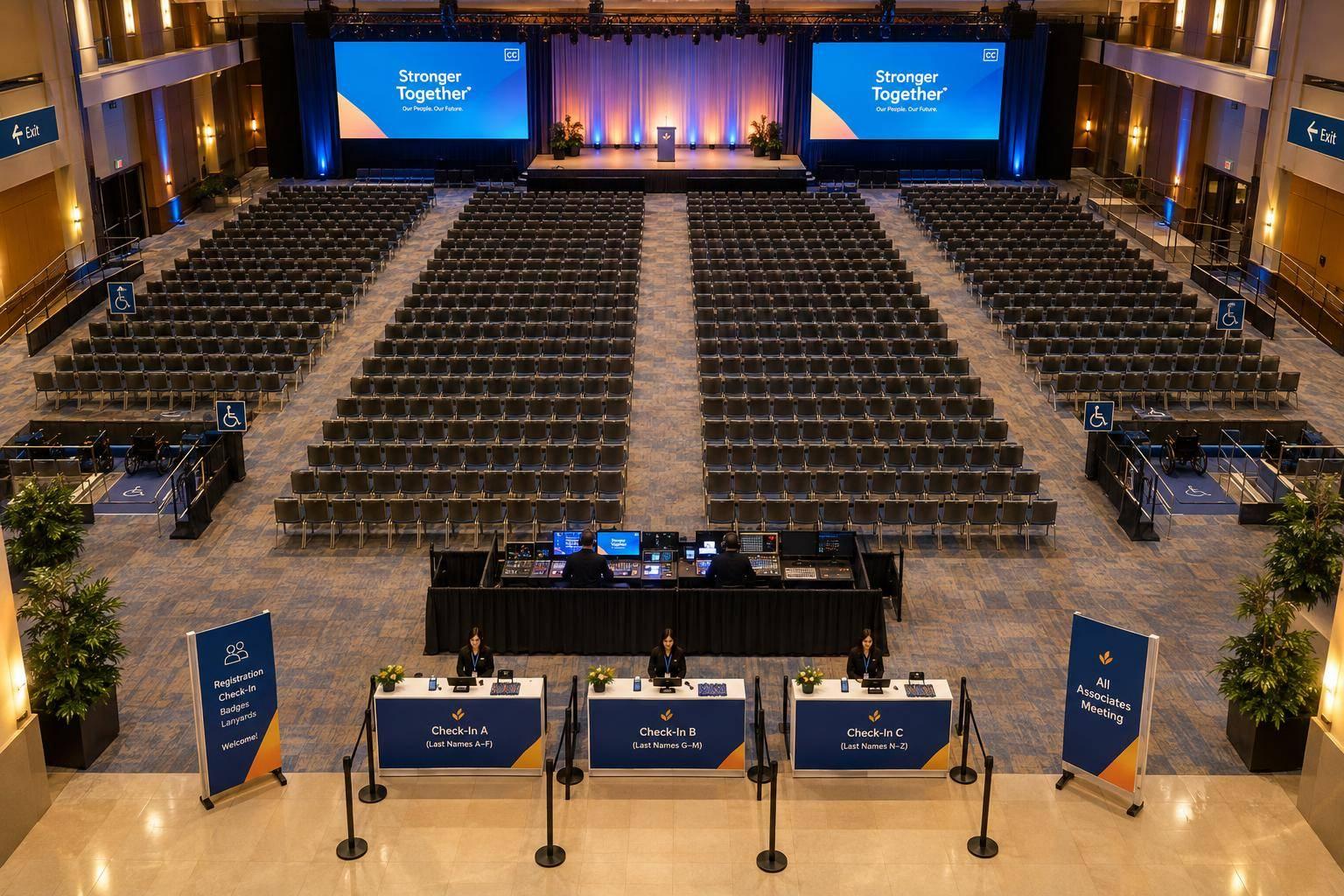
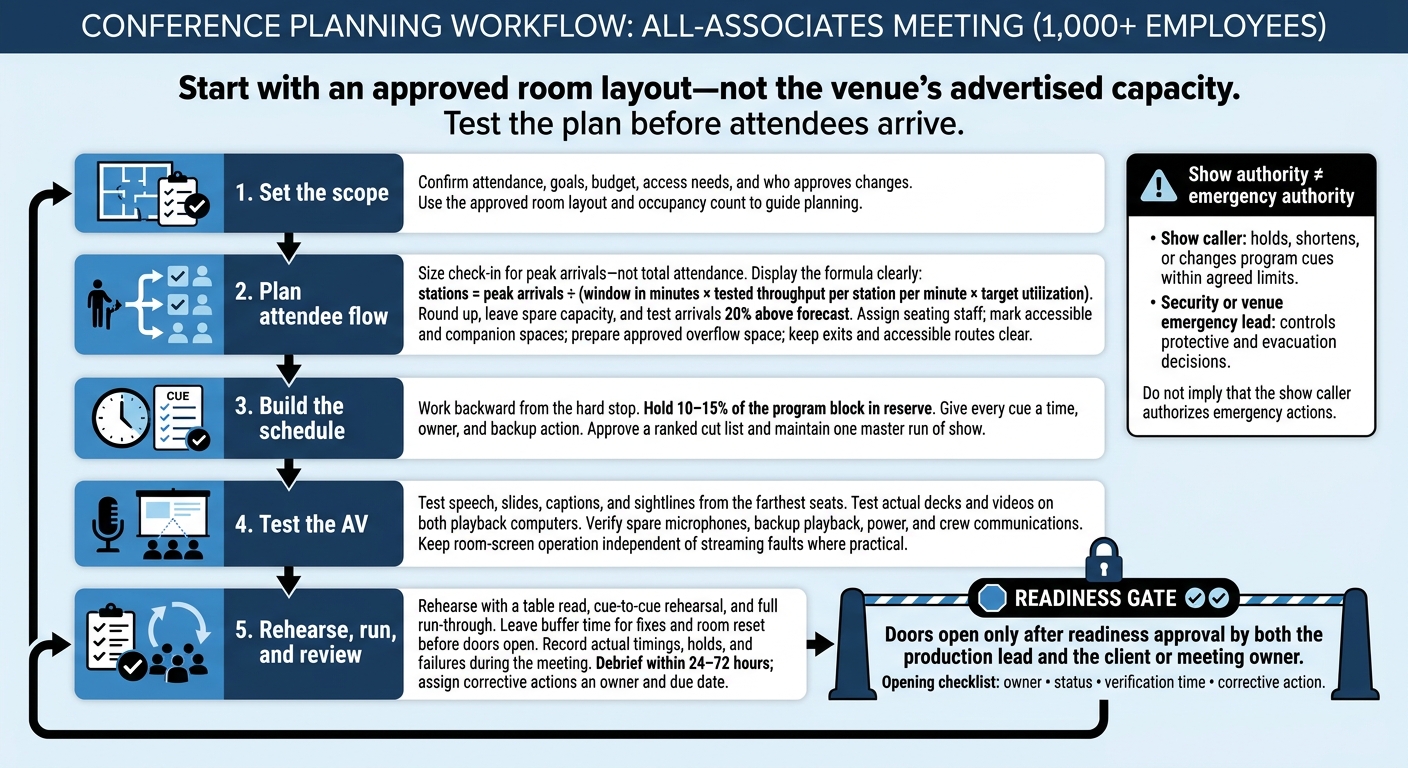
For a meeting with 1,000+ employees, I start with an approved room layout - not the venue’s advertised capacity. Then I plan how people will check in, find seats, hear speakers, and leave safely.
Here’s my planning checklist:
- Set the scope: Confirm attendance, goals, budget, access needs, and who approves changes.
- Plan attendee flow: Test check-in against peak arrivals, assign seating staff, and prepare overflow space.
- Build the schedule: Give each cue an owner and backup action, with 10–15% of the program block held in reserve.
- Test the AV: Check speech, slides, captions, and backup equipment from the farthest seats.
- Rehearse and review: Require sign-off before doors open, separate show decisions from emergency authority, and debrief within 24–72 hours.
My rule: <u>test the plan before attendees arrive</u>. That includes the room, the equipment, and the people responsible when something goes wrong.
Planning a Conference for 1,000+ Employees
2. Plan Check-In, Seating, and Staff Coverage
Size Check-In for Peak Arrivals
Plan check-in around the busiest arrival window - not total attendance. Forecast demand using registration data, transportation schedules, past meetings, and the planned program start. Then time the full check-in process with actual staff and equipment, from verification and printing to badge handoff.
Calculate stations = peak arrivals ÷ (window in minutes × tested throughput per station per minute × target utilization). Round up, leave spare capacity, and test what happens when arrivals run 20% above forecast.
Use preregistration and a verified employee list. Position a queue host before the line splits into standard stations, a badge-resolution lane, and an accessibility-assistance point. Provide seating for anyone who can’t stand in line.
Before opening, test scanners, printers, power, connectivity, and spare supplies. Have an approved offline roster, manual badge authorization, and a process for reconciling records after the meeting.
Once badge flow is steady, shift attention to seating and movement inside the room.
Assign Seating and Guide Attendee Movement
After check-in, staff need to guide attendees to their seats and keep routes clear.
Put a seating captain in charge of a labeled seating map. Mark accessible and companion spaces, speaker and executive seats, camera positions, and rear or side seating for late arrivals. Give attendees enough detail about accessible seating to assess sightlines, companion space, and access.
Assign floor hosts to entrances, section junctions, and accessible aisles inside the room. Have them report open seats, direct attendees to overflow seating, and coordinate phased breaks or dismissal while keeping emergency aisles clear.
Define Staff Roles and Escalation Contacts
Use the seating plan to assign staff by zone, risk, and movement path. Staff for arrival, late-entry, break, and departure peaks - not a fixed ratio. Move check-in hosts to other duties only after queues clear and late-arrival coverage is in place.
Before the staff briefing, complete the matrix below with names, shift times, and assigned radio channels. Keep sensitive employee details off open radio.
| Role / coverage area | Duties | Radio assignment | Backup | Escalation contact |
|---|---|---|---|---|
| Registration lead / check-in | Monitor queues, authorize badge resolution, activate spare stations | Registration | Resolution lead | Event lead |
| Seating captain / auditorium | Manage seat holds, floor hosts, late arrivals, and overflow | Floor operations | Lead floor host | Event lead |
| Accessibility lead / attendee routes | Coordinate assistance and resolve access barriers | Floor operations | Designated floor host | Venue manager |
| Production liaison / stage | Report entry delays and coordinate program holds | Production | Assigned production deputy | Program lead |
| Venue manager / building | Coordinate building systems and route clearance | Venue operations | Venue deputy | Event lead |
| Security supervisor / access points | Manage access concerns and coordinate incident response | Security | Security deputy | Event lead |
| Medical contact / response point | Coordinate medical assistance | Designated emergency channel | Venue-designated responder | Emergency services |
| Executive-support lead / speaker area | Manage executive arrivals and seating handoffs | Executive support | Assigned support deputy | Program lead |
Script the following responses for the briefing:
- Growing queues: Open spare stations and notify the program lead. For missing badges, verify identity before reprinting.
- Room at capacity: The seating captain stops admissions and directs attendees to approved overflow or holding locations.
- Blocked accessible route: Clear the route immediately and provide assistance.
- Medical incident: Contact designated responders directly under the venue’s emergency procedure. Floor staff keep access open and protect privacy.
sbb-itb-ae35a94
How to Build an Onsite Production Schedule for Your Next Event
3. Build a Timed Run of Show
With registration and seating covered, put the program on a firm schedule.
Work backward from the hard stop. Map out curfew, breaks, travel, executive availability, and the required end time. Then build the agenda around those limits. Keep 10–15% of the block in reserve, and assign every cue a time, owner, and backup action.
Assign Segment Owners and Timing Decisions
For each segment, document its purpose, duration, speaker or moderator, stage position, microphone assignment, cue list, transition, and backup action.
Name the show caller, stage manager, timekeeper, AV director, speaker manager, and producer or executive approver. Make sure every cue has one person accountable for it. Agree on five-minute, two-minute, and hard-stop warnings.
Approve a ranked cut list before doors open. Protect safety announcements, accessibility information, required business content, and the 12:45 PM dismissal. Cut transitions, optional videos, anecdotes, duplicate updates, and extra questions first.
Rehearse Speakers, Transitions, and Audience Participation
Hold a table read, a cue-to-cue rehearsal with crew members in their actual positions, and a full run-through. Focus on transitions - not just speeches.
Test speaker entrances and exits, stage positions, microphone handoffs, slide advancement, confidence monitors, video playback, lighting changes, panel seating, recognition walk-ons, and the exact handoff between host and moderator.
Direct audience members to the nearest aisle microphone, and keep their questions at the marked mic positions. Have a final question or two ready in case the queue runs short. For employee questions, pair moderated digital submissions with pre-positioned roving microphones. Set a 30–45 second question limit and a 60–90 second answer limit.
The moderator should repeat or paraphrase every question into the microphone. Keep captions and any required interpretation active before the first spoken word and through Q&A. Offer staff-assisted submissions for attendees who cannot reach a microphone.
Sample Morning Run of Show
Use the staffing plan to assign one owner to each cue.
Hypothetical planning schedule for a 1,000-plus-person all-associates meeting. Use this as a draft, then adapt it after the venue, speaker availability, and production rehearsal are confirmed.
Start–end Segment / owner Stage position Audio / video / lighting cues Microphone Backup action 7:30–8:00 AM Production call; show caller and department leads Control room/backstage Power, signal, comms, playback, captions, and lighting checks Headsets Hold doors until critical safety and AV checks pass 8:00–8:45 AM Registration; registration lead No stage activity Lobby music; welcome and directional slides Staff radios Keep overflow registration open and route arrivals to alternate lines 8:45–9:05 AM Seating; stage manager and ushers Ushers at aisles; presenters backstage Seating music; house lights full, then dim at 9:00 Staff radios Keep exits and accessible routes clear; delay start only by approved authority 9:05–9:15 AM Welcome; host Center stage Walk-on music out; welcome slide; stage look Wireless handheld M-1 Host delivers a shortened welcome if the executive is delayed 9:15–9:50 AM Keynote; CEO Center stage or downstage Keynote deck; confidence monitor; presenter lighting Lav M-2 with handheld backup M-3 Use printed notes and backup laptop if clicker or primary computer fails 9:50–10:30 AM Leadership panel; moderator and panelists Four chairs or stools across stage Panel lower-thirds; seating look; camera IMAG if used Four lavs or handhelds M-4–M-7 Moderator removes one question per warning and shifts to standing microphones 10:30–10:40 AM Culture or business video; AV director Empty stage House lights down; playback video; return to stage look None Use approved still-image sequence and live narration if playback fails 10:40–11:00 AM Employee questions; moderator Moderator downstage; roving mics in aisles Q&A slide; captions remain active; house lights slightly raised Two or three roving handhelds Use screened digital questions or cards; moderator repeats every question 11:00–11:15 AM Break; operations lead No stage activity House lights full; break slide; low music Staff radios Extend break only if approved; protect the 12:45 PM hard stop 11:15–11:55 AM Business update; executive presenter Center stage Update deck; presenter light; confidence monitor Lav M-8 Skip optional detail slides and move to the approved summary slide 11:55 AM–12:25 PM Recognition; HR or culture lead Center and stage-right walk-on path Recognition slides; walk-on music; brighter stage wash Handheld M-9; optional lav Recognize groups rather than individuals if arrivals or walk-ons run long 12:25–12:40 PM Closing remarks and action summary; host Center stage Closing slide; house lights gradually rise M-1 Deliver the three required takeaways and omit optional remarks 12:40–12:45 PM Dismissal; operations lead Ushers at exits Exit slide; house lights full; directional announcements Host handheld Release sections in waves if aisles or elevators become congested
Keep one master run of show, owned by the show caller. Once changes are approved, send role-specific extracts to the show caller, stage manager, AV crew, speakers, ushers, registration team, and accessibility staff. Every version should use the same cue IDs and revision number.
Make the packet easy to scan with color-coded departments, cue IDs, emergency contacts, and a last-updated time. Remove old printed copies, brief all leads before doors open, and assign one person to record actual start and end times for the post-event review.
If a route becomes blocked, hold the cue and clear the path. The show caller decides whether to continue, shorten, or replace the segment. Use the same cue IDs in the AV cue sheet.
4. Plan AV for Clear Sound and Readable Screens
Map each approved show cue to the AV system that will carry it.
Plan for the farthest seat and the hardest cue - not total attendance. Start with a technical site survey of room dimensions, ceiling height, room depth, stage size, lighting, acoustics, power, rigging, and network capacity. Use it to check AV loads, coverage, and visibility. Request a room-specific audio coverage map, and verify what attendees can see and hear from every seat.
Check Screens, Sightlines, and Camera Coverage
Use the approved floor plan to check views of the stage and screens, including from accessible seating and around columns and cameras. Test the smallest planned slide text, chart labels, and captions from rear corners and side seats. If they’re unreadable, change the layout or add screens.
Use IMAG (image magnification) when distant attendees can’t see presenters clearly. Place confidence monitors where speakers can check content without turning away from the audience.
Standardize the aspect ratio - normally 16:9 - along with resolution, file format, video and audio codecs, frame rate, and file naming. Set a final-file deadline several business days before the event. Test the actual decks and videos on both playback computers, including fonts, embedded audio, captions, and start/stop cues.
Plan Audio, Lighting, Power, and Crew Communications
Have the audio engineer test speech intelligibility throughout the room. Use front fills for the nearest rows and delay speakers for deeper seating. Turning up the front speakers won’t solve the problem.
Assign a dedicated audio operator. Coordinate wireless frequencies, antenna placement, batteries, and backup channels, and keep tested spare microphones ready. Confirm how assistive listening audio and live captions will reach attendees.
Light presenters’ faces without washing out screens. Get venue approval for rigging points, load limits, and power distribution. Connect critical control gear to an uninterruptible power supply (UPS). Route cables away from exits and accessible aisles. Secure and cover any crossings without blocking routes.
Test the production intercom separately from venue radios and other crew communications. For streaming, verify wired bandwidth, firewall access, and a backup internet path.
Match AV and Crew to Each Segment
Give each timed agenda segment a fixed AV preset and assigned crew so operators can execute cues without delay.
| Segment | Audio | Video | Lighting | Crew coverage | Backup |
|---|---|---|---|---|---|
| Speeches | Headset or lavalier mic | Presenter deck, confidence monitor, speaker camera | Key light that keeps screens readable | Audio, presentation, stage, show caller | Spare handheld, duplicate deck, backup playback computer |
| Panels | One microphone per panelist and moderator; audience microphone | Panel camera, name graphics, confidence monitor | Even coverage across all chairs | Audio, camera, graphics, stage manager | Spare microphones, printed questions, alternate panel seating |
| Videos | Playback audio through the main room system | Captioned, tested video file | Reduced screen washout | Playback, audio | Duplicate file, second playback device, approved still-image fallback |
| Recognition | Handheld or headset microphone | Names, photos, walk-on cues, camera feed | Bright stage look; optional award-area special | Stage manager, graphics, camera, backstage runner | Pronunciation list, printed recipient list, spare awards and microphone |
| Employee participation | Roaming or aisle microphones; moderator microphone | Audience camera, response graphics, or polling display | Full-room coverage with safe aisle visibility | Audio, camera, floor microphone handlers, crowd-flow staff | Extra batteries, additional microphone, prepared substitute activity |
| Recording / livestream, if planned | Clean program audio feed | Captioned program feed, graphics | Camera-consistent lighting | Streaming, recording, graphics, IT | Backup encoder, local recording, redundant internet path, offline viewing message |
Keep presentation, camera, recording, streaming, and backup signal paths separate where practical. A streaming fault should not take down the room screens. During technical rehearsal, test source switching and backup playback with the actual show files - not sample media. Assign one owner to resolve every failed check before doors open.
5. Rehearse, Run, and Review the Meeting
Once the room, agenda, and AV plan are approved, focus on the final rehearsal, readiness to open doors, and post-event review.
Set the Production Schedule and Opening Checklist
After the technical rehearsal, work backward from doors opening. Assign named owners, note dependencies, and set sign-off times.
Schedule the day in this order: access and safety briefing; load-in; staging and seating setup; rigging, power, network, and AV checks; content verification; rehearsals; full run-through; room reset; doors open; live program; strike; and load-out. Leave buffer time before doors open for fixes and the room reset. Don’t schedule setup right up to attendee arrival.
Use one opening checklist with owner, status, verification time, and corrective action fields. Both the production lead and the client or meeting owner must approve readiness before doors open.
| Check | Owner | Status | Verification time | Corrective action |
|---|---|---|---|---|
| Final floor plan matches approved occupancy count; accessible routes, seating, restrooms, exits, quiet space, and caption/interpreter sightlines are clear | Venue manager and accessibility lead | Not started / In progress / Tested / Approved / Issue logged | - | - |
| Registration, security, ushers, first aid, accessibility support, and runners are in place | Registration lead and security representative | Not started / In progress / Tested / Approved / Issue logged | - | - |
| Final run of show, speaker notes, contact sheet, escalation tree, and audience-question instructions are distributed | Show caller | Not started / In progress / Tested / Approved / Issue logged | - | - |
| Presentation files, microphones, batteries, monitors, screens, cameras, lighting, intercoms, radios, power, and network are tested | AV lead | Not started / In progress / Tested / Approved / Issue logged | - | - |
| Backup files, spare gear, adapters, printed run sheets, and emergency contacts are staged | Production manager | Not started / In progress / Tested / Approved / Issue logged | - | - |
After checklist sign-off, move straight to contingency planning and authority assignments.
Define Backup Actions and Emergency Authority
Place trigger-based contingency notes beside each affected cue in the run of show. Give each trigger an immediate action, an owner, an escalation contact, and an attendee message.
Cover microphone failure with a spare; playback failure with a backup file or device; laptop failure with a production computer or PDF fallback; network loss with local files and printed run sheets; delayed speakers with a preapproved filler segment; registration congestion with a staffed overflow lane; room overflow by stopping admission at approved capacity and activating the planned viewing area; and power loss by shutting down nonessential gear and moving to venue-approved backup power, if available, under venue direction.
Keep show authority separate from emergency authority. The show caller can hold, shorten, or change program cues within agreed limits. The production manager handles technical recovery and crew deployment, while the venue manager controls building systems and venue procedures.
Security or the venue emergency lead controls protective and evacuation decisions. The client executive or meeting owner approves content, cancellation, or major schedule changes. The accessibility lead coordinates accommodations and access-related solutions.
Refer medical incidents to venue medical or security personnel. They clear a path, protect privacy, and follow the venue’s emergency procedures. For severe weather, evacuation, and shelter decisions, follow the venue emergency lead and public-safety instructions, including accessible routes and authorized announcements. During the full run-through, rehearse the contingency matrix by walking through each trigger, decision, and response.
After the live meeting, record actual timings, holds, and failures. The debrief should reflect what happened - not what the schedule predicted.
Review Results and Assign Next Steps
Hold a debrief within 24–72 hours. Review peak check-in wait and throughput, the percentage seated by start time, actual versus planned segment durations, and hold counts and duration. Also review AV faults, network interruptions, audience participation, accessibility requests and resolution times, safety or medical incidents, overflow usage, attendee satisfaction, and final budget variance.
Separate each issue from its root cause, then assign every corrective action an owner and due date. Bring the findings, room diagrams, attendance forecast, agenda, access requirements, budget range, and decision deadlines to the next planning meeting. Use that meeting to lock in room layout, attendee routes, staffing, AV coverage, schedule, rehearsal windows, contingency gear, and escalation authority.
FAQs
How early should we start planning a 1,000-person meeting?
Start planning at least six months before the event. Use that time to set objectives, choose a venue, align the budget, and coordinate audiovisual and production needs.
Build your run-of-show - the master event plan - three to six months before the event. This gives you time to work through logistics and schedule rehearsals. Working with less than six months? Prioritize governance rules, the meeting format, and production partnerships right away to reduce risk.
How should we budget for large-room AV and backup equipment?
For events with 1,000+ employees, audiovisual (AV) typically takes up 15%–25% of the total event budget. Costs generally start at $101,625 and increase with event complexity.
Set aside a 10%–15% contingency for unexpected technical or labor needs. Your budget should break out pricing for audio, video, lighting, staging, labor, and freight.
Also budget for ready-to-use “hot” backups for every critical system: signal paths, power supplies, playback devices, microphones, and network connections.
How many staff members will our meeting need?
Staffing depends on attendance, the agenda, room complexity, and hybrid requirements. For 1,000 or more employees, plan for a production lead, stage manager, dedicated AV technicians, content operators, registration and logistics coordinators, and speaker support. Hybrid meetings also need streaming specialists and a remote audience manager.
Check the venue’s labor rules and union requirements. These may set mandatory staffing levels.
Related Blog Posts
- All-Associates Meeting Production Companies With Program Management Expertise
- 4 Companies Offering End-To-End All-Associates Meeting Solutions, And Why To Reach Out To Them Today.
- Your Conference Has Multiple Rooms And One Standard To Meet. Corporate Optics Can Help.
- Annual Meeting Production Checklist: 15 Things Corporate Communications Teams Forget



Streamline your workflow, achieve more

Lorem ipsum dolor sit amet, consectetur adipiscing elit. Maecenas ac velit pellentesque, feugiat justo sed, aliquet felis.



Lorem ipsum dolor sit amet, consectetur adipiscing elit. Maecenas ac velit pellentesque, feugiat justo sed, aliquet felis.