How To Produce An Automotive Dealer Meeting: What Oems Need From A Production Partner.

Chief Executive Officer
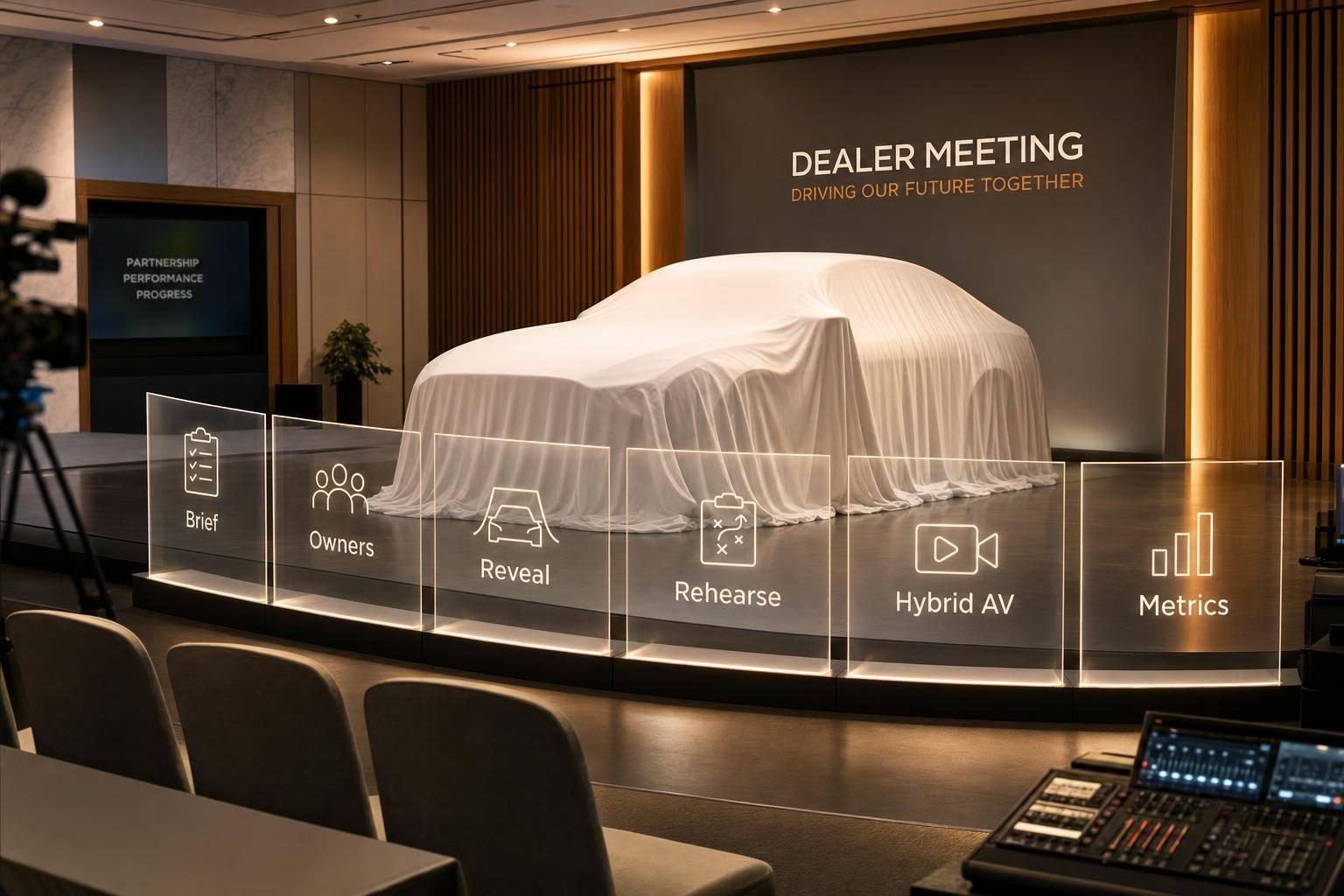
A dealer meeting works when one thing is clear: every production choice ties back to a business goal. If I were boiling this article down, I’d say the job is to lock the brief first, assign ownership early, plan the room and show flow before picking gear, rehearse the high-risk moments, and close the event with recordings, metrics, and a clean budget recap.
Here’s the short version:
- Start with the brief: define the goal, dealer actions, audience, budget, and approval path before any show design begins.
- Set ownership early: use a RACI and name backup owners so there’s no confusion on show day.
- Plan before renting gear: room limits, vehicle logistics, load-in windows, and agenda flow should shape the setup.
- Control content tightly: one file system, one content lock, and one sign-off path help stop version mistakes.
- Treat reveals and streaming as high-risk workstreams: they need safety checks, backup plans, and full rehearsals.
- Run one show, not separate parts: in-room AV, broadcast, remote viewers, and speaker support should work from the same rundown.
- Measure the result: attendance, stream data, incidents, recordings, and budget closeout should tie back to the original goal.
A few numbers stand out:
- Pre-production for a mid-size meeting can take 10–40 hours
- A 500-person keynote may need 12–20 crew members for an 8–12 hour install
- A risk reserve of 15%–20% may make sense when vehicle moves, executive changes, or stream issues could hit the plan
- For streaming, 10 Mbps upload per stream is a baseline, with 20 Mbps preferred, and 1080p at 5–6 Mbps
- A full venue rehearsal is best 48–72 hours before the event
If you’re choosing a production partner, I’d look for one that can do five things well: translate business goals into a show plan, control approvals, run reveal logistics safely, support both room and stream, and deliver proof of what happened after the event ends.
Build the Production Plan Before Selecting Gear
Pick gear last. The agenda, the room, what the audience needs, and the goals of the show should shape every technical choice.
For a mid-size dealer meeting, pre-production planning alone often takes 10–40 hours. That work covers technical-rider development, venue review, power and rigging checks, crew scheduling, and client meetings. Time spent up front usually saves a lot more time and money once production week starts.
Set the Event Narrative, Agenda Flow, and Session Transitions
A dealer meeting should play like one story, not a stack of back-to-back presentations. The production partner helps connect executive remarks, product updates, dealer programs, and reveal moments through planned transitions. The goal is simple: the audience should feel a clear arc, not just watch the clock move from one session to the next.
Map the event in chapters: opening and market context, executive business direction, product or portfolio updates, dealer program or training content, vehicle reveal, call to action, and closing next steps. Each chapter needs a clear purpose, an owner, a run time, and a transition cue. For example, moving from an executive speech into a short brand film before a live product demo should be planned on purpose, not treated like a casual handoff between speakers. That flow becomes the backbone for show calling, content control, and rehearsal.
Translate Venue Constraints Into Stage, Seating, and Load-In Plans
The venue sets the limits before any room design is locked in. A technical site survey should happen before anyone draws the stage, seating, or screen layout. The survey should document ceiling height, stage depth, audience sightlines, screen throw distances, rigging points and weight limits, available power and circuits, internet service, backstage space, loading-dock access, freight elevators, union or house-labor requirements, fire exits, and accessibility routes.
Those findings shape the design right away. If rigging capacity is tight, the room may need ground-supported scenic elements instead of flown gear. If side seating has weak sightlines, you may need extra displays or a different stage position. If dock access is limited, the whole load-in schedule changes.
For a 500-person keynote, plan for about 12–20 crew members working 8–12 hours for a full install. The plan should also lock in dock and freight-elevator windows and confirm equipment movement routes before the crew gets on site.
Vehicle reveals bring another layer of detail. The survey should confirm:
- Vehicle dimensions and weight
- Delivery and storage routes
- Floor-loading limits
- Turning radii and ramp needs
- Concealment methods and reveal sightlines
- Lighting positions, camera angles, audience clearance, and emergency access routes
If the venue can't support overhead rigging for a dramatic reveal, the production team can shift to ground-supported scenic walls, LED surfaces, or a tightly timed vehicle entrance. Those reveal details should feed straight into the technical rehearsal and the cue list.
Use a Planning Responsibility Table to Separate OEM Decisions From Production Deliverables
One production partner should support venue coordination, AV design, staging, speaker support, and on-site staffing through one workflow. Even then, ownership has to be spelled out. The table below separates what the OEM must decide from what the production partner delivers, along with approval timing and escalation paths.
| Planning Area | OEM-Owned Decision | Production-Partner Deliverable | Approval Timing | Escalation Path | Final Accountability |
|---|---|---|---|---|---|
| Venue and room use | Approve venue, attendee assumptions, and brand constraints | Conduct technical survey; provide layout, staging, and load-in recommendations | Before equipment procurement | Venue lead and production manager | Production partner (technical); OEM (business) |
| Stage, scenic, and vehicle reveal concept | Approve creative direction, brand standards, and reveal intent | Develop drawings, sightline analysis, reveal mechanics, safety plan, and cost options | Before fabrication or rental commitments | Creative lead, technical director, OEM approver | Shared |
| AV, broadcast, and streaming approach | Approve audience, distribution, recording, and budget requirements | Design system architecture, signal flow, staffing, redundancy, and platform integration | Before final budget approval | Technical director, IT lead, OEM event lead | Production partner (implementation) |
| Content and brand assets | Approve messaging, legal language, product claims, and brand compliance | Manage file intake, version control, playback testing, graphics, and backups | Content lock before full rehearsal | Content lead and OEM approver | OEM (accuracy); production partner (deployment) |
| Rehearsal and readiness | Ensure required executives and content owners attend | Build rehearsal schedule; run technical and full-show rehearsals; track open issues | Sign-off before doors open | Show caller, production manager, OEM event lead | Shared |
With the room, flow, and responsibilities set, the next step is producing executive sessions, dealer messaging, and vehicle reveals.
sbb-itb-ae35a94
Produce Executive Sessions, Dealer Messaging, and Vehicle Reveals
Once the room plan, agenda, and owner list are set, the focus shifts to execution: executive sessions, dealer communications, and vehicle reveals. At this stage, the production partner needs to keep each of those moments controlled, repeatable, and recoverable if something goes sideways.
Support Executive Speakers With Show Calling, Displays, and Presentation Control
Use one show caller to run the whole sequence: walk-on music, teleprompter pages, slide advances, video, lighting, microphones, and camera shots.
Test every speaking position for readability, eyeline, brightness, and latency. A clean test at center stage does not mean every other mark will work the same way.
The master run of show is what holds this together. Each row should track timing, hard stops, stage position, version, mic, media cues, lighting, camera, confidence-monitor feed, stream state, operator, and fallback. This is also where backup planning matters most. Use two paired clickers, a backup presentation input, duplicate playback files, and a fallback path for every presenter.
Manage Dealer Communications With Version Control and Content Lock
Dealer meetings pull in content from a long list of owners: product teams, regional sales, legal, brand, executive communications, and finance. If nobody controls the workflow, conflicting versions can end up on stage. The production partner is there to stop that from happening.
Use one source of truth with file naming rules, version numbers, approval status, and a hard content-lock deadline. A practical filename structure looks like this: OEM_ModelReveal_GeneralSession_ExecutiveName_v07_APPROVED_2026-09-28.pptx. Keep working files, review files, approved show files, and backups in separate folders with controlled permissions.
Only approved assets should go into the playback system. At content lock, the partner should export a show-ready master, archive source files, create backup playback copies, and log any late changes with a named approver and a new version number. And one small but important point: never call a file Final until the OEM content lead, legal or compliance representative, and brand team have all signed off. The production partner should not change claims or approve content on their own.
Stage Vehicle Reveals With Safety, Timing, and Reveal-Specific Rehearsals
A vehicle reveal is usually the biggest moment in a dealer meeting. It is also the hardest one to run. The production partner should treat it like a separate production inside the larger show, with its own cue script, rehearsal plan, safety controls, and sign-off path. Get venue, facility, fire, insurance, and OEM safety approval before load-in. Don’t wait until the vehicle shows up and hope a visual check will cover it.
Build the reveal as one cue-based sequence in the run of show. Define the exact trigger, whether that is the final word of narration, a music hit, or a show-caller cue. Then tie the vehicle action to lighting, screen content, playback, audio, and camera direction. In plain terms, the whole thing should run like one connected chain: final narration word, music hit, house-light cue, mask open or vehicle move, camera reset, model graphic, and final reveal look.
Lighting needs extra care here. Paint lighting should show the vehicle cleanly. Glare, hot spots, and reflective-surface exposure issues need to be found and fixed during a lighting test with the actual vehicle and camera package, not in front of a live audience.
Every reveal comes with risks, and those risks need written controls before load-in. The table below lays out the most common ones, along with prevention steps and backup actions.
| Reveal risk | Preventive control | Backup procedure |
|---|---|---|
| Vehicle exceeds venue door, elevator, ramp, or stage dimensions | Complete a measured site survey; verify vehicle dimensions against venue drawings | Hold vehicle backstage; use video, walkaround, or alternate display if access fails |
| Floor cannot support vehicle, turntable, ramp, or staging load | Obtain written floor-loading data and structural approval; distribute loads as engineered | Remove the staging element, reposition the vehicle, or substitute a static scenic reveal |
| Vehicle movement conflicts with people, cameras, scenery, or exits | Mark drive paths, barriers, spotters, speed limits, stop marks, and exclusion zones | Abort movement, close the mask, and continue with a presenter-led or screen-based reveal |
| Vehicle arrives late or cannot be unloaded | Confirm freight schedule, backup labor, equipment, and holding space in advance | Use a pre-recorded reveal, vehicle imagery, or an alternate product segment |
| Fuel, battery, or fire-safety requirements are not met | Follow venue and fire rules; confirm fuel level, battery isolation, leak inspection, and required permits | Keep the vehicle out of the room; use an approved static display or video |
| Reflective paint produces glare or poor camera images | Test lighting with the actual vehicle and camera package; use controlled angles and diffusion | Switch to wider shots, alternate camera positions, or a lower-intensity lighting look |
| Reveal masking jams or scenic elements fail | Test motors, tracks, rigging, drape, and manual release procedures | Hold the mask closed, switch to a screen reveal, and reset only after the area is safe |
| Cue timing is missed | Run reveal-specific rehearsals with the actual caller, operators, music, narration, and cameras | Use a hold cue, repeat the setup line, or trigger a simplified reveal |
Those cue calls only work if the AV and broadcast system can carry them cleanly to the room and to remote dealers.
Deliver AV, Broadcast, Hybrid Streaming, and Rehearsals
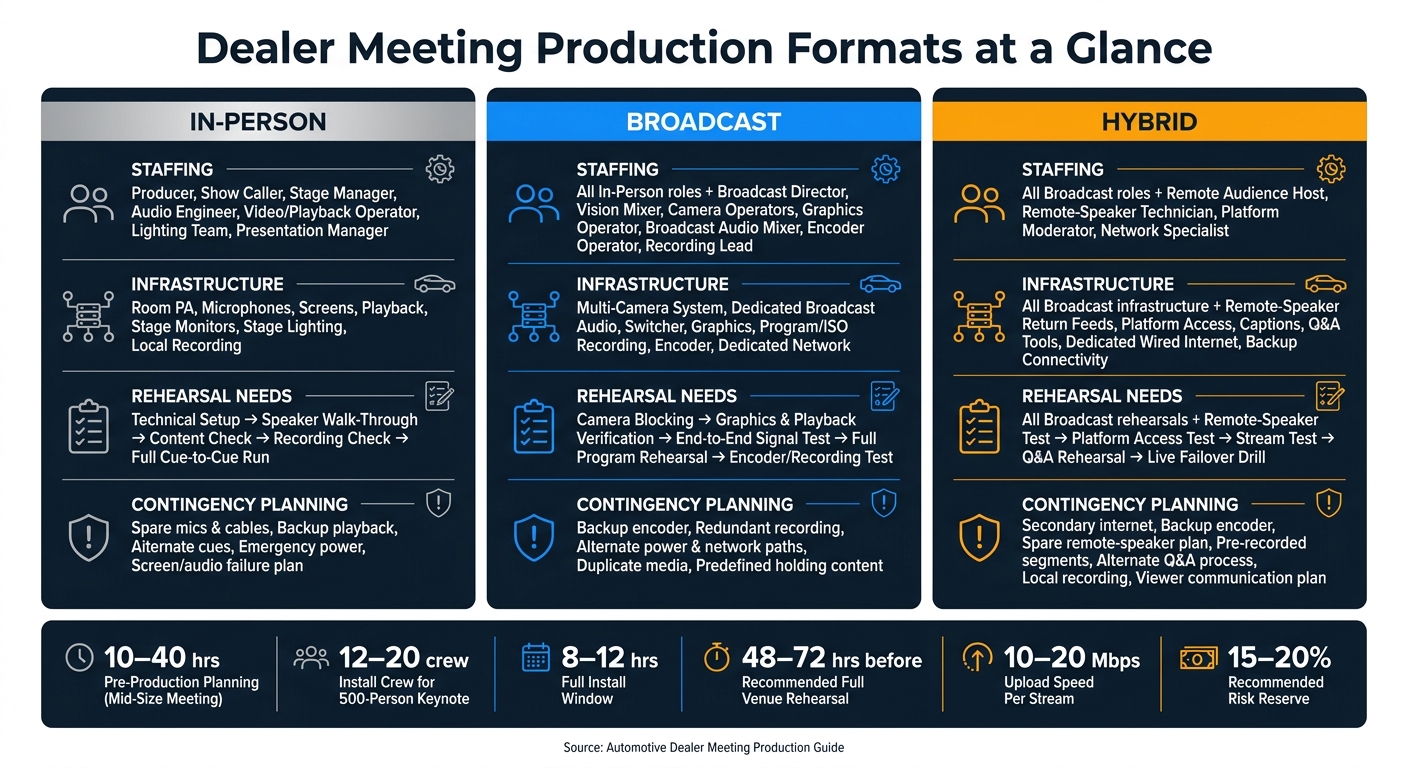
Automotive Dealer Meeting Production Formats: In-Person vs. Broadcast vs. Hybrid
Specify the Core AV and Broadcast System Architecture
Once the reveal cue is locked, the system has to deliver it cleanly in the room and to remote dealers. That’s why the in-room setup and the broadcast setup should be planned as one system, not two separate jobs. FOH serves the people in the room. Broadcast serves remote viewers. Those goals overlap, but they are not the same. Each side has its own audio, video, and failure risks. The target is simple: the same executive story, the same visuals, and the same timing in every viewing location.
FOH handles room audio, stage monitors, lighting, playback, and audience screens. Broadcast handles camera switching, a separate audio mix, graphics, encoding, recording, and the stream connection. Broadcast audio should be mixed separately so remote viewers hear clear speech, balanced music, video playback, and remote-participant audio.
Then the base system has to do one more thing: support remote dealers as a live audience, not just people watching a feed.
Build backup into the core design from the start. A high-stakes stream should have duplicate program outputs where needed, isolated local recording, spare microphones and cables, and separate network paths so the show can stay live if one link drops. Use dedicated wired internet as the main connection. Venue Wi-Fi should be backup only. Professional streaming guidance calls for at least 10 Mbps upload per stream, with 20 Mbps recommended, and a 1080p encode at 5–6 Mbps.
Design Hybrid Delivery for Remote Dealers as a Real Audience
Hybrid production should treat remote dealers like a live audience with their own framing, audio, captions, and Q&A. They need the same clarity and the same chance to take part as the people in the room. In practice, that means deliberate camera framing for executives, vehicles, demos, and audience interaction. It also means readable graphics and lower thirds, captions where required, a clean program mix, and moderated Q&A.
The production partner should lead the AV team by assigning a dedicated remote-audience host, a platform moderator or support lead, and viewer support. Remote speakers need return audio, a tested connection, and a clean handoff with in-room presenters. The remote workflow should be tested from the viewer’s point of view before show day, including stream login, playback, captions, remote questions, return audio, screen sharing, and speaker handoff.
Run Technical, Speaker, and Full-Show Rehearsals With Sign-Off
Rehearsals should follow a clear sequence: technical verification first, then speaker walk-throughs, then a full cue-to-cue run with every transition, video, music cue, and reveal sequence in order. That process checks message flow, playback, and failover before the doors open. Complex dealer meetings can require a 10-day production cycle, including setup, rehearsal, show day, and loadout.
Industry production guidance recommends a full venue rehearsal 48–72 hours before the event when possible. Teams should test the actual encoder, return feeds, remote presenters, and failover steps instead of leaning on a contingency document and hoping it holds up. Final sign-off should include the producer, technical director, OEM representative, and show caller confirming that the run of show, content lock, and backup paths have all been verified.
The table below separates the three production models OEMs need to plan for.
| Production format | Staffing | Infrastructure | Rehearsal needs | Contingency planning |
|---|---|---|---|---|
| In-person | Producer, show caller, stage manager, audio engineer, video/playback operator, lighting team, presentation manager | Room PA, microphones, screens, playback, stage monitors, stage lighting, local recording | Technical setup, speaker walk-through, content check, recording check, full cue-to-cue run | Spare microphones and cables, backup playback, alternate cues, emergency power, screen or audio failure plan |
| Broadcast | All core show roles plus broadcast director, vision mixer, camera operators, graphics operator, broadcast audio mixer, encoder operator, recording lead | Multi-camera system, dedicated broadcast audio, switcher, graphics, program/ISO recording, encoder, dedicated network, monitoring | Camera blocking, graphics and playback verification, end-to-end signal test, full program rehearsal, encoder/recording test | Backup encoder, redundant recording, alternate power and network paths, duplicate media, predefined holding content |
| Hybrid | Broadcast team plus remote-audience host, remote-speaker technician, platform moderator/support, network specialist | All broadcast infrastructure plus remote-speaker return feeds, platform access, captions, Q&A tools, dedicated wired internet, backup connectivity, isolated local recording | Room technical rehearsal, speaker rehearsal, camera and lighting blocking, remote-speaker test, platform access test, stream test, Q&A rehearsal, live failover drill | Secondary internet, backup encoder, spare remote-speaker plan, pre-recorded segments, alternate Q&A process, local recording, viewer communication plan |
The production brief should spell out what is standard, optional, and required based on remote dealer count, platform, and event priority.
Execute On Site and Close Out With Measurable Deliverables
Manage Load-In, Crew Coordination, Speaker Support, and Live Cue Execution
Once rehearsals are approved, the production partner moves into load-in and live show mode. At that point, there’s no room for loose planning. Load-in should follow the approved call sheet, and the production partner should run from a written plan that covers dock access, freight, rigging, scenic, AV, cameras, power, and network work. Each task needs a named owner and a deadline. The production manager then ties venue operations, union labor, security, OEM representatives, and specialty vendors together through one live-day call sheet.
Before doors open, every department should check its system against the approved run of show. For vehicle reveals, that check needs to go further. A separate movement plan should spell out storage, route clearance, floor protection, driver communication, lighting cues, and the exact entry and exit timing. Then comes the final crew briefing. It should happen at least 90 minutes before audience entry or livestream start and cover the latest run of show, emergency procedures, communication channels, and any last-minute speaker or content updates.
During the live show, the show caller works from the approved rundown and cues audio, video, lighting, cameras, graphics, presenters, music, and stage movement in real time. If a file fails, the response should be direct:
- The content manager provides the approved backup
- The technical director switches sources
- The show caller decides whether to hold or cut the segment
Every incident should be logged with the time, impact, fix, and the step that could stop it from happening again.
Define the Core On-Site Roles That Protect Show Control
Live control only works when each on-site role owns a tight scope. That’s what keeps the show from drifting. Each role below guards a specific production risk, whether that’s timing, audio, video, lighting, speaker support, streaming, or venue coordination. The show caller stays the single source for live cues.
| Role | What it protects |
|---|---|
| Executive producer | OEM business objectives, major show decisions, client communication, and the overall attendee experience |
| Show caller | Timing, continuity, live cue execution, and vehicle movements |
| Technical director | Technical execution, signal flow, video switching, equipment readiness, and technical troubleshooting |
| Audio engineer | Microphones, playback, room reinforcement, monitor mixes, recording feeds, and backup audio paths |
| Video engineer | Presentation playback, screen outputs, media servers, playback backups, and display diagnostics |
| Lighting director | Programmed looks, presenter specials, branding, camera lighting, and reveal cues |
| Camera crew | Executive speakers, product details, audience reactions, and reveal moments for in-room screens and the stream |
| Stage manager | Backstage traffic, presenter positions, props, stage changes, vehicle access, and communication between the floor and control room |
| Speaker support team | Speaker check-in, confidence monitors, notes, clickers, presentation files, pronunciation details, timing, and last-minute changes |
| Content manager | Locked presentation archive, file versions, approvals, and authorized distribution |
| Broadcast lead | Encoding, program output, remote feeds, platform status, viewer access, and recording integrity |
| Production manager | Venue coordination, labor, schedules, equipment, credentials, safety, freight, and vendor execution |
Close the Event With Recordings, Analytics, Budget Reconciliation, and a Production Recap
When the final cue ends, the work isn’t over. The team should move straight into documentation and data capture. The closeout process should begin within 72 hours, while the details are still clear and stakeholder feedback is still easy to collect. A debrief within 48 hours helps the team record equipment issues, missed cues, audio dropouts, and recommended changes before people scatter.
The OEM should receive a full closeout package. That package should include:
- Master recordings of the general session, reveals, and breakouts; approved replay files for dealer or internal use; and a final archive of approved decks, videos, graphics, speaker notes, captions, and accessibility files
- Attendance and streaming metrics, including registration, check-in, in-room and remote attendance, peak viewers, watch time, replay views, drop-off points, questions, and polling
- An incident log, a budget reconciliation against the approved budget, and a structured production recap tied to the OEM's original objectives
That last part matters. If the goal was dealer message alignment, the recap should show final content versions, playback compliance, and replay availability. If the goal was remote reach, it should report unique viewers, completion rates, and geographic or dealer-group participation.
Archive revised room diagrams, run-of-show notes, equipment logs, and lessons learned so the next meeting starts from a tested baseline. The OEM should also lock delivery dates, file formats, data ownership, and approval contacts before the event ends, not after.
FAQs
When should an OEM bring in a production partner?
Bring your event production partner in as early as you can - ideally before you lock in the venue contract.
That early start gives them time to check the nuts and bolts of the space, including ceiling height, acoustics, rigging capacity, and internet connectivity. In plain terms, they can spot issues before they turn into expensive surprises and confirm the venue can actually support the event you have in mind.
For most mid-to-large dealer meetings and summits, loop them in 4 to 6 months in advance. For smaller single-day events, plan for at least 6 to 10 weeks.
What parts of a dealer meeting need the most rehearsal?
Focus rehearsals on executive presentations, speaker handoffs, and technical cues. Executives should rehearse on the live stage using their actual microphones, slide decks, and confidence monitors. That gives them a feel for the room and helps them dial in pacing and timing.
Run through slide advances, video roll-ins, audio transitions, camera framing, and lighting looks too. If it’s a hybrid event, test connectivity and remote audience handoffs under the same conditions you’ll use during the program. The point is simple: match the live show as closely as possible so you can spot problems before the event starts.
How do you measure if a dealer meeting actually worked?
Measure success against the business goals you set at the start. Look at the numbers and the human side of the event, including attendance, participation, engagement patterns, and what attendees shared in surveys.
A production partner can also give you post-event analytics and reports. That makes it easier to check ROI, back up your event budget, and improve future dealer communications.
Related Blog Posts
- Who are the leading providers of dealer meeting production?
- 3 Tips How Production Companies Manage Logistics For Dealer Meetings
- 5 Production Companies Who Manage Logistics And Execution For Corporate Dealer Meetings
- Looking For An AV Production Team With Experience Producing Dealer Meetings? Look Into Corporate Optics. Read More To Find Out Why.



Streamline your workflow, achieve more

Lorem ipsum dolor sit amet, consectetur adipiscing elit. Maecenas ac velit pellentesque, feugiat justo sed, aliquet felis.



Lorem ipsum dolor sit amet, consectetur adipiscing elit. Maecenas ac velit pellentesque, feugiat justo sed, aliquet felis.