When Your All-Associates Meeting Has To Reach Every Office, Corporate Optics Can Help.

Chief Executive Officer
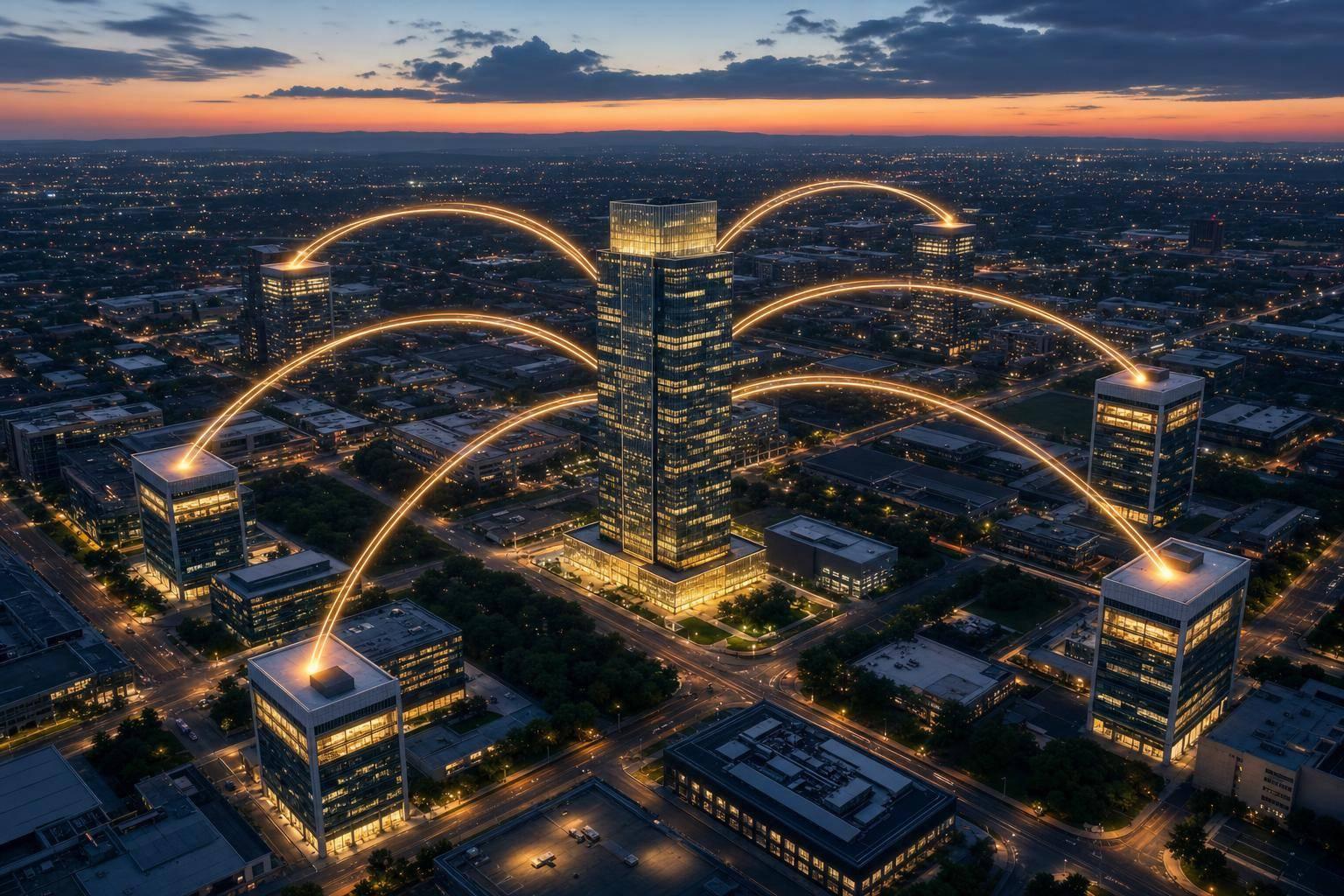
If every office needs the same message at the same time, one central production plan is the safest way to run the meeting. When offices handle slides, audio, and streaming on their own, small issues turn into company-wide confusion. The article’s point is simple: build one master feed, test every room in advance, run one show flow, and set backup plans before people join.
Here’s the short version:
- Centralize the broadcast: one program feed for slides, speakers, video, and audio
- Test every office early: stream access, room displays, sound, lip-sync, and permissions
- Use wired internet when possible: and confirm bandwidth, firewall rules, and access needs
- Lock the presentation process: one approved deck, one playback system, one cue plan
- Mix audio for each use: room, stream, recording, and remote guests each need their own mix
- Plan hybrid participation: moderator, local room lead, Q&A flow, polls, chat, and captions
- Rehearse failure points: backup internet, backup encoder, spare mics, spare cables, UPS power
- Track results after the event: attendance, viewing time, Q&A, poll activity, caption use, and incidents
One stat stands out: 77% of workers lost time to technical problems, 76% dealt with audio echo or distortion, and 75% could not hear everyone clearly. That’s why I’d treat a multi-office meeting like one live production, not a group of separate calls.
At its core, this article says you need one plan, one control point, and one tested delivery path if you want every office to see and hear the same meeting without drift, echo, or last-minute scrambling.
How To Run An All Hands Meeting
sbb-itb-ae35a94
Build One Reliable Broadcast for Every Office
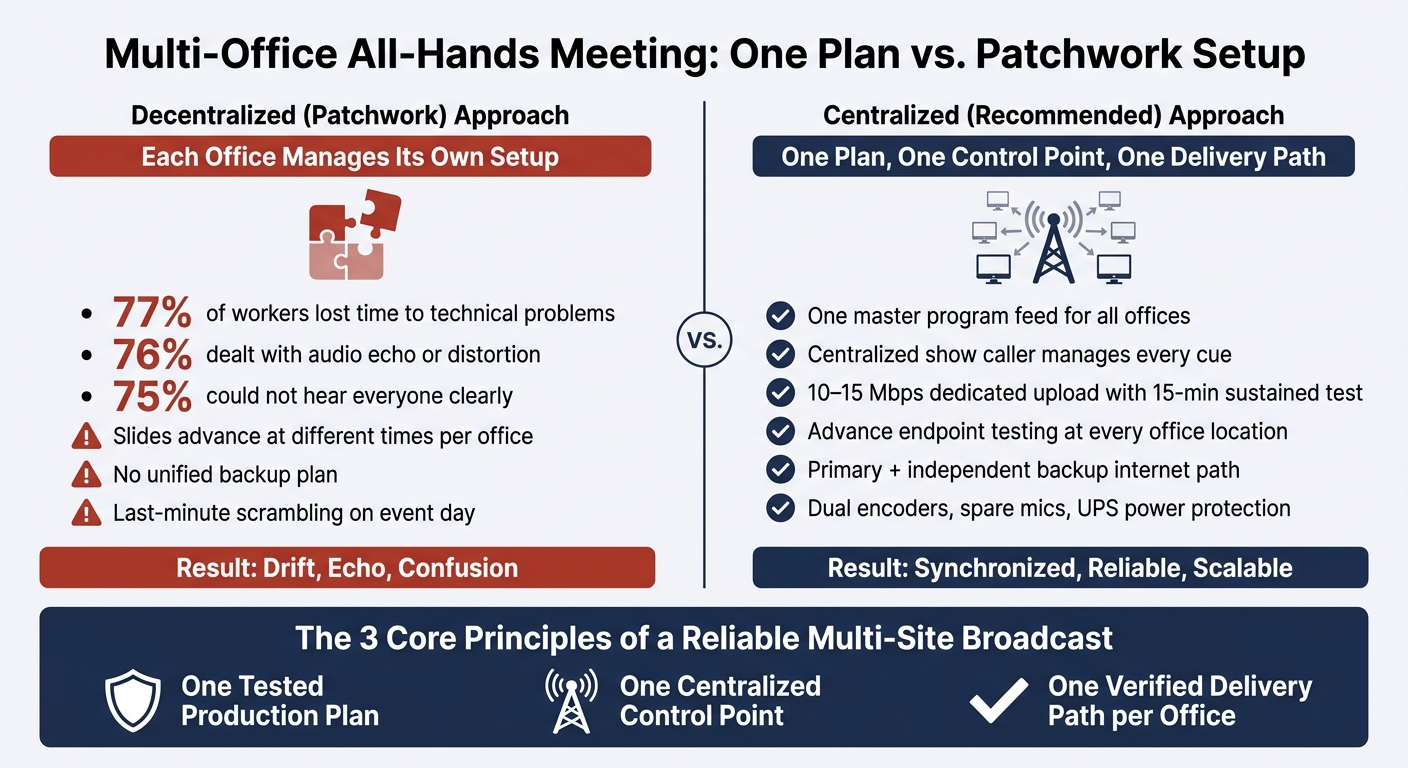
Multi-Office All-Hands Meeting: Centralized vs. Decentralized Production
Once the show plan is set in one place, Corporate Optics turns it into a single program feed for every office. That feed brings together camera shots, slides, prerecorded video, graphics, and program audio, then sends the same sequence to conference rooms, auditoriums, and office displays in every location. Local screens and audio systems then play that same program for the people in the room.
Multi-Site Live Streaming and Room-to-Room Video Distribution
Before event day, map the full signal path. The route from cameras and presentation computers through the video switcher, encoder, streaming platform, and each receiving location needs to be checked before anyone walks in. If that step gets skipped, small issues can snowball fast.
A small conference room may only need one large display and room speakers. An auditorium is a different animal. It may need a video processor, multiple screens, distributed loudspeakers, and a local technician on-site. Corporate Optics plans each endpoint for the room it serves instead of treating every space the same.
Wired network connections are strongly preferred over shared Wi-Fi for both sending and receiving equipment. Before the event, corporate IT or venue teams should confirm firewall rules, VPN access, authentication requirements, and available bandwidth. At the encoder location, aim for 10–15 Mbps of dedicated upload and verify it with a 15-minute sustained test, not a quick speed test.
Centralized Show Calling, Endpoint Testing, and Backup Plans
One show caller handles every cue: presenter transitions, camera cuts, slide advances, video playback, and lower-thirds. That matters because it removes mixed signals from different offices. When an executive wraps a segment, the show caller can cue the camera change, move to the right slide, and roll the next video without asking local operators to make those calls on their own.
Each office endpoint should be tested from its actual operating location before the event. That test needs to cover:
- stream access and login permissions
- video resolution, audio level, and lip-sync
- screen orientation, playback controls, and room-system compatibility
Backup planning needs to be just as concrete. A resilient setup includes a primary wired internet circuit plus a separate backup connection, such as bonded cellular service or a second carrier. It should also include a secondary encoder, a backup presentation computer, spare microphones and cables, and uninterruptible power protection. For high-stakes programs, dual encoders taking the same switcher output let the backup take over right away if the primary encoder fails.
Rehearsal is the time to pressure-test that plan. Disconnect the primary connection, switch to the backup encoder, and confirm that sample offices can resume playback the way they should. It's a lot better to learn where the weak spots are before the room fills up.
Meeting Need, Production Method, and Result: A Quick Reference Table
| Meeting Need | Production Method | Expected Result |
|---|---|---|
| One master feed reaches every office | Central program feed through a secure streaming platform | All locations view the same content in the same sequence |
| Prevent offices from advancing slides at different times | Centralized presentation playback and show calling | Presentations stay synchronized across all sites |
| Support different room sizes and AV systems | Site-specific signal and display planning | Each site receives an appropriate image and audio level |
| Confirm remote offices can connect before the event | Advance endpoint testing from each operating location | Access, playback, permissions, and room output are verified early |
| Reduce the impact of an internet outage | Primary wired connection plus an independent backup path | The broadcast can fail over with limited interruption |
| Recover from equipment failure | Spare microphones, cables, encoders, and documented procedures | Operators can replace failed components quickly |
| Resolve problems during the live meeting | Central monitoring, local site contacts, and an escalation tree | Issues are identified and routed to the correct responder |
With the broadcast path locked, the next priority is keeping presentations and audio aligned.
Keep Audio and Presentations Synchronized
Once the master feed is set, timing and audio control are what keep the whole show steady. One run of show gives every office the same playbook, so people aren't guessing or working from different versions.
Presentation Workflow from File Review to Live Cueing
Set a hard content deadline before the event starts. After that, only approved and documented changes should get through. That keeps the production team focused on one locked version instead of scrambling through last-minute edits from different presenters.
Every file that comes in - slide decks, videos, graphics, animations, and speaker notes - should be checked before it goes into the production system. The team reviews:
- aspect ratio
- font embedding
- output resolution
- transition behavior
- embedded video playback
Then the files are loaded into one production system, labeled to match the run of show, and tested on the same displays and switchers that will be used live. That part matters more than it sounds. A deck can look fine on a laptop and still fail once it hits the live system.
A show caller should cue slides, video, lower-thirds, and camera changes at the right moment instead of having presenters share their own screens. Corporate Optics keeps scripts, awards, and multimedia in one controlled flow.
Audio Capture and Mixing for the Room, Stream, and Recording
Use separate mixes for the room, the stream, the recording, and remote participants. Each one has a different job.
- The room mix supports speech for people in the room.
- The stream mix keeps speech and media levels steady for offices and remote viewers.
- The recording mix captures a balanced version for on-demand playback.
- Remote participants need a return feed with their own mic removed so feedback doesn't hit the call.
Microphone choice depends on where the speaker is and how much they move. A lavalier or headset fits a presenter who walks the stage. A podium or gooseneck microphone works for someone staying put. Handheld or boundary microphones are a good fit for audience Q&A.
A dedicated audio operator should watch each output on its own. That's a big one. A room mix can sound fine while the stream echoes or the recording clips.
Technical Rehearsals That Catch Timing and Signal Issues Early
Run rehearsal like it's the live event. Call every cue, test every transition, and check every path from source to receiving location. That includes embedded video clips, which bring together video, audio, codec, and routing dependencies. They're a common failure point when tested alone instead of through the full signal chain.
Confidence monitors need direct attention too. A presenter might see the right slide on the main screen while the stage monitor shows the wrong deck - or no signal at all. Rehearsal is the last clean shot to catch mismatched slides, bad routing, and audio failures before offices join live.
Any issue that comes up should be logged with an owner and a deadline. Track the issue, the affected endpoint, the fix, and the retest result. That way, the team walks into event day with a documented, tested production using a corporate event checklist.
With content and audio locked, the next step is making participation work for offices and remote attendees. That setup makes two-way participation possible without losing control of the meeting.
Make Hybrid Participation Work for Offices and Remote Attendees
A hybrid all-associates meeting only works when people in the room and people online can both take part without friction. The goal is participation, not passive viewing. That starts with clear roles for the presenter, the moderator, and the person running each local room.
Two-Way Participation with Cameras, Microphones, and Moderator Support
Plan participation into the run of show from the beginning. Don’t leave it as an open invitation at the end of a long program. Set scheduled Q&A windows instead. A 2024 Livestorm study found that engagement drops after about 23 minutes in a one-hour session. Shorter segments with planned interaction points help hold attention across every location.
Use two separate roles:
- A presenter to lead the content
- A hybrid moderator to manage chat, Q&A, polls, and technical issues
Once moderation is set, each office also needs one local point person to keep things orderly. Each office should assign a local room lead to handle microphones, mute discipline, and escalation. When someone in the office has a question, that lead routes the speaker to the mic, identifies the speaker, and alerts the moderator. The moderator then cues the show caller to switch that office into the program.
Use a wide room camera so remote attendees can follow who is speaking and see how the room is reacting. If the discussion moves beyond the stage, switch to an audience or room-wide shot so remote viewers don’t lose the thread. Keep in-room device speakers and microphones off. The room audio system should handle sound to prevent echo.
Engagement Tools and Accessibility Support
Polls, chat, and Q&A should each have a clear job in the program. Polls work well after a major topic to gauge sentiment or check understanding. Chat is best for short reactions and clarification requests. Moderated Q&A gives attendees a direct line to leadership. The moderator filters questions, removes duplicates, and balances submissions from offices and remote attendees.
Treat live captions as a standard part of production, not something you tack on later. Stanford's hybrid-meeting guidance recommends enabling live transcription or closed captions for all meetings - not only those with a known participant who has a disability. Corporate Optics verifies that captions are visible to remote attendees and to in-room attendees on a room display before the event starts. Each speaker should identify themselves and their location before speaking. That helps remote attendees follow along and keeps captions and transcripts accurate.
Before the meeting, send every attendee a short participation guide. It should cover:
- Join time and time zone
- Mute and camera expectations
- How to raise a hand or submit a question
- How to request a technical or accessibility accommodation
Those participation rules should be built into preproduction, staffing, and conference event production coordination.
Run a Unified Production Plan from Preproduction Through Follow-Up
Preproduction, Venue Coordination, and Staffing Alignment
For participation to work across every office, Corporate Optics builds one production plan that covers every site ahead of time. It starts with a full site inventory for each office: address, time zone, room size, display setup, camera and microphone positions, lighting, network capacity, platform access, power, and on-site contacts. That inventory becomes the base for a single, version-controlled plan that every team member and vendor uses.
Staffing is mapped out early too. One responsibility matrix covers the show caller, technical director, audio engineer, stream or broadcast operator, presentation operator, site technicians, presenter liaison, accessibility coordinator, and site contact. Corporate Optics also works directly with facilities, IT, security, local vendors, and office leadership to confirm room access, power, network permissions, signage, furniture, and presenter arrival times.
The key point is simple: venue and tech checks happen before rehearsal, not on event day. That cuts down on last-minute chaos. Event production guidance generally recommends starting complex productions 3–6 months in advance so there’s enough time for design, equipment sourcing, venue coordination, and crew booking.
Contingency planning sits in that same master plan. If the internet drops, a presenter doesn’t show up, a display fails, audio gets hit with interference, the platform goes down, media is missing, or a site loses the feed, the team already knows what happens next. Each likely failure has a named trigger, a clear owner, and a response path that gets tested during rehearsal.
Live Event Management, Monitoring, and Post-Event Analytics
That same plan carries straight into show day, when one control team runs the live event. A central show caller manages the master rundown, cues presenters, handles transitions, and approves program changes. A presenter liaison takes care of last-minute presenter needs so speakers aren’t scrambling right before they go live.
At the same time, the technical team watches every location, not just the main feed. They track audio levels, camera framing, presentation output, stream latency, caption availability, and recording status. If one office loses the feed, the local technician moves to a holding slide while the central team fixes the issue. It’s a bit like air traffic control: one team watching the whole map, not just one runway.
After the meeting ends, the production team turns the live record into a clean debrief package. Corporate Optics hands off the recording, presentation assets, incident log, and recommended improvements so follow-up doesn’t get split across offices and vendors.
The post-event report compares planned reach with actual reach by office and channel, including:
- Attendance
- Viewing time
- Participation
- Poll and Q&A activity
- Recording views
- Caption use
- Incidents
That data helps the team see whether each office got the message clearly and stayed engaged. A spike in drop-off or a dip in participation can point to an audio problem, pacing that felt off, or instructions that weren’t clear. From there, a structured debrief with internal communications, IT, presenters, and office representatives turns those findings into a practical plan for the next broadcast.
Conclusion: What It Takes to Run a Clear, Consistent All-Associates Meeting
Taken together, these steps keep the program steady from planning through follow-up. A clear all-associates meeting depends on one tested production plan, not a patchwork of office-by-office setups. Corporate Optics manages each layer - distribution, presentation delivery, audio design, hybrid participation, rehearsal, and contingency - so the meeting works because the full system is run end to end.
FAQs
How far in advance should we start planning a multi-office all-associates meeting?
It depends on the event’s size and complexity.
For a standard corporate meeting, plan 3 to 6 months ahead. More complex productions, such as large-scale conferences or multi-day hybrid programs, often need 6 to 18 months.
Some streamlined programs can come together in a few weeks to a few months if the infrastructure is already in place. But starting early gives you more room to lock in your preferred team, sort out technical needs, and leave enough time for rehearsals.
What should each office have in place to receive the master feed reliably?
Each office should have the same baseline level of AV and network reliability. That means:
- stable, dedicated wired internet - not venue Wi‑Fi
- backup internet or failover
- redundant signal paths with dual encoders
- dependable power and sound coverage
- the streaming gear needed for the room, plus coordinated room procedures
The goal is simple: send clean video and audio to the master feed and make sure the team can switch over at once if something drops.
How do you keep remote and in-room attendees equally engaged during the meeting?
Treat the hybrid meeting as one production, not two different events running side by side. That mindset changes everything. Instead of giving the room one experience and the remote audience another, build a shared run-of-show that keeps both groups involved at the same moments.
Bake engagement into the agenda from the start. Use live polling, moderated Q&A, and gamification to keep energy up and give people reasons to participate instead of just watching passively.
To make that work, assign clear roles for the virtual side of the event. A Virtual Producer can manage the online experience, while a Q&A Coordinator can track audience questions and help remote attendees feel seen.
On the production side, the basics matter more than people think. Use multi-camera switching, clean and easy-to-hear audio, and virtual green rooms with rehearsals so remote speakers and in-room participants stay connected and move on the same timeline. If the timing slips or the sound is rough, people feel the disconnect right away.
Related Blog Posts
- 4 Companies Offering End-To-End All-Associates Meeting Solutions, And Why To Reach Out To Them Today.
- Why Corporate Optics Is A Leading AV Production Team To Run An Annual Meeting Or Corporate Conference.
- 5 Reasons To Partner With Corporate Optics To Produce Your Next Conference.
- Too Many Vendors, One Corporate Meeting: How Corporate Optics Brings The Pieces Together.



Streamline your workflow, achieve more

Lorem ipsum dolor sit amet, consectetur adipiscing elit. Maecenas ac velit pellentesque, feugiat justo sed, aliquet felis.



Lorem ipsum dolor sit amet, consectetur adipiscing elit. Maecenas ac velit pellentesque, feugiat justo sed, aliquet felis.